
Cloud Native: A Practical Introduction for Engineers
Where it came from, what the term actually means, and how containers, orchestration and automation fit together.
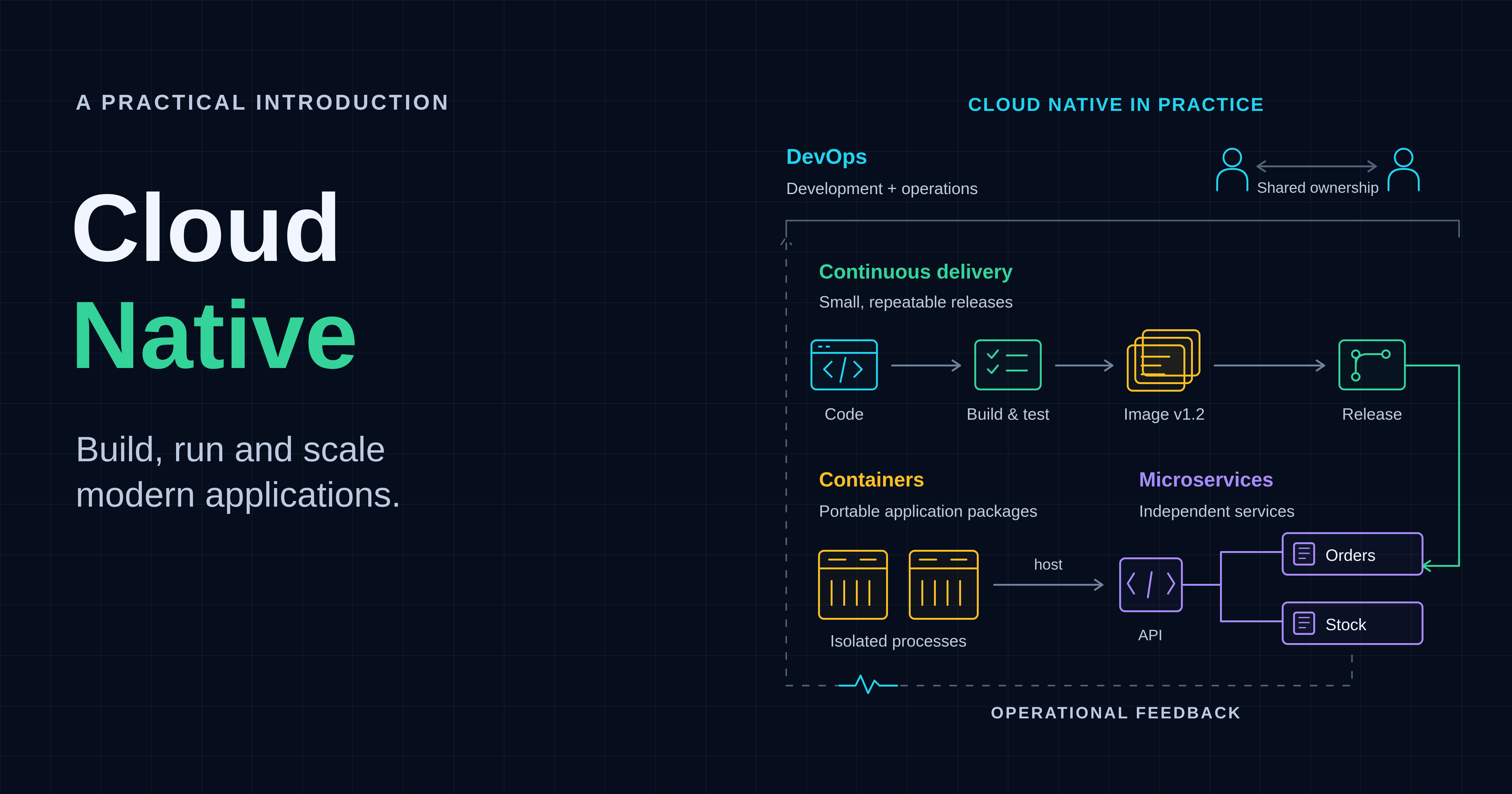
Cloud native grew from the need to isolate applications, reproduce their environments and operate them across machines. This introduction traces that history, explains how containers, runtimes, Kubernetes, GitOps and observability fit together, and walks through building, running and scaling a small application on a local Kubernetes cluster.
Before teams could request machines through an API, they had to work with the hardware and operating systems available to them. Sharing a server raised questions about isolation and capacity. Giving each application its own virtual machine improved separation, but left teams managing operating systems and reproducing application environments. Containers addressed another part of that work; managing them across machines created a further problem to solve.[2]
Cloud native grew out of these overlapping developments rather than one invention. To understand it, we will follow three threads: isolating work, renting capacity and scheduling applications. Along the way, a fictional online store and its orders API will show why each change matters.
Where did cloud native come from?
Cloud native draws on several developments: isolating workloads, obtaining infrastructure programmatically and managing applications across machines. These threads overlap; they are not a sequence every organisation followed or proof that Kubernetes is the right destination for every application.[2][1]
Isolating work on one machine
Sharing hardware raises a basic problem: how much should one application be able to see or consume? Unix Version 7, released in 1979, included chroot, which changes the root used for pathname lookup. That narrowed filesystem view was not a complete security sandbox, nor a way to package an application for another machine.[3][4][5]
FreeBSD 4.0 introduced jails in March 2000, extending the mechanisms available for separated execution environments. Solaris 10 included Zones in 2005, allowing isolated environments within an operating-system instance. These developments addressed sharing a host without requiring a complete virtual machine for every workload. They were related ideas, not interchangeable implementations.[6][7][8]
Linux acquired its own mechanisms incrementally. Mount namespaces were present in Linux 2.4.19 in 2002.[61] Linux 2.6.24, released in January 2008, added control groups, PID namespaces and basic network namespaces. Namespaces separate selected resource views; control groups, usually shortened to cgroups, organise processes for resource accounting and control. They answer different questions: what can a process see, and what resources may its group use?[9][10][11]
Linux Containers, or LXC, brought several kernel mechanisms together; its first release was in August 2008. Crucially, these containers share the host kernel rather than each booting an independent one. Isolation still depends on the mechanisms and configuration involved.[12][13]
Isolation alone did not solve the store's deployment problem. Imagine its orders API working on an engineer's laptop, then failing on the test server: a different Python version, an incompatible library or a missing operating-system package. Fixing that server could make the tests pass, only for production to reveal another difference. “It works on my machine” described a real gap: the team had moved the code, but had not reproduced the environment it depended on.[32]
Without a repeatable way to package that environment, a release could become a handover of installation instructions, scripts and undocumented fixes. Engineers had to determine whether a failure came from the application or the machine. Updating a shared dependency for one application could break another. Rolling back the code did not necessarily undo changes made to the server. Adding a replacement machine meant recreating those assumptions yet again.
Automation and standardised VM images could reduce this work. The attraction of application containers was a more portable unit: package the application and its user-space dependencies together, test that package, then move the same artifact between compatible environments instead of reconstructing it at each deployment.
Docker was publicly demonstrated by Solomon Hykes at PyCon on 15 March 2013. It helped popularise the workflow of building, sharing and running packaged applications; it did not invent process isolation. For our store, the useful change is that the application and its user-space dependencies can travel together. Host kernel and CPU compatibility, configuration and external services still matter.[14][15]
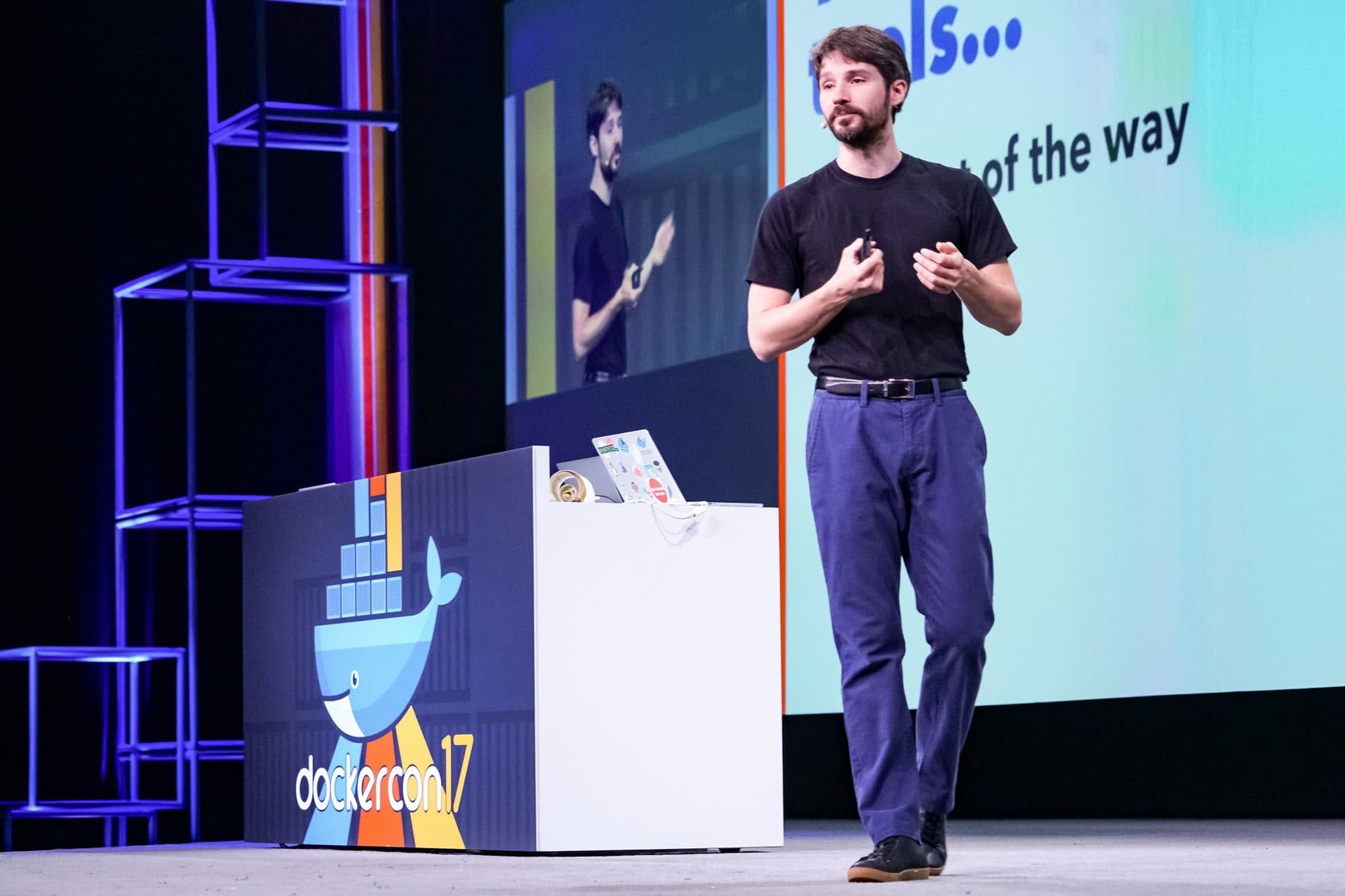
Docker founder Solomon Hykes presenting at DockerCon 2017. Photo: Docker, via CNBC.
Renting machines by the hour
Packaging software does not supply hardware. The second thread concerned how teams obtained capacity. Amazon announced the limited beta of Elastic Compute Cloud, or EC2, on 25 August 2006, offering virtual machines with hourly charging. That made renting machine capacity a practical alternative to owning every server, without making capacity planning disappear.[16]

Server hardware inside an AWS data center. Photo: © Noah Berger, 2023 / AWS press kit.
Replaceable infrastructure creates an application-design question: what must survive when a particular machine goes away? Heroku introduced the Twelve-Factor App methodology in 2011, documenting practices for service applications, including declarative setup and reducing differences between development and production. The lesson for the store is to make its environment reproducible, rather than relying on an administrator's knowledge of one host.[17][18]
The “pets versus cattle” analogy captures the intended change in attitude, although its history is less tidy than a single invention date. In Randy Bias's retrospective, he encountered Bill Baker's scale-up/scale-out analogy in “2011 or 2012” and adapted it to cloud infrastructure and disposability. It is a metaphor for replacing instances, not permission to neglect the data or people depending on them.[19]
For the fictional store, replacing an API process should not mean replacing its order history. Separating disposable execution from persistent data makes the proposed design possible, but database availability and recovery remain separate engineering work.
Scheduling work across many machines
Once applications can be reproduced and machines replaced, somebody must still decide where each workload runs. Google's Borg system addressed cluster management at substantial scale; its EuroSys 2015 paper describes experience accumulated before the paper appeared. Kubernetes drew on that experience without simply publishing Borg under another name.[20][21]
Kubernetes's first public-repository commit was on 6 June 2014; its public announcement followed on 10 June. Version 1.0 and the founding of the Cloud Native Computing Foundation, or CNCF, followed on 21 July 2015. Separately, the Open Container Initiative, or OCI, formed on 22 June 2015 to develop open container standards—not to declare every specification finished that day.[21][22][23]
https://youtu.be/RBAQyqgFl4w?si=HmlXCSpMWXvL1wYM
What is the Open Container Initiative? — Canonical Ubuntu.
Kubernetes became CNCF's first graduated project on 6 March 2018. Amazon EKS and Azure Kubernetes Service reached general availability that June. These milestones widened the available operating models; they did not settle every team's architecture choice.[24][25][26]
The vocabulary also evolved. CNCF's Technical Oversight Committee approved version 1.0 of its cloud-native definition in June 2018 and version 1.1 in February 2024. OpenTelemetry emerged from OpenTracing and OpenCensus in 2019 and graduated within CNCF in 2026. Kubernetes 1.37, “Garhwal”, was released on 26 August 2026. These are different kinds of milestone: shared definitions, telemetry standards and software releases.[27][1][28][29][30]
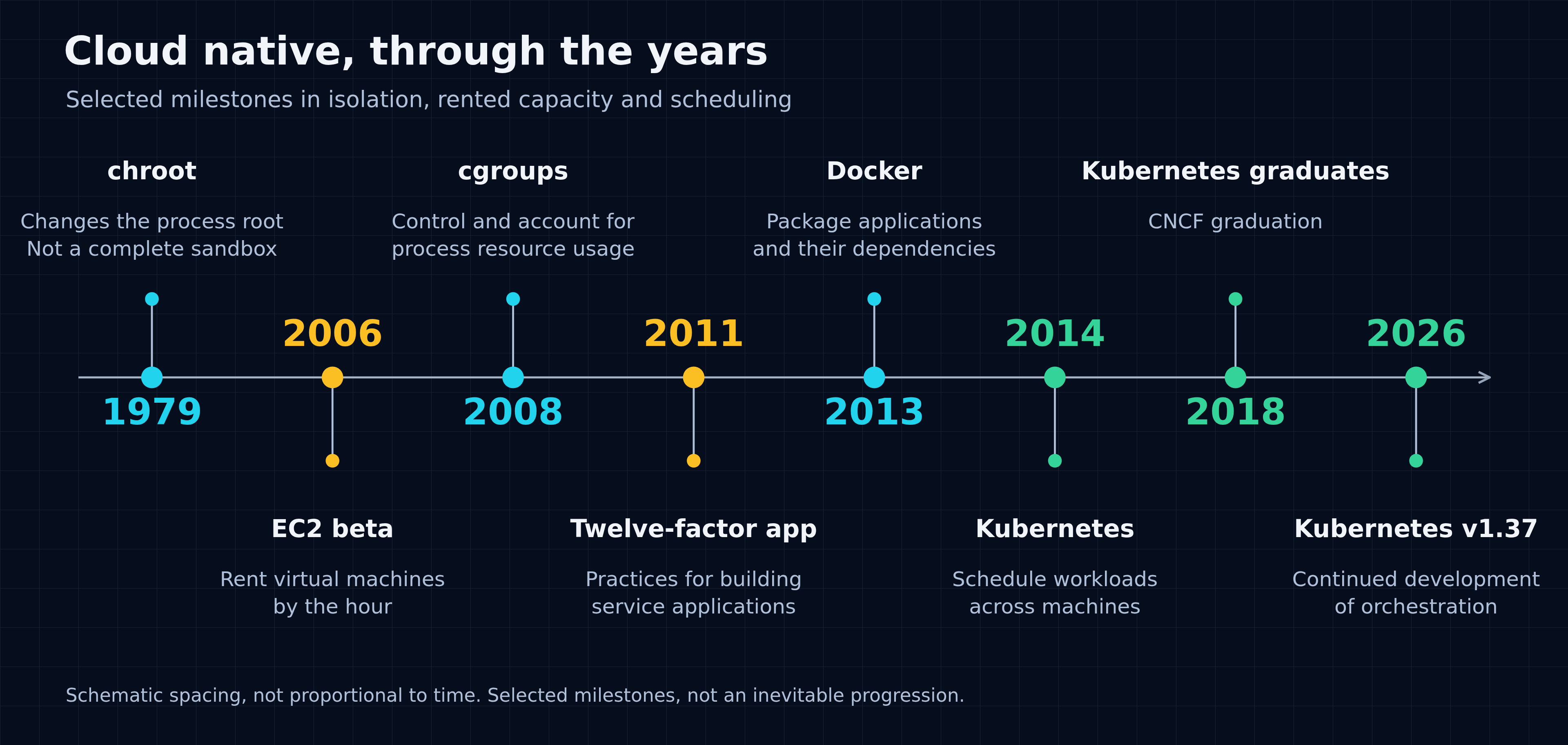
Figure 1 — Selected milestones in cloud-native history, shown chronologically from left to right. Isolation and packaging, rented capacity and scheduling developed along different paths. Spacing is schematic, not proportional to elapsed time; this is not an inevitable progression. chroot changes pathname roots and is not a complete security sandbox.
In CNCF's 2025 survey, 82% of responding container users reported production Kubernetes use, compared with 66% in the 2023 survey. The relevant 2025 question had 351 respondents after filtering and excluding uncertain answers. This is evidence of adoption within that surveyed population, not a census of all organisations or the same companies tracked over time.[31]
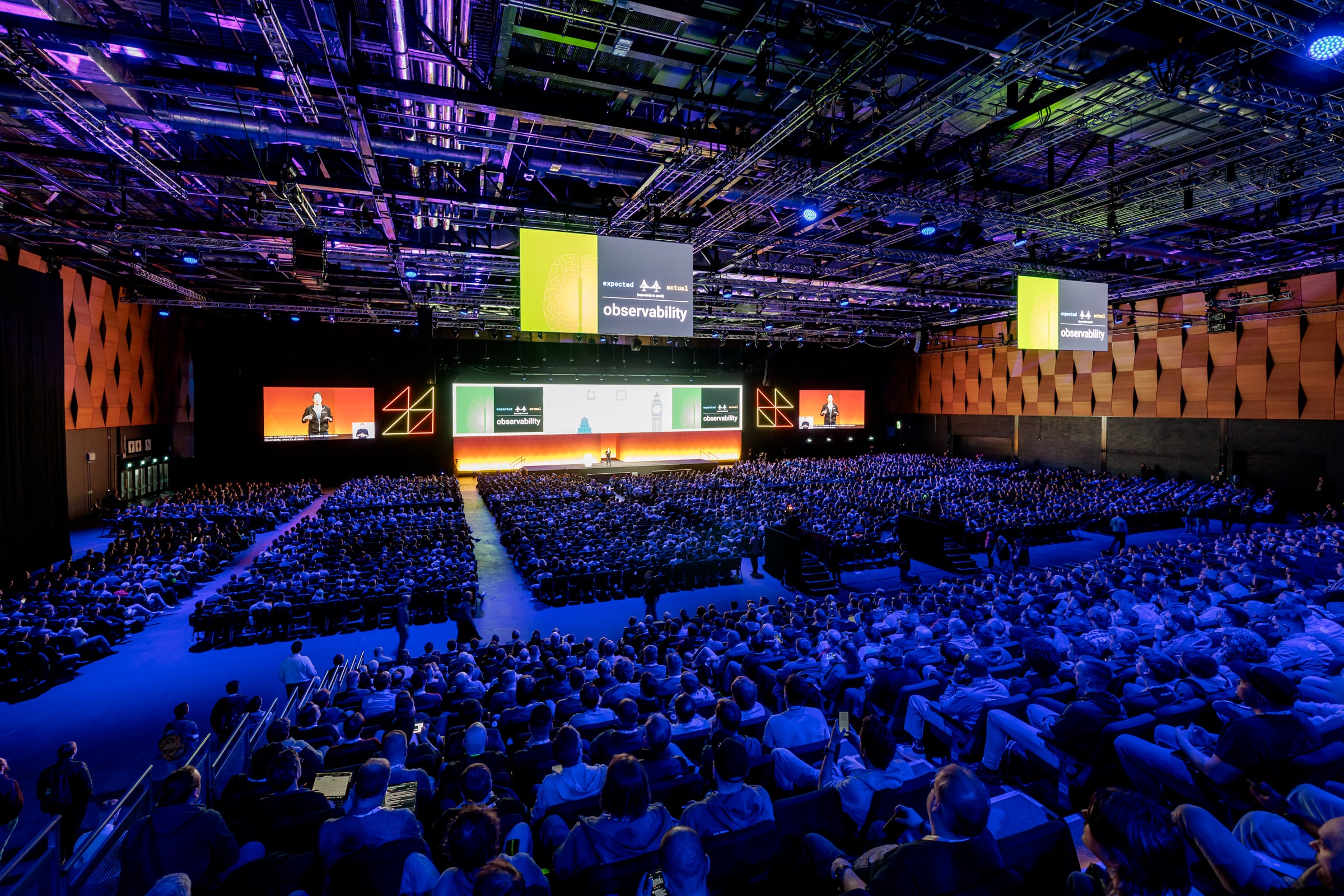
A presentation at KubeCon + CloudNativeCon Europe 2025 in London, illustrating the growth of the cloud-native community. Photo: CNCF, CC BY-NC 2.0.
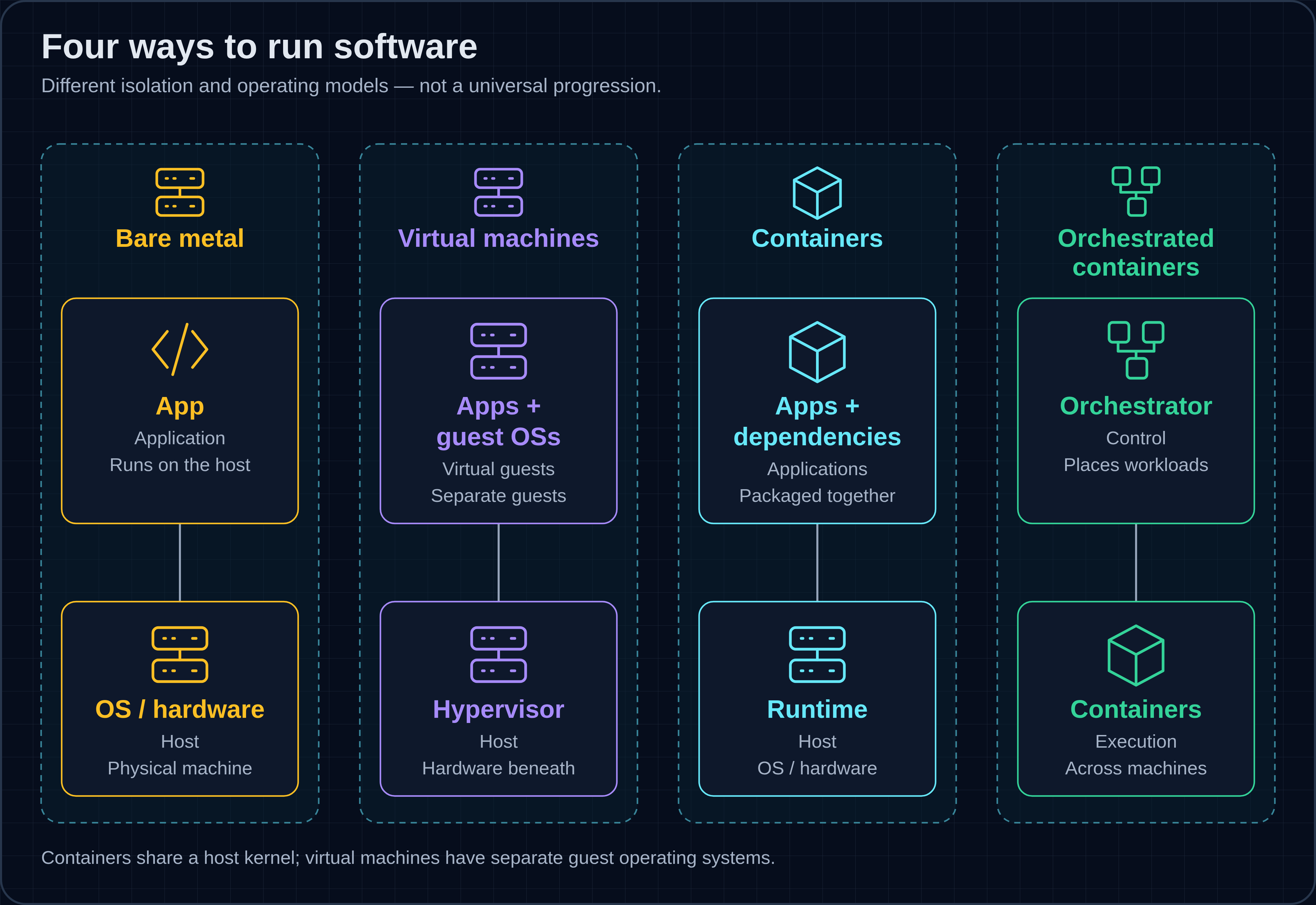
Figure 2 — Coexisting deployment models, not a universal progression: bare metal runs applications on an OS; VMs add guest operating systems; containers package dependencies while sharing a host kernel; orchestration places them across machines. Startup times and sizes depend on workload and platform.[2]
The history explains why these capabilities exist. It leaves a more useful question than which product won: what should their combination allow a team to do?
Imagine a fictional online store in 2006. A customer uses its website to submit an order; an orders API handles the request and stores the result. The API and database share a server. Before a busy period, the team must arrange additional capacity, reproduce the application environment and decide what happens if that machine fails.
Now imagine a possible design for the same store in 2026. Replaceable API replicas run across machines, traffic enters through a gateway and the database lives separately. Routine releases use a defined delivery path rather than edits on individual hosts. This changes where the work happens; it does not remove infrastructure, data ownership or operational responsibility.
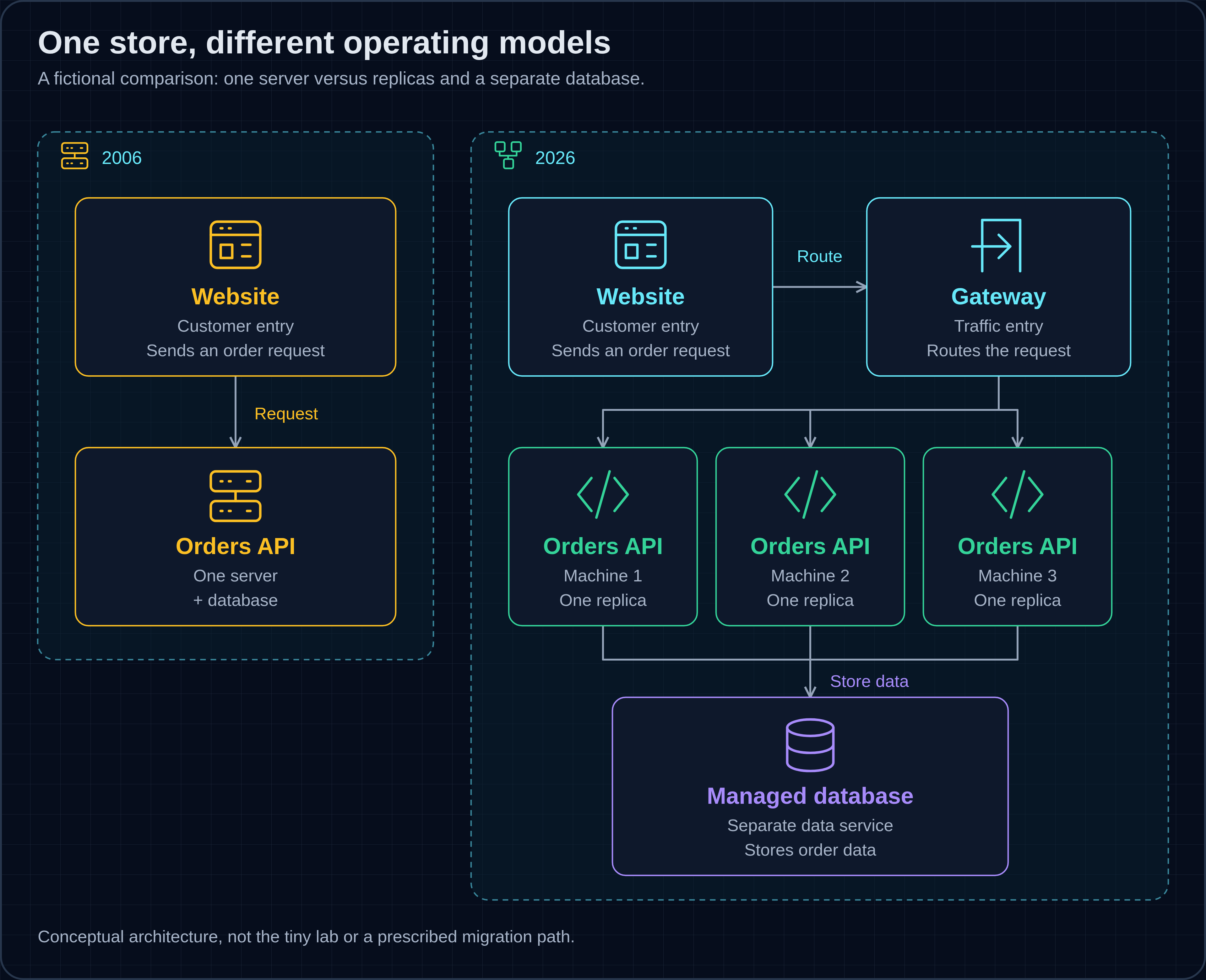
Figure 3 — Fictional store designs: one server holds the orders API and database; replicas occupy three machines with a separate managed database. This is conceptual, not the lab or a migration prescription; capacity timings are not claimed.
Cloud native is a set of practices for changing and operating software repeatably, not a particular hosting location.[1] We will trace the problems those practices address, connect six useful building blocks and follow a deliberately small workload into a local cluster. This is an introduction, not a production Kubernetes tutorial. What do these developments mean for the way we build and operate software?
What does “cloud native” actually mean?
Cloud native means organising development and operation around repeatable, programmatic changes and interoperating systems. It is not synonymous with renting a cloud server. CNCF's definition explicitly covers public, private and hybrid environments, and its technology list is non-exhaustive.[1]
The first paragraph of CNCF's version 1.1 definition, approved on 26 February 2024, reads:[1]
Cloud native practices empower organizations to develop, build, and deploy workloads in computing environments (public, private, hybrid cloud) to meet their organizational needs at scale in a programmatic and repeatable manner. It is characterized by loosely coupled systems that interoperate in a manner that is secure, resilient, manageable, sustainable, and observable.
The phrase “programmatic and repeatable” means the store's next release should not depend on reconstructing an undocumented sequence. “Loosely coupled” means components can interact without every change forcing coordinated replacement of the entire system. Resilience and observability concern what happens when reality differs from expectations: can the service recover, and can its owners understand the failure?
The adjacent Benefits section describes frequent, predictable changes with “minimal toil and clear separation of concerns”. That is an intended benefit of practices combined with automation, not a guarantee delivered by installing a cluster.[1]
The comparison below describes operating habits, not a boundary between old and new hardware. VMs can be automated and declarative; Kubernetes can run stateful workloads. Moving a monolith onto a cloud VM, by itself, tells us little about how it is built, released or operated.[2][1]
| Concern | Host-centred manual approach | Cloud-native-oriented practice |
|---|---|---|
| Deployment unit | Files and dependencies installed on a named host | Versioned, digest-identified workload artifact |
| Capacity | Arrange and configure individual machines | Request capacity through an automated interface |
| Scaling | Repeat host setup and configuration | Adjust a declared workload requirement |
| Failure handling | Investigate and repair the individual instance | Replace disposable instances; recover persistent state separately |
| Configuration | Settings accumulate on hosts | Review and version declarations |
| Release cadence | Coordinate bespoke deployment steps | Automate a repeatable delivery path |
| State | Persistence may be mixed with application execution | Identify data ownership and lifecycle explicitly |
For the store, the test is practical: can another engineer reproduce the service, change it safely and investigate its behaviour? A hosting label cannot answer those questions. The building blocks matter because they make parts of that work explicit.
What are the building blocks?
We will use six concerns to organise the design: packaging, orchestration, networking, declarative configuration, observability and delivery automation. This is a teaching model, not an official CNCF checklist. Security, identity and persistent data cut across it and still need deliberate design.[1]
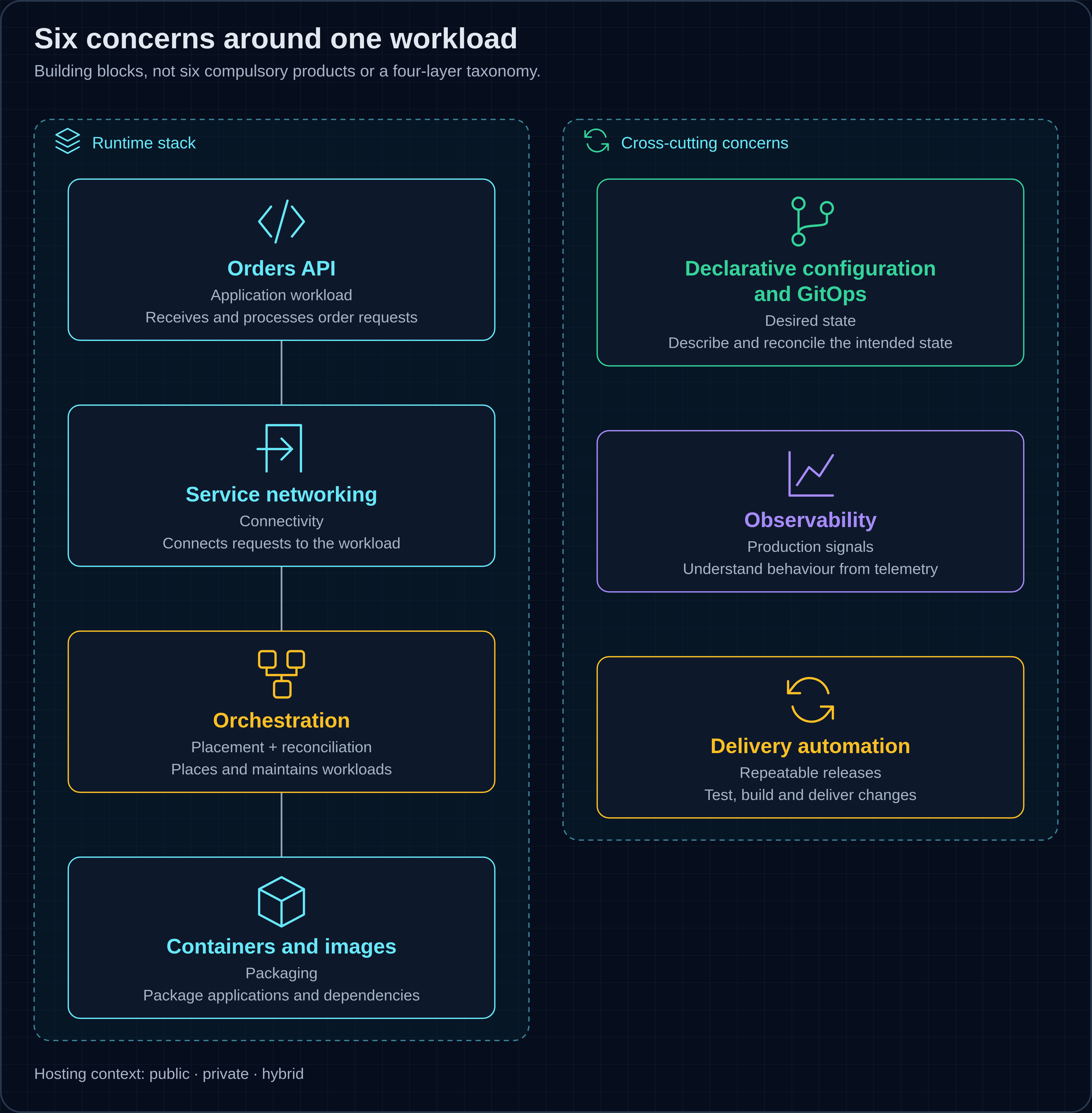
Figure 4 — Six concerns, not compulsory products or a four-layer taxonomy. Images, orchestration and networking support the API; declarative configuration/GitOps, observability and delivery automation span the stack. Public, private and hybrid are hosting contexts, not a seventh block.
Containers and images
The store needs a reliable answer to “what exactly are we running?” A container image packages application files and dependencies; a runtime starts containers from it. A registry stores and distributes images. Containers share a host kernel, so a packaged environment is not a complete independent machine.[32][15]
The runtime is the software that actually manages containers on a machine. containerd pulls and stores images, starts and stops containers, and supervises their execution. Docker is not a competing name for the same layer: Docker Engine uses containerd underneath its developer-facing tools. On Linux, containerd commonly delegates the low-level work of creating a container process to runc, an implementation of the Open Container Initiative (OCI) runtime specification.[62][63]
An image digest identifies immutable content. A tag is a movable reference, even when its name resembles a Git commit. For repeatable releases, record the digest or explicitly enforce a registry policy rather than assuming a meaningful tag cannot change.[33]
The cost is maintaining the packaged software: freezing an artifact makes it identifiable, not permanently safe. In our proposed delivery process, dependency updates must lead to a rebuilt, checked artifact rather than manual repairs inside running containers.
Orchestration
A container image does not decide which machine should run it or replace a missing instance. Kubernetes manages workloads across a cluster of nodes. A Pod is its workload execution unit; our example puts one application container in each Pod. A Deployment manages ReplicaSets, which maintain the requested number of Pods.[34][35][36]
This is reconciliation: controllers compare desired state with observed state and act on the difference. The scheduler assigns an unscheduled Pod to a node; that node's kubelet asks a runtime such as containerd or CRI-O to run it through the Container Runtime Interface (CRI). The API server exposes cluster state, with etcd storing the API data. These are cooperating components, not one omniscient scheduler.[34][37]
Kubernetes does not need Docker Engine on the node. An image built with Docker can run through containerd, provided it matches the node's operating system and CPU architecture. Docker is the build tool used in our exercise; containerd is a runtime that can execute the resulting image.[64][15]
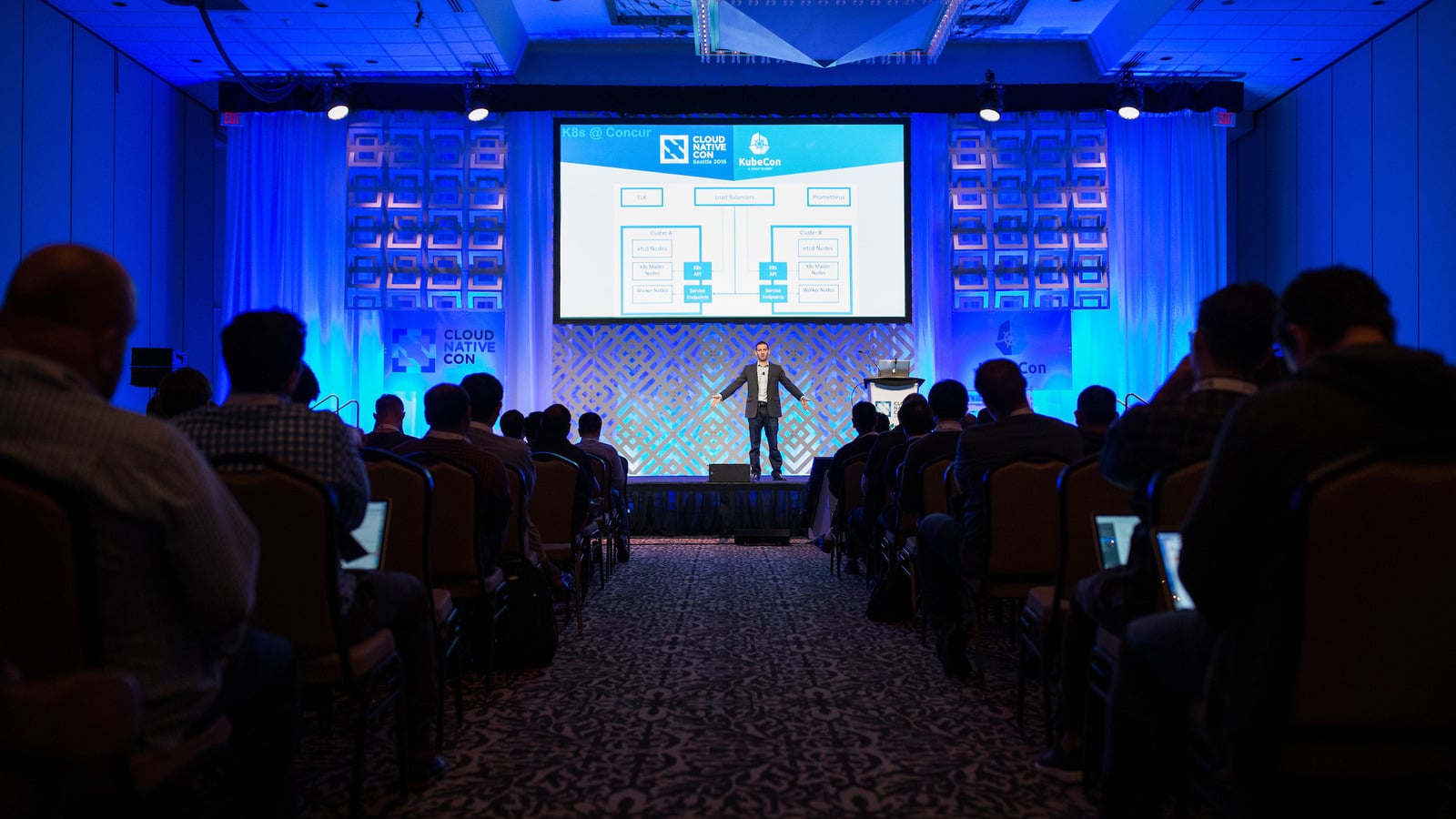 A Kubernetes presentation at CloudNativeCon + KubeCon, Seattle, 8 November 2016. Photo: Stan Olszewski / SOSKIphoto, via CNCF, CC0; cropped.
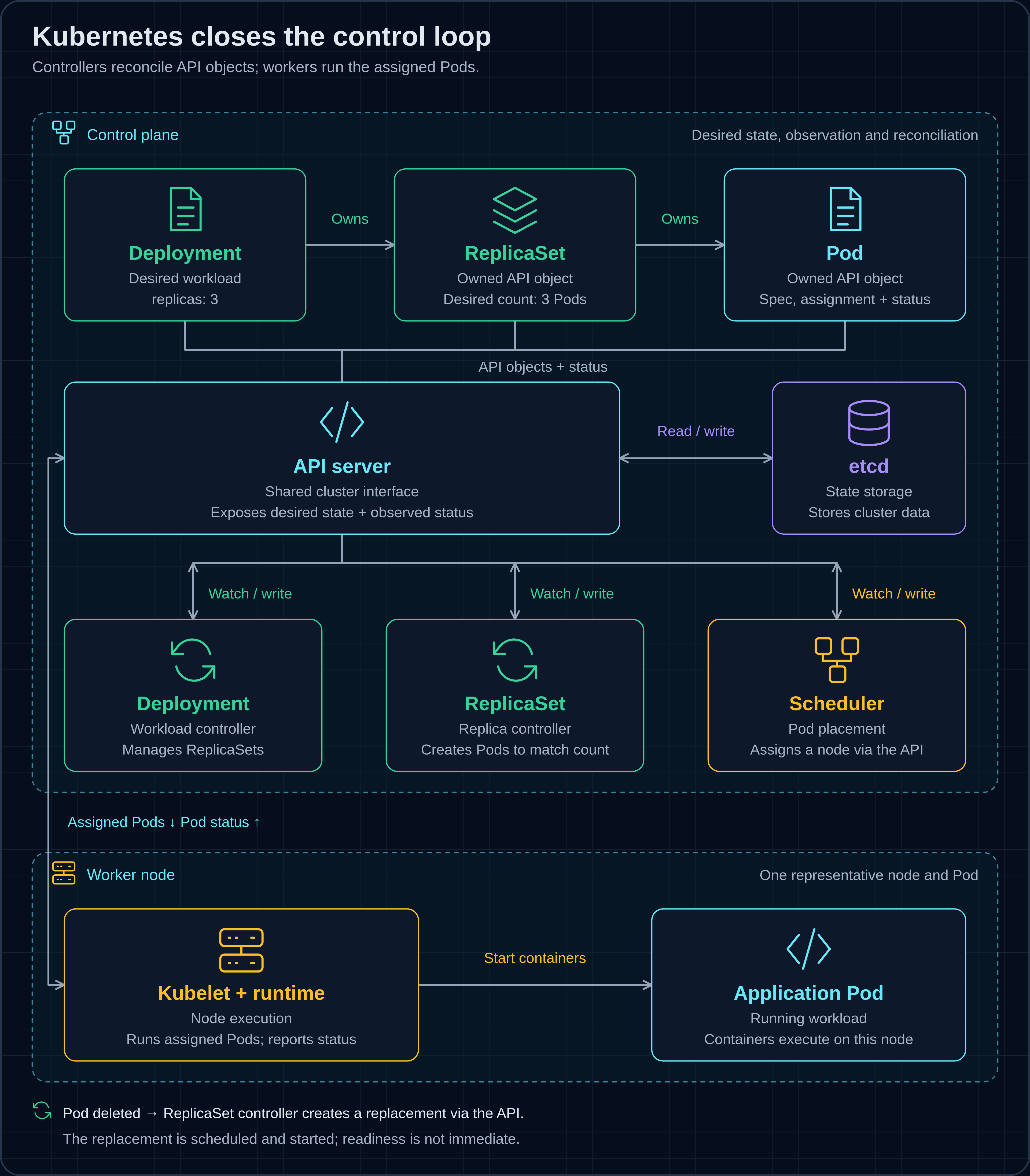
Figure 5 — One workload lifecycle: the Deployment controller manages ReplicaSets, whose controller creates Pod objects; the scheduler assigns a node; kubelet and runtime start containers. Deletion triggers reconciliation, not immediate readiness. etcd stores cluster data, not only desired state. Solid arrows summarise dependencies, not direct RPCs; watches, writes and status updates use the API server.[34][37][36]
A container process restart and a replacement Pod are different events. Deleting a controller-owned Pod creates a shortfall for its ReplicaSet to address; replacement does not mean the old Pod is resurrected. Available capacity, image access and application health still determine whether the new workload becomes ready. The cost is operating this control system, directly or through a managed service.[35][36][38]
Service networking
Replaceable Pods create a new problem: callers cannot rely on their individual addresses. A Kubernetes Service represents a set of backends; cluster Domain Name System, or DNS, gives callers names to resolve. DNS answers a lookup—it is not another proxy through which every application request travels.[39][40]
For the broader store architecture, an edge gateway can route incoming traffic towards the service. Gateway API describes configuration that needs an implementation; a basic local cluster does not automatically provide a public gateway. Extra routing layers also mean more places to investigate a failed request.[41]
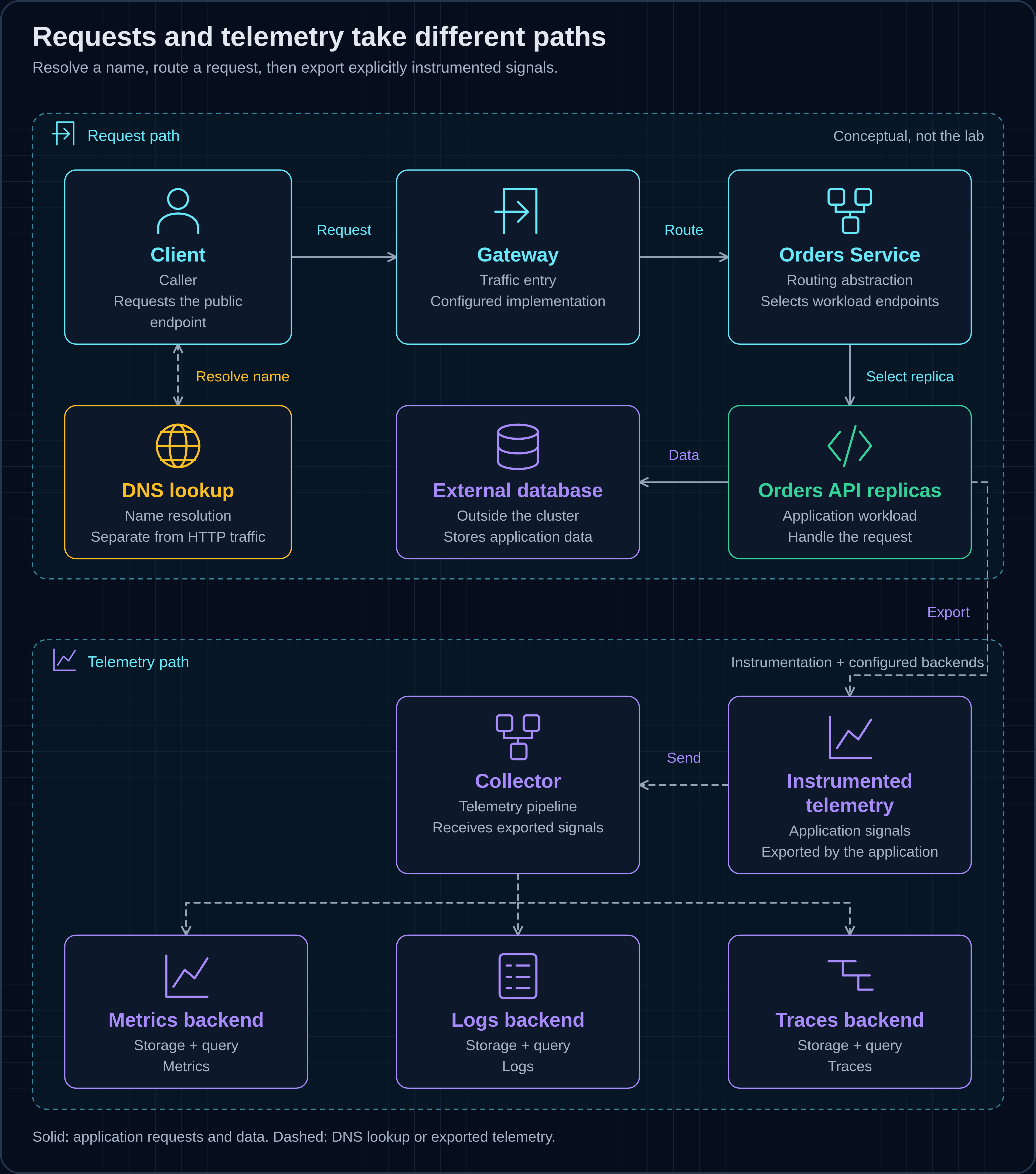
Figure 6 — Public DNS is a separate lookup, not an HTTP hop. A configured Gateway routes through the Service abstraction or directly to its endpoints. Explicitly instrumented applications export signals through a configured Collector to storage/query backends; Kubernetes does not install this application instrumentation, Collector or storage/query backend by default. The database is external.[39][40][41][42]
Declarative configuration and GitOps
Even a replaceable service can drift if its intended configuration lives only in someone's terminal history. A manifest declares resources and their desired properties. Helm packages related Kubernetes resources as charts; it does not by itself continuously reconcile a cluster.[43]
GitOps puts versioned, declarative desired state in Git and connects reviewed changes to the running environment. The principles are not tied to a particular product. Two implementation options differ mainly in who initiates deployment and when the desired and actual states are compared.
- Push-based GitOps: a Git change triggers a deployment pipeline. For example, Terraform can plan and apply Kubernetes manifests: during planning it reads the managed resources by default and determines the changes needed. Once the run finishes, another trigger, scheduled run or separate drift-checking process is needed for the next comparison. The pipeline uses a deployment identity with access to the target cluster; that identity can be temporary.[65]
- Pull-based GitOps: an agent retrieves the desired configuration and repeatedly compares it with the target environment. The agent holds or obtains the permissions needed to apply changes; the delivery pipeline can update Git without deploying directly to the cluster. Argo CD and Flux are examples, not prerequisites. Automatic synchronisation, deletion and self-healing depend on the implementation and its settings.[45][46]
In both arrangements, Kubernetes controllers continue maintaining the resources already declared in the cluster. The distinction is the Git-to-cluster reconciliation loop, not whether Kubernetes replaces failed Pods. Push and pull describe different deployment arrangements, not a ranking of good and bad practice.[37]
OpenGitOps uses a stricter definition that explicitly requires automatic pulling and continuous reconciliation. Here, the push/pull comparison makes the implementation choices explicit rather than making any one tool a requirement.[44]
For the store, a reviewed configuration change can say which image and replica count should run. The cost is treating that repository as an operational interface, including deciding who can change it and how emergency intervention is reconciled afterwards.
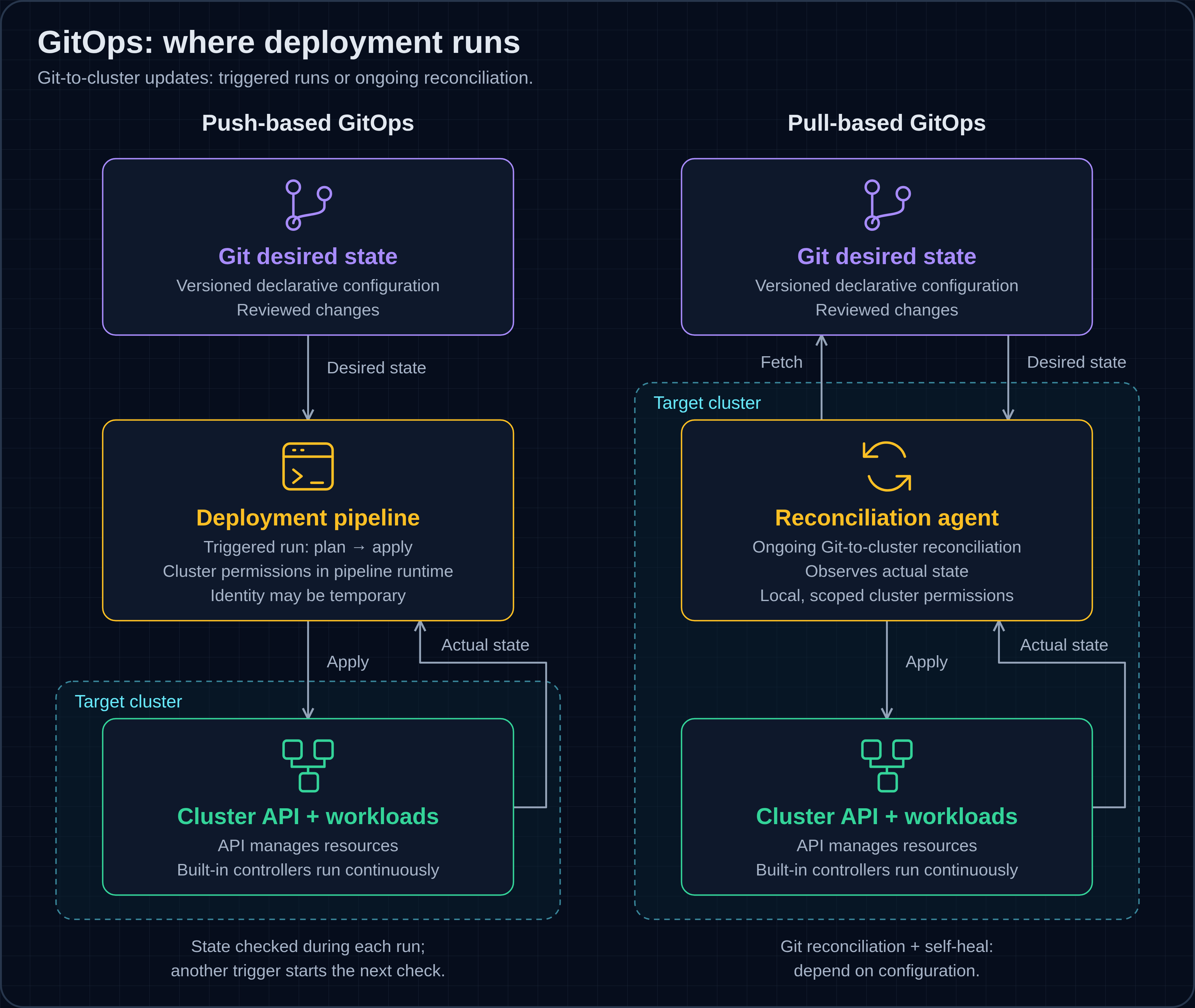
Figure 7 — Two representative GitOps deployment arrangements: a triggered pipeline versus an ongoing reconciliation agent. Both use versioned desired state and observe actual state. Agent placement and permissions vary by implementation; Kubernetes controllers remain active in both.
Argo CD and Flux are two implementations of pull-based GitOps. Argo CD organises delivery around applications, with a web UI and CLI for management and status. Flux provides composable Kubernetes controllers for retrieving configuration and reconciling resources and Helm releases. Both compare desired configuration with the cluster; their settings determine how changes are applied. They are options, not requirements for GitOps.[66][46]
Figure 8 shows how such a reconciler fits into the wider flow: CI publishes an image, a reviewed configuration change enters Git, and the reconciler updates the cluster.
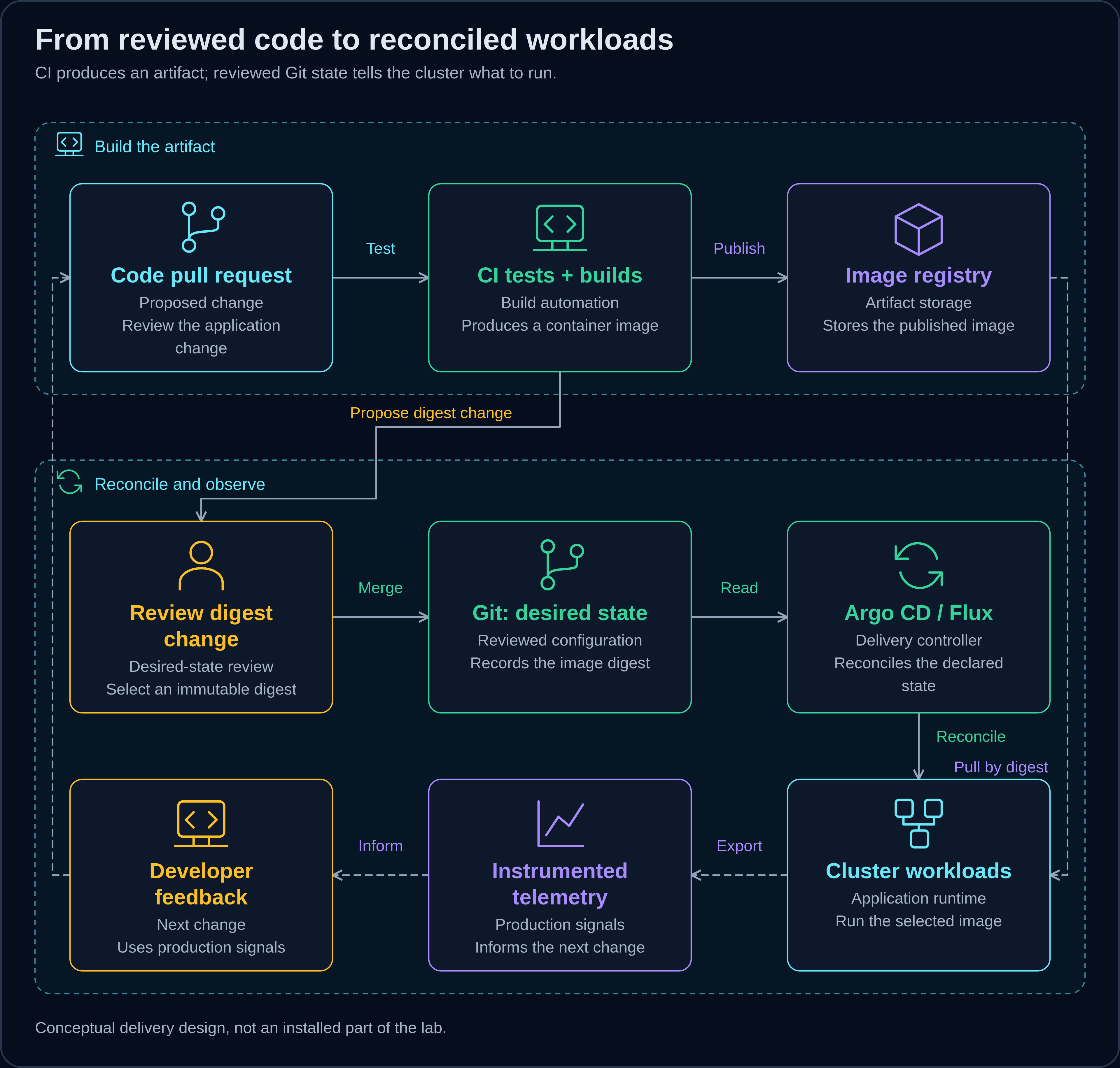
Figure 8 — CI tests, builds and publishes an image; a reviewed digest change enters Git desired state. Argo CD or Flux reconciles it; the runtime separately pulls the image. Instrumented telemetry informs changes. Commit-SHA tags are not immutable; sync, recovery and emergency access require policy.[44][45]
Observability
A running Pod does not tell the store whether customers are receiving useful responses. Metrics describe measurements over time, logs record events and traces follow requests through components. These complementary signals help answer different questions, but applications and collection paths must actually produce them.[47]
OpenTelemetry supports instrumentation, collection and export; it is not the database or dashboard where every signal is stored and explored. Prometheus collects and stores time-series metrics. Figure 6 separates these roles rather than drawing “observability” as something Kubernetes automatically supplies.[42][48]
The cost includes instrumentation work, storage decisions and controlling how much telemetry is produced. Our tiny sample supplies no metrics exporter or tracing stack. The separate Observability on Amazon EKS article explores those integrations in more detail without making them prerequisites for this exercise.
Delivery automation
Finally, the store needs a repeatable route from a reviewed source change to a running version. In the proposed workflow, CI tests the code, builds an image, publishes it to a registry and proposes the image digest in desired-state configuration. A reconciler can then apply the accepted change. Kubernetes itself does not build application source code.[2][44]
This separates the artifact from the decision to deploy it. The cost is maintaining the delivery path and its permissions as carefully as the application. The GitHub Actions introduction covers workflows and reuse; here, delivery automation is the connection between the other concerns, not another installed lab component.
| Block | Pain addressed | Representative tools or resources | Continuing cost |
|---|---|---|---|
| Images and runtime | Environment differs between machines | OCI formats, container runtimes | Artifact maintenance and compatibility |
| Orchestration | Workloads need placement and replacement | Kubernetes Deployments and ReplicaSets | Capacity and control-plane ownership |
| Service networking | Replica addresses change | Kubernetes Service, DNS, Gateway API | Routing and implementation choices |
| Declarative configuration | Intended state becomes unclear | Helm, Argo CD, Flux | Review and reconciliation policy |
| Observability | Running does not mean understood | OpenTelemetry, Prometheus | Instrumentation and data volume |
| Delivery automation | Releases repeat manual work | CI workflows and a GitOps reconciler | Pipeline maintenance and access |
These entries deliberately mix standards, Kubernetes resources and tools; they are not all separate CNCF projects. The table summarises the roles above rather than prescribing a product for every layer. Enough architecture: which part can we make visible with a small experiment?
How do you run your first workload?
Build an application image, run it in a local Kubernetes cluster, then scale it and observe how Kubernetes replaces a deleted Pod. You will use Docker, kind and kubectl on a disposable workstation or VM; no cloud account is needed. kind runs Kubernetes nodes in containers.[51]
Use Bash with Docker's daemon running and kind and kubectl installed. Work in a new directory and keep the same terminal and directory throughout. Run the blocks in order, stopping if any command fails. The lab uses a dedicated .intro-kubeconfig file and the explicit kind-intro context, rather than your usual cluster configuration. Reserve the kind name intro for this session: it must not already exist or be created by another session while you work.
The example repository also contains the full automated script. Here, you will run the exercise in seven steps.
https://github.com/ferhaty/cloud-native-intro
1. Build the application image
Create app.py and Dockerfile in your working directory. The application returns an empty orders list, its hostname in served_by and a version; /healthz returns ok. It accepts no order submissions and connects to no database. Python's http.server is not intended as a production server.[52]
app.py
from http.server import BaseHTTPRequestHandler, HTTPServer
import json, os, socket

class Handler(BaseHTTPRequestHandler):
    def do_GET(self):
        if self.path == "/healthz":
            body, content_type = b"ok", "text/plain; charset=utf-8"
        else:
            body = json.dumps({
                "orders": [],
                "served_by": socket.gethostname(),
                "version": os.getenv("APP_VERSION", "dev"),
            }).encode()
            content_type = "application/json"
        self.send_response(200)
        self.send_header("Content-Type", content_type)
        self.end_headers()
        self.wfile.write(body)

if __name__ == "__main__":
    HTTPServer(("", 8080), Handler).serve_forever()
Dockerfile
FROM python:3.13-slim@sha256:ae14d4ce8771606477a81446e7ef429edd6762305fc50c84507c1041fa8285d1
WORKDIR /app
COPY app.py .
ENV APP_VERSION=1.0.0
EXPOSE 8080
USER 1000
CMD ["python", "app.py"]
The Dockerfile packages Python and the application, sets its version and defines the startup command. Build that image with:
docker build -t orders-api:1.0.0 .
This creates the local image orders-api:1.0.0; you do not need Python installed on the host.
2. Create the local cluster and load the image
This check refuses an existing intro cluster or kubeconfig file and does not create anything if cluster discovery fails. Only successful creation marks the cluster as belonging to this session.
export KIND_EXPERIMENTAL_PROVIDER=docker
intro_created=false
if ! clusters=$(kind get clusters); then
  printf '%s\n' 'Cannot discover kind clusters; stop here.' >&2
  false
elif printf '%s\n' "$clusters" | grep -Fxq intro; then
  printf '%s\n' 'The intro cluster already exists; stop here.' >&2
  false
elif [[ -e "$PWD/.intro-kubeconfig" || -L "$PWD/.intro-kubeconfig" ]]; then
  printf '%s\n' '.intro-kubeconfig already exists; stop here.' >&2
  false
else
  kind create cluster --name intro --wait 120s \
    --kubeconfig "$PWD/.intro-kubeconfig" \
    --image kindest/node:v1.37.0@sha256:a1ed56cfb0e7b93589bdf97c8cd566405a265939e3620fc4f5de89adff580ae5 &&
  intro_created=true &&
  kind load docker-image orders-api:1.0.0 --name intro
fi
After success, Kubernetes is running locally and its node has your application image. If creation fails, stop and inspect what remains; do not delete a cluster whose ownership you have not established.
3. Deploy the workload
Save orders.yaml beside the application files. The Deployment requests one replica. The Service selects Pods labelled app: orders and routes port 80 to the application's port 8080. The readiness probe checks /healthz before a Pod receives Service traffic.[35][39]
orders.yaml
apiVersion: apps/v1
kind: Deployment
metadata:
  name: orders
spec:
  replicas: 1
  selector:
    matchLabels: { app: orders }
  template:
    metadata:
      labels: { app: orders }
    spec:
      containers:
        - name: orders
          image: orders-api:1.0.0
          ports: [{ containerPort: 8080 }]
          readinessProbe:
            httpGet: { path: /healthz, port: 8080 }
          resources:
            requests: { cpu: 50m, memory: 64Mi }
            limits: { memory: 128Mi }
---
apiVersion: v1
kind: Service
metadata:
  name: orders
spec:
  selector: { app: orders }
  ports: [{ port: 80, targetPort: 8080 }]
The non-latest image tag defaults to IfNotPresent, so Kubernetes can use the image loaded into kind.[33]
kubectl --kubeconfig "$PWD/.intro-kubeconfig" --context kind-intro apply -f orders.yaml &&
kubectl --kubeconfig "$PWD/.intro-kubeconfig" --context kind-intro rollout status deployment/orders --timeout=120s &&
kubectl --kubeconfig "$PWD/.intro-kubeconfig" --context kind-intro get pods -l app=orders
The rollout wait allows time for the application to start. After it succeeds, the listing should show one ready orders Pod.
4. Send a request
Start a small client Pod, wait for it to become ready, then use it to call the Service from inside the cluster.
kubectl --kubeconfig "$PWD/.intro-kubeconfig" --context kind-intro run client --restart=Never \
  --image=curlimages/curl:8.16.0@sha256:463eaf6072688fe96ac64fa623fe73e1dbe25d8ad6c34404a669ad3ce1f104b6 --command -- sleep 3600 &&
kubectl --kubeconfig "$PWD/.intro-kubeconfig" --context kind-intro wait --for=condition=Ready pod/client --timeout=120s &&
kubectl --kubeconfig "$PWD/.intro-kubeconfig" --context kind-intro exec client -- curl -fsS --max-time 5 http://orders/
The JSON response should contain orders: [], version 1.0.0 and the serving Pod's hostname. Using the in-cluster Service name exercises Service routing rather than forwarding directly to one Pod.
5. Scale to three replicas
Change the desired replica count, wait for the rollout and send several separate requests through the same Service.
kubectl --kubeconfig "$PWD/.intro-kubeconfig" --context kind-intro scale deployment orders --replicas=3 &&
kubectl --kubeconfig "$PWD/.intro-kubeconfig" --context kind-intro rollout status deployment/orders --timeout=120s &&
kubectl --kubeconfig "$PWD/.intro-kubeconfig" --context kind-intro get pods -l app=orders &&
kubectl --kubeconfig "$PWD/.intro-kubeconfig" --context kind-intro exec client -- sh -ec 'for i in $(seq 10); do curl -fsS --max-time 5 http://orders/; echo; done'
You should now see three ready orders Pods. Compare their names with the responses' served_by values: requests may reach different replicas, but a short sample need not visit every Pod or alternate between them.[39]
6. Delete one Pod and observe its replacement
Capture one orders Pod's name and delete only that Pod. Then wait for the Deployment to recover and list its Pods again.
pod=$(kubectl --kubeconfig "$PWD/.intro-kubeconfig" --context kind-intro get pods -l app=orders -o jsonpath='{.items[0].metadata.name}') &&
kubectl --kubeconfig "$PWD/.intro-kubeconfig" --context kind-intro delete pod "$pod" --wait=true --timeout=120s &&
kubectl --kubeconfig "$PWD/.intro-kubeconfig" --context kind-intro wait --for=condition=Ready pod -l app=orders --timeout=120s &&
kubectl --kubeconfig "$PWD/.intro-kubeconfig" --context kind-intro rollout status deployment/orders --timeout=120s &&
kubectl --kubeconfig "$PWD/.intro-kubeconfig" --context kind-intro get pods -l app=orders &&
kubectl --kubeconfig "$PWD/.intro-kubeconfig" --context kind-intro exec client -- curl -fsS --max-time 5 http://orders/
Compare the names with step 5: the deleted Pod should be gone and a new one should bring the count back to three. The ReplicaSet creates the replacement because the desired count has not changed. Replacement takes time; a successful request afterwards does not prove uninterrupted availability. Reapplying orders.yaml would restore its declared count of one.[36][35]
This demonstrates reconciliation, not recovery from a failed host: all three replicas share one local node. A healthy endpoint also says nothing about correct business rules or recovery of persistent data.
7. Clean up explicitly
When finished, remove only the cluster successfully created in step 2. Run this in the same terminal and directory; the session flag prevents deletion when creation was refused or failed. Nothing is removed automatically when you close the terminal.
if [[ "${intro_created:-false}" == true ]]; then
  kind delete cluster --name intro --kubeconfig "$PWD/.intro-kubeconfig" &&
  rm -f "$PWD/.intro-kubeconfig" &&
  intro_created=false
else
  printf '%s\n' 'No successfully created cluster recorded in this session; nothing deleted.'
fi
This removes the local cluster, including its workload and client Pod, then removes the dedicated kubeconfig. Your source files and locally built image remain. If deletion fails, the kubeconfig and session flag remain available for a retry; inspect any remaining resources before proceeding.
Where should you go next?
Use the lab's replacement behaviour as a starting point, then examine one real service's delivery and recovery path. Identify what is reproducible, what depends on a particular machine and who owns failures. That reveals the next useful improvement more clearly than copying a complete reference architecture.
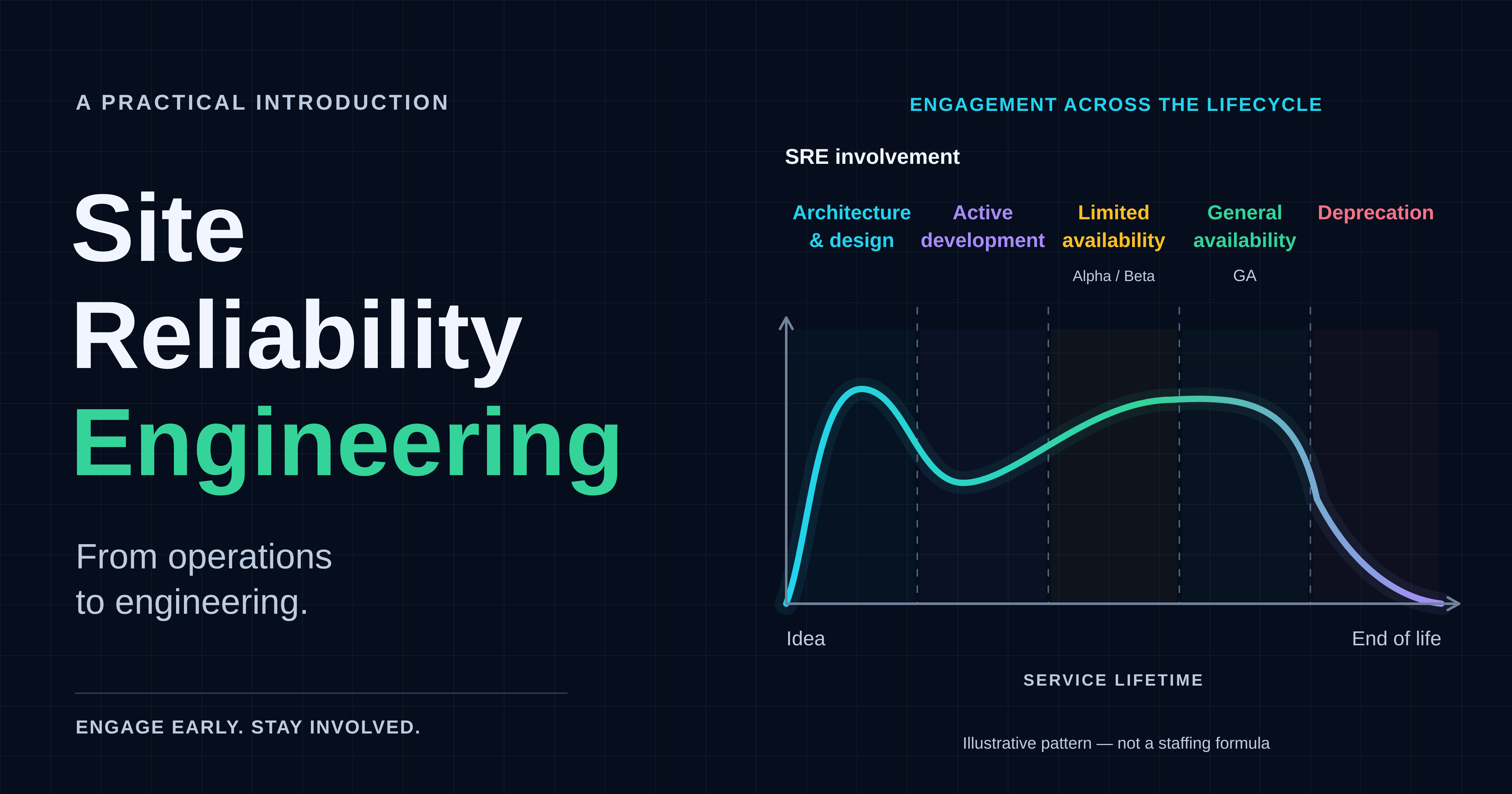
The Platform Engineering introduction discusses making supported paths easier for teams to use. The Site Reliability Engineering introduction examines reliability and operational work. Alongside the observability and delivery articles linked earlier, these provide different perspectives on the same problem: changing software while keeping its behaviour understandable.
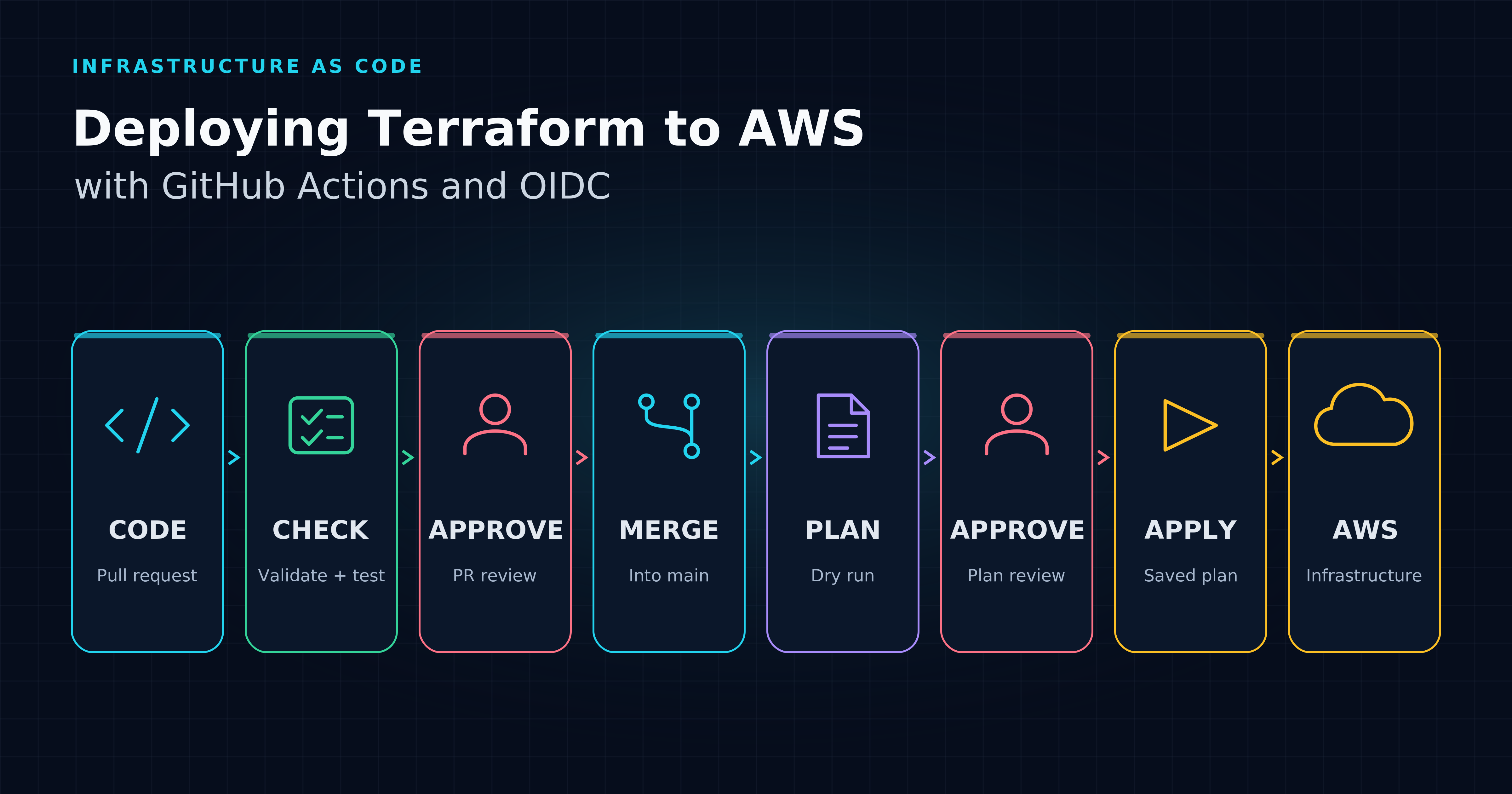
For infrastructure delivery, Deploying Terraform to AWS with GitHub Actions and OIDC explains a separate pipeline; it is not part of this lab.[58] The CNCF glossary offers a shared vocabulary, while the CNCF landscape is a directory to explore.[59][60]
There is more to explore beneath each building block, from workload lifecycle to persistent data and safer releases. Future articles can follow those connections without assuming every reader needs the same platform. The durable mental model is the relationship between a declared intention, the mechanisms that realise it and the evidence that it is working.
Frequently asked questions
Is cloud native the same as Kubernetes?
No. Kubernetes supplies workload-management capabilities; cloud native describes broader practices for developing and operating systems. A cluster can support those practices without automatically providing good delivery, observability or ownership. The CNCF definition does not make Kubernetes mandatory.[1][2]
Do I need microservices to be cloud native?
No. CNCF lists microservices among a non-exhaustive combination of technologies and architectures, not as an entry requirement. A monolith can benefit from reproducible packaging, declarative deployment and observability. Splitting it into services should address an actual design need, not satisfy a label.[1]
Can I be cloud native on-premises?
Yes. CNCF's definition explicitly includes private and hybrid environments alongside public cloud. The relevant question is how workloads are built, changed and operated, not whose building contains the hardware. On-premises operation still needs infrastructure ownership, just as rented infrastructure retains responsibilities.[1][38]
Sources
[1] CNCF Cloud Native Definition v1.1 #
[2] Overview | Kubernetes
[3] UNIX Seventh Edition manual: chdir, chroot(2) — TUHS source archive
[4] Version 7 Unix - Wikipedia
[5] chroot(2) - Linux manual page
[6] Release Information | The FreeBSD Project
[7] FreeBSD 4.0 Release Notes | The FreeBSD Project
[8] Solaris 10 Zones (Sun Java Enterprise System 2005Q4 Installation Guide for UNIX)
[9] mount_namespaces(7) - Linux manual page
[10] Linux_2_6_24 - Linux Kernel Newbies
[11] cgroups(7) - Linux manual page
[12] LXC | Stéphane Graber's website
[13] Linux Containers - LXC - Introduction
[14] Docker: Nine Years YOUNG | Docker
[15] Multi-platform builds | Docker Docs
[16] Amazon EC2 Beta | AWS News Blog
[17] The Twelve-Factor App
[18] The Twelve-Factor App
[19] The History of Pets vs Cattle and How to Use the Analogy Properly | Cloudscaling
[20] Large-scale cluster management at Google with Borg
[21] 10 Years of Kubernetes | Kubernetes
[22] New Cloud Native Computing Foundation to drive alignment among container technologies | CNCF
[23] About the Open Container Initiative - Open Container Initiative
[24] Cloud Native Computing Foundation announces Kubernetes® as first graduated project | CNCF
[25] Amazon EKS – Now Generally Available | AWS News Blog
[26] Azure Kubernetes Service (AKS) GA – New regions, more features, increased productivity | Microsoft Azure Blog
[27] CNCF Cloud Native Definition v1.0 #
[28] A brief history of OpenTelemetry (So Far) | CNCF
[29] OpenTelemetry | CNCF
[30] Kubernetes v1.37: Garhwal | Kubernetes
[31] CNCF Annual Cloud Native Survey: The Infrastructure of AI’s Future (January 2026)
[32] What is a container? | Docker Docs
[33] Images | Kubernetes
[34] Cluster Architecture | Kubernetes
[35] Deployments | Kubernetes
[36] ReplicaSet | Kubernetes
[37] Controllers | Kubernetes
[38] Security in Amazon EKS - Amazon EKS
[39] Service | Kubernetes
[40] DNS for Services and Pods | Kubernetes
[41] Gateway API | Kubernetes
[42] What is OpenTelemetry? | OpenTelemetry
[43] Charts | Helm
[44] Home | OpenGitOps
[45] Automated Sync Policy - Argo CD - Declarative GitOps CD for Kubernetes
[46] Flux Documentation | Flux
[47] Signals | OpenTelemetry
[48] Overview | Prometheus
[49] Observability on EKS: Metrics, Logs and Traces
[50] GitHub Actions Workflows and Reusable Workflows
[51] kind – Quick Start
[52] http.server — HTTP servers — Python 3.15.2 documentation
[56] Platform Engineering: A Practical Introduction
[57] Site Reliability Engineering: A Practical Introduction [58] Deploying Terraform to AWS with GitHub Actions and OIDC
[59] Cloud Native Glossary
[60] CNCF Landscape — directory, not evidence for project totals
[61] Linux kernel 2.4 release archive — Linux 2.4.19, August 2002
[62] containerd — container lifecycle and OCI support
[63] Alternative container runtimes | Docker Docs
[64] Container Runtimes | Kubernetes
[65] Terraform plan command | HashiCorp Developer
[66] Architectural Overview | Argo CD
Frequently asked questions
What is cloud native in simple terms?
Cloud native refers to practices that organize software development and operation around repeatable, programmatic changes across various environments. It emphasizes loosely coupled systems, resilience, and observability.
How does Kubernetes fit into cloud native?
Kubernetes provides workload-management capabilities within cloud native practices. It manages applications across a cluster but doesn't automatically ensure good delivery or observability.
Do I need Kubernetes to be cloud native?
No, Kubernetes is not mandatory for cloud native practices. Cloud native encompasses broader methods for developing and operating systems, which can be achieved without Kubernetes.
What are the key building blocks of cloud native?
The key building blocks include containers and images, orchestration, service networking, declarative configuration, observability, and delivery automation. These elements help manage and operate software efficiently.
Can cloud native practices be applied on-premises?
Yes, cloud native practices can be applied in private and hybrid environments, not just public clouds. The focus is on how workloads are built, changed, and operated, regardless of their physical location.
What is GitOps in the context of cloud native?
GitOps is a practice that uses Git for versioned, declarative configuration and connects changes to the running environment. It ensures that the desired state is consistently applied to the system.
About the author
- I’m a hands-on technology architect, engineer and founder of Turing Technology Services, with nearly two decades of experience in software engineering, platform engineering, site reliability engineering and cloud infrastructure. My work combines architecture and implementation with technical leadership, coaching and helping organisations adopt new engineering practices. I’ve worked with organisations including Shell, ING, ABN AMRO, Rabobank, Schiphol Group and Ahold Delhaize, across complex and regulated enterprise environments. On this blog, I share practical guides and perspectives on software architecture, cloud platforms, reliability and AI, explaining the reasoning behind technical choices as well as how to implement them.
Cloud
Practical guides to designing, building and operating cloud environments. Explore cloud architecture, networking, compute, storage, managed services and cloud operations, with clear engineering trade-offs.