

Observability on Amazon EKS: Metrics, Logs and Traces
Add OpenTelemetry, AMP, Fluent Bit and Grafana to an existing cluster—and follow a controlled failure across all three signals.
A running application is not necessarily a healthy application. This guide adds observability to an existing Amazon EKS cluster: metrics to spot patterns, logs to explain events and traces to follow requests. We will introduce each component, connect the three signals and investigate a deliberately failed request.
Why do we need more than a running cluster?
A running container does not tell us whether users receive errors or slow responses. Observability helps us understand application behaviour through telemetry: metrics reveal patterns, logs describe events, and traces show the operations involved in a request.
Imagine an API suddenly starts returning errors. We want to answer three different questions:
Metrics — how often is this happening? Metrics are numerical measurements over time, such as request counts, error rates and response durations. They help us spot trends and decide where to investigate.
Logs — what happened? Logs record individual events, ideally with useful fields such as a timestamp, an error message and a request identifier. They provide detail about a particular failure.
Traces — where did the request spend its time or fail? A trace describes the work performed for a request. It contains spans, each representing an operation with its timing and context. In a distributed application, a trace can connect operations across services when those services propagate the trace context.
These signals complement each other. A metric can reveal an increase in errors, a log can describe one of those errors, and a trace can identify the operation involved. Here we use Podinfo, an upstream demo service, rather than build a second application project. With tracing enabled and debug logging selected, its request-start log includes a trace ID that we can look up manually in the span store. Collecting all three signals does not automatically link them; the application and collection configuration must preserve that connection.
What does each component do?
OpenTelemetry instruments applications; the Collector forwards metrics and traces. AMP stores metrics, while Fluent Bit sends container logs to CloudWatch. X-Ray receives spans for Transaction Search. Grafana queries metrics and logs; Terraform and Helm deploy the tooling.
- Amazon EKS runs the application, collectors and Grafana on your existing Kubernetes cluster. We do not create a cluster or rebuild its networking.
- OpenTelemetry (OTel) provides vendor-neutral instrumentation and transport, not a database or dashboard. Podinfo already uses it to produce spans; OTLP is the protocol that carries them. OpenTelemetry overview
- The OpenTelemetry Collector receives, processes and forwards telemetry. Here it scrapes Podinfo's Prometheus endpoint and sends metrics to AMP; it also receives OTLP/gRPC spans and exports them to X-Ray over OTLP/HTTP. It does not collect application logs or provide long-term storage. Collector documentation
- Prometheus and AMP provide the metrics model and managed storage. Scraping means periodically reading an HTTP metrics endpoint; Podinfo already exposes
/metrics, so no custom exporter is needed. The Collector uses remote write to send samples to Amazon Managed Service for Prometheus (AMP). Grafana queries them with PromQL, the Prometheus query language. - AWS for Fluent Bit and CloudWatch Logs handle application events. Fluent Bit tails container logs from stdout/stderr and forwards them to the application log group. Podinfo writes JSON to stderr; debug request-start events include a trace ID, but no completion status or duration. Existing EKS control-plane logging is a separate path.
- X-Ray and Transaction Search handle spans. The Collector sends them to AWS's X-Ray OTLP ingestion endpoint. With the prerequisite CloudWatch Transaction Search enabled, spans are stored in CloudWatch Logs under
aws/spans, separately from application logs. Transaction Search is the trace-investigation interface. Transaction Search documentation - Grafana queries AMP metrics and CloudWatch application logs. It does not replace those stores; this example uses Transaction Search separately, not a Grafana trace datasource.
- Terraform and Helm configure AWS resources, workload permissions and tooling charts through your existing CI/CD pipeline. kubectl installs Podinfo separately. IAM roles give collectors ingestion permissions and Grafana query permissions; they are distinct from the pipeline's deployment identity.
What will we build and verify?
We will add a Collector, AMP workspace, application log group, workload permissions and Grafana to existing EKS. Using Podinfo, we will generate an HTTP 500, identify its metric signal, find its request-start log and locate the server span using the same trace ID.
This is a focused learning implementation, not a claim of production high availability. We assume that EKS, Terraform state and CI/CD already work, and that the account owner has enabled Transaction Search. The prerequisites below make those assumptions explicit before we deploy anything.
Architecture: how the signals travel
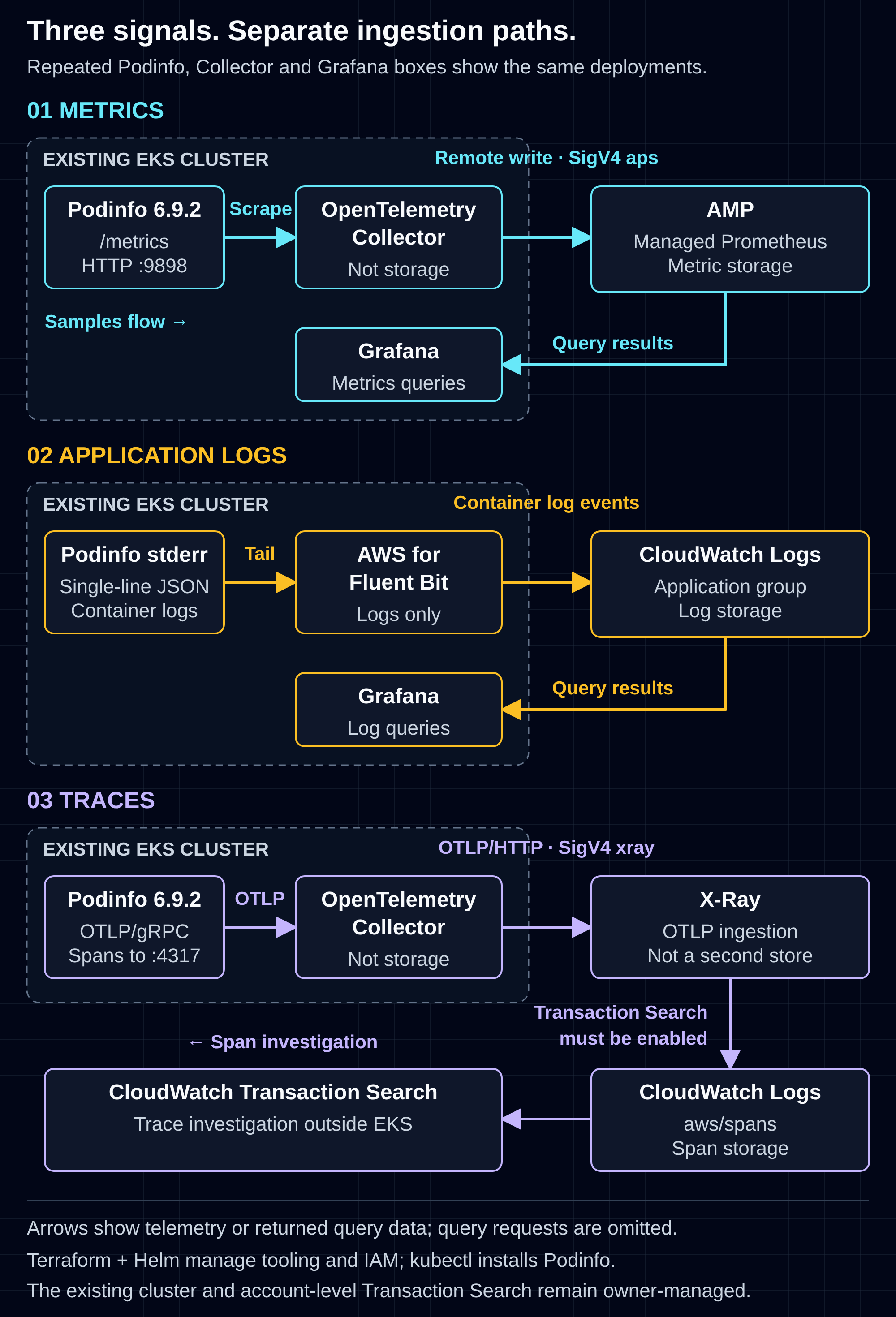
The diagram separates collection from storage and investigation. Terraform and Helm configure the tooling through the existing pipeline; kubectl installs Podinfo. Neither deployment path carries telemetry. Account-level Transaction Search configuration remains with its existing owner.
1. What needs to exist before I deploy this stack?
You need an existing EKS cluster, Terraform CI/CD, authorized Kubernetes access and the cluster's existing IAM OIDC provider. Prepare the Grafana admin Secret, confirm workload egress, and have the account owner enable Transaction Search before applying observability resources.
Use us-east-1, Linux amd64 nodes, tooling in observability, one Podinfo replica in demo, and /aws/eks/observability-lab/application for application logs. Confirm:
- Your runner/operator can reach the EKS API and is authorized for these resources, including Fluent Bit's cluster-scoped RBAC. A private API needs VPC or connected-network access. EKS networking
- The owner supplies the cluster name, endpoint, decoded PEM CA, exact OIDC issuer URL and existing provider ARN. Do not recreate or import the cluster's OIDC provider here.
- Workloads can reach regional STS, APS, X-Ray and CloudWatch Logs; nodes can pull images, including Podinfo from GHCR. Grafana startup also needs
grafana.comfor its AMP plugin. No application build toolchain or private registry is required. - The existing Terraform process provides credentials, backend, approvals and provider locks. Use Terraform
>= 1.10.0, < 2.0.0, AWS CLI for EKS token generation, and Helm/kubectl for inspection. - The account owner has enabled Transaction Search, approved span costs/retention and granted the investigator access to
aws/spans. Its account-level configuration is outside this lab. AWS setup
Explicit example pins: AWS provider 6.69.1; Helm provider 3.3.0; Collector chart 0.176.1 / contrib 0.162.0; Fluent Bit chart 0.2.0 / AWS image 3.2.1; Grafana chart 14.0.1 / image 13.2.4-distroless / AMP plugin 3.2.0; Podinfo 6.9.2 plus digest. These are not claims of latest versions or upgrade advice.
Prepare the namespace and Grafana Secret
Check ownership and name collisions first: fixed release names and IAM role names must not replace existing installations. Use your approved operator context, and create the Secret only if it does not already exist:
kubectl config current-context
kubectl create namespace observability --dry-run=client -o yaml | kubectl apply -f -
# Supply private files through your approved secret-handling process.
: "${ADMIN_USER_FILE:?required}" "${ADMIN_PASSWORD_FILE:?required}"
kubectl -n observability create secret generic grafana-admin \
  --from-file=admin-user="$ADMIN_USER_FILE" \
  --from-file=admin-password="$ADMIN_PASSWORD_FILE"
The namespace and Secret are operator-managed. Keep credentials outside Terraform state and job output; rotate existing credentials through the owner's approved process. The Secret must contain both admin-user and admin-password.
Use this layout; all handwritten deployment files appear below. There is no separate application project:
observability/
  versions.tf
  telemetry.tf
  permissions.tf
  helm.tf
  values/{otel-collector,fluent-bit,grafana}.yaml.tftpl
podinfo/
  podinfo.yaml
Use a separately owned Terraform root with your established backend, or integrate after reviewing resource ownership. Supply cluster through the existing pipeline's variable mechanism.
2. Create the observability resources and workload roles
The input identifies the existing cluster and its existing IAM OIDC provider; ca_pem must already be decoded. The region is consistently us-east-1.
observability/versions.tf:
terraform {
  required_version = ">= 1.10.0, < 2.0.0"
  required_providers {
    aws  = { source = "hashicorp/aws", version = "6.69.1" }
    helm = { source = "hashicorp/helm", version = "3.3.0" }
  }
  # Use the backend configuration already owned by your Terraform pipeline.
}
provider "aws" { region = "us-east-1" }
variable "cluster" {
  description = "Existing us-east-1 cluster and its existing IAM OIDC provider; CA is decoded PEM, not base64."
  type = object({
    name              = string
    endpoint          = string
    ca_pem            = string
    oidc_issuer_url   = string
    oidc_provider_arn = string
  })
  validation {
    condition     = startswith(var.cluster.endpoint, "https://") && startswith(var.cluster.oidc_issuer_url, "https://") && !endswith(var.cluster.oidc_issuer_url, "/")
    error_message = "Supply HTTPS cluster and issuer URLs; the issuer must not end with a slash."
  }
}
IRSA allows a Kubernetes workload to assume an AWS role with its service-account token. The trust below matches the existing OIDC provider, STS audience and exact service-account subject. It creates three roles, an AMP workspace and a seven-day application log group. AWS IRSA
observability/telemetry.tf:
locals {
  oidc_key = trimprefix(var.cluster.oidc_issuer_url, "https://")
}
resource "aws_iam_role" "workload" {
  for_each = toset(["otel-collector", "fluent-bit", "grafana"])
  name     = "lab-${each.key}"
  assume_role_policy = jsonencode({
    Version = "2012-10-17"
    Statement = [{
      Effect    = "Allow", Action = "sts:AssumeRoleWithWebIdentity"
      Principal = { Federated = var.cluster.oidc_provider_arn }
      Condition = { StringEquals = {
        "${local.oidc_key}:aud" = "sts.amazonaws.com"
        "${local.oidc_key}:sub" = "system:serviceaccount:observability:${each.key}"
      } }
    }]
  })
}
resource "aws_prometheus_workspace" "lab" { alias = "observability-lab" }
resource "aws_cloudwatch_log_group" "app" {
  name              = "/aws/eks/observability-lab/application"
  retention_in_days = 7
}
locals {
  amp_base        = trimsuffix(trimsuffix(aws_prometheus_workspace.lab.prometheus_endpoint, "/"), "/api/v1")
  app_streams_arn = "${aws_cloudwatch_log_group.app.arn}:log-stream:*"
}
locals {
  tool_values = {
    region               = "us-east-1"
    cluster_name         = var.cluster.name
    endpoint             = var.cluster.endpoint
    ca_pem               = var.cluster.ca_pem
    collector_role_arn   = aws_iam_role.workload["otel-collector"].arn
    fluent_bit_role_arn  = aws_iam_role.workload["fluent-bit"].arn
    grafana_role_arn     = aws_iam_role.workload["grafana"].arn
    amp_base_url         = local.amp_base
    amp_remote_write_url = "${local.amp_base}/api/v1/remote_write"
    app_log_group        = aws_cloudwatch_log_group.app.name
    xray_traces_url      = "https://xray.us-east-1.amazonaws.com/v1/traces"
  }
}
output "amp_base_url" {
  value = local.amp_base
  precondition {
    condition     = can(regex("^https://[^/]+/workspaces/[^/?#]+$", local.amp_base))
    error_message = "Unexpected AMP endpoint shape; inspect before deployment."
  }
}
output "amp_remote_write_url" { value = local.tool_values.amp_remote_write_url }
Normalize the AMP endpoint's trailing slash and known /api/v1 suffix before appending /api/v1/remote_write. Grafana receives the workspace base. The output precondition catches unexpected shapes. The pinned provider passes through the workspace endpoint and removes the log-group ARN's trailing :*. AMP provider source · Log-group ARN
Attach permissions, not shared credentials
| Role | Scope |
|---|---|
| Collector | aps:RemoteWrite on this workspace; xray:PutSpans on * |
| Fluent Bit | Create streams and write events in the precreated application group |
| Grafana | Query AMP and application logs; separate global discovery/stop actions |
xray:PutSpans authorizes OTLP span uploads, not the separate PutTraceSegments action; it has no resource-level ARN. X-Ray authorization
observability/permissions.tf:
resource "aws_iam_role_policy" "collector" {
  name = "telemetry-write"
  role = aws_iam_role.workload["otel-collector"].id
  policy = jsonencode({
    Version = "2012-10-17"
    Statement = [
      { Effect = "Allow", Action = ["aps:RemoteWrite"], Resource = aws_prometheus_workspace.lab.arn },
      { Effect = "Allow", Action = ["xray:PutSpans"], Resource = "*" }
    ]
  })
}
resource "aws_iam_role_policy" "fluent_bit" {
  name = "application-log-write"
  role = aws_iam_role.workload["fluent-bit"].id
  policy = jsonencode({
    Version = "2012-10-17"
    Statement = [{
      Effect   = "Allow"
      Action   = ["logs:CreateLogStream", "logs:PutLogEvents"]
      Resource = local.app_streams_arn
    }]
  })
}
resource "aws_iam_role_policy" "grafana" {
  name = "telemetry-read"
  role = aws_iam_role.workload["grafana"].id
  policy = jsonencode({
    Version = "2012-10-17"
    Statement = [
      {
        Effect   = "Allow"
        Action   = ["aps:QueryMetrics", "aps:GetLabels", "aps:GetSeries", "aps:GetMetricMetadata"]
        Resource = aws_prometheus_workspace.lab.arn
      },
      {
        Effect   = "Allow"
        Action   = ["logs:StartQuery", "logs:GetQueryResults"]
        Resource = [aws_cloudwatch_log_group.app.arn, "${aws_cloudwatch_log_group.app.arn}:*"]
      },
      {
        Effect   = "Allow"
        Action   = ["logs:DescribeLogGroups", "logs:StopQuery"]
        Resource = "*"
      }
    ]
  })
}
The Logs query policy includes the application's bare group ARN and :* form. Verify the form accepted by each action, then tighten it if appropriate. DescribeLogGroups can enumerate names but does not authorize event reads. Optional Grafana editor features may need separate permissions; give the human trace investigator access to aws/spans rather than widening this application-log role. Grafana permissions
AWS for Fluent Bit 3.2.1 packages upstream 4.2.2. With log-group auto-creation disabled and no retention change, this configuration needs only stream creation and event writes. Release · Pinned implementation
3. Install tooling with the existing Terraform process
The Helm provider connects to the existing EKS API. Only the three tooling releases belong to Terraform; Podinfo is installed later with kubectl. Provider 3.3.0 uses object-valued kubernetes and exec settings. Provider documentation
observability/helm.tf:
locals {
  charts = {
    otel-collector = {
      repository = "https://open-telemetry.github.io/opentelemetry-helm-charts"
      chart      = "opentelemetry-collector"
      version    = "0.176.1"
    }
    fluent-bit = {
      repository = "https://aws.github.io/eks-charts"
      chart      = "aws-for-fluent-bit"
      version    = "0.2.0"
    }
    grafana = {
      repository = "https://grafana-community.github.io/helm-charts"
      chart      = "grafana"
      version    = "14.0.1"
    }
  }
}
provider "helm" {
  kubernetes = {
    host                   = var.cluster.endpoint
    cluster_ca_certificate = var.cluster.ca_pem
    exec = {
      api_version = "client.authentication.k8s.io/v1beta1"
      command     = "aws"
      args = ["eks", "get-token", "--cluster-name", var.cluster.name,
      "--region", "us-east-1"]
    }
  }
}
resource "helm_release" "tools" {
  for_each         = local.charts
  name             = each.key
  namespace        = "observability"
  create_namespace = false
  repository       = each.value.repository
  chart            = each.value.chart
  version          = each.value.version
  values           = [templatefile("${path.module}/values/${each.key}.yaml.tftpl", local.tool_values)]
  wait             = true
  timeout          = 600
  depends_on       = [aws_iam_role_policy.collector, aws_iam_role_policy.fluent_bit, aws_iam_role_policy.grafana]
}
Terraform downloads each chart directly from its repository at the pinned version and supplies our values. No manual chart download, extraction or local vendor directory is needed. The existing pipeline must be able to reach these repositories and their chart download hosts.
For production environments with additional supply-chain requirements, an approved internal chart mirror and provenance verification can be added separately; they are not prerequisites for following this guide.
The .yaml.tftpl files below are Terraform templates, not direct Helm values. templatefile renders each complete document before Helm consumes it. Keep $${env:MY_POD_IP} escaped so Terraform leaves environment expansion to the Collector. Terraform string syntax
Confirm the operator-managed namespace and Secret exist, then use the existing pipeline's reviewed plan/apply. Afterward:
kubectl -n observability rollout status deployment/otel-collector --timeout=180s
kubectl -n observability rollout status daemonset/fluent-bit --timeout=180s
kubectl -n observability rollout status deployment/grafana --timeout=180s
A successful rollout is not proof of telemetry ingestion.
4. Give the Collector one scrape owner
The pinned remote-write exporter supports nested http settings, while the OTLP HTTP exporter accepts an explicit traces_endpoint and top-level HTTP client settings. Remote-write configuration · OTLP HTTP configuration
Use this complete Collector template: a Recreate singleton, one static application target, separate aps and xray signers, finite in-memory queues and retries, and no log pipeline. Expose only OTLP/gRPC on port 4317 for Podinfo; retain the chart’s internal health check. The Collector still exports traces to AWS over OTLP/HTTP with SigV4.
observability/values/otel-collector.yaml.tftpl:
fullnameOverride: otel-collector
mode: deployment
replicaCount: 1
rollout: {strategy: Recreate, rollingUpdate: {}}
autoscaling: {enabled: false}
image: {repository: otel/opentelemetry-collector-contrib, tag: '0.162.0'}
command: {name: otelcol-contrib}
serviceAccount:
  create: true
  name: otel-collector
  automountServiceAccountToken: true
  annotations: {eks.amazonaws.com/role-arn: '${collector_role_arn}'}
clusterRole: {create: false}
presets:
  logsCollection: {enabled: false}
  hostMetrics: {enabled: false}
  kubernetesAttributes: {enabled: false}
  kubeletMetrics: {enabled: false}
  kubernetesEvents: {enabled: false}
  kubernetesObjects: {enabled: false}
  clusterMetrics: {enabled: false}
  annotationDiscovery: {logs: {enabled: false}, metrics: {enabled: false}}
  profiling: {enabled: false}
  resourceDetection: {enabled: false}
resources:
  requests: {cpu: 100m, memory: 256Mi}
  limits: {memory: 512Mi}
extraEnvs: [{name: AWS_EC2_METADATA_DISABLED, value: 'true'}]
ports:
  otlp: {enabled: true, containerPort: 4317, servicePort: 4317, hostPort: null}
  otlp-http: {enabled: false}
  jaeger-compact: {enabled: false}
  jaeger-thrift: {enabled: false}
  jaeger-grpc: {enabled: false}
  zipkin: {enabled: false}
  metrics: {enabled: false}
service: {enabled: true, type: ClusterIP}
config:
  extensions:
    sigv4auth/amp: {region: us-east-1, service: aps}
    sigv4auth/xray: {region: us-east-1, service: xray}
  receivers:
    jaeger: null
    zipkin: null
    otlp:
      protocols:
        grpc: {endpoint: '$${env:MY_POD_IP}:4317'}
        http: null
    prometheus:
      config:
        scrape_configs:
          - job_name: podinfo
            scrape_interval: 15s
            scrape_timeout: 10s
            static_configs: [{targets: [podinfo.demo.svc.cluster.local:9898]}]
  processors:
    memory_limiter: {check_interval: 1s, limit_percentage: 75, spike_limit_percentage: 15}
    batch: {timeout: 5s, send_batch_size: 1024, send_batch_max_size: 1024}
  exporters:
    debug: null
    prometheus_remote_write/amp:
      http:
        endpoint: '${amp_remote_write_url}'
        auth: {authenticator: sigv4auth/amp}
      remote_write_queue: {enabled: true, queue_size: 100, num_consumers: 1}
      max_batch_request_parallelism: 1
      retry_on_failure: {enabled: true, initial_interval: 1s, max_interval: 10s, max_elapsed_time: 60s}
    otlp_http/xray:
      traces_endpoint: '${xray_traces_url}'
      auth: {authenticator: sigv4auth/xray}
      compression: gzip
      sending_queue: {enabled: true, queue_size: 100, num_consumers: 1}
      retry_on_failure: {enabled: true, initial_interval: 1s, max_interval: 10s, max_elapsed_time: 60s}
  service:
    extensions: [health_check, sigv4auth/amp, sigv4auth/xray]
    pipelines:
      logs: null
      metrics: {receivers: [prometheus], processors: [memory_limiter, batch], exporters: [prometheus_remote_write/amp]}
      traces: {receivers: [otlp], processors: [memory_limiter, batch], exporters: [otlp_http/xray]}
The chart requires health_check for its probes. Multiple Collector replicas with identical Prometheus configurations scrape the same targets repeatedly. Chart defaults · Component documentation
Accept a scrape interruption during replacement rather than overlapping owners. This Service target is deliberately limited to one application replica; introduce per-pod discovery and explicit scrape ownership before scaling. No WAL or outage-delivery guarantee is configured.
Keep the nested http settings, one queue consumer and max_batch_request_parallelism: 1; these avoid the deprecated client configuration and parallel metric-batch delivery. They do not provide durable queues or make duplicate scrapers safe.
5. Keep container logs on one path
Fluent Bit’s Kubernetes filter can put parsed application JSON under Merge_Log_Key; its CloudWatch output sends the entire record unless log_key selects only one value. Kubernetes filter · CloudWatch output
Use data as that key, disable annotation-driven parsing/exclusion, and leave logKey unset. Tail only this application, avoiding collection of Fluent Bit’s own diagnostics. The following is the complete fluent-bit.yaml.tftpl.
observability/values/fluent-bit.yaml.tftpl:
fullnameOverride: fluent-bit
image:
  repository: public.ecr.aws/aws-observability/aws-for-fluent-bit
  tag: "3.2.1"
serviceAccount:
  create: true
  name: fluent-bit
  annotations:
    eks.amazonaws.com/role-arn: ${fluent_bit_role_arn}
nodeSelector:
  kubernetes.io/os: linux
hostNetwork: false
env:
  - name: AWS_EC2_METADATA_DISABLED
    value: "true"
service:
  parsersFiles:
    - /fluent-bit/parsers/parsers.conf
  extraService: |
    Flush 5
    Grace 30
    Log_Level info
    HTTP_Server On
    HTTP_Listen 0.0.0.0
    HTTP_Port 2020
    Health_Check On
    storage.path /buffers/chunks
    storage.sync normal
    storage.checksum On
    storage.max_chunks_up 64
    storage.backlog.mem_limit 16M
input:
  enabled: true
  tag: kube.*
  path: /var/log/containers/podinfo-*_demo_podinfo-*.log
  db: /buffers/tail.db
  multilineParser: docker, cri
  memBufLimit: 5MB
  skipLongLines: "On"
  refreshInterval: 5
  extraInputs: |
    Read_from_Head On
    storage.type filesystem
    DB.Sync Normal
filter:
  enabled: true
  match: kube.*
  mergeLog: "On"
  mergeLogKey: data
  keepLog: "Off"
  k8sLoggingParser: "Off"
  k8sLoggingExclude: "Off"
  bufferSize: 32k
cloudWatchLogs:
  enabled: true
  match: kube.*
  region: us-east-1
  logGroupName: ${app_log_group}
  logStreamPrefix: fluentbit-
  autoCreateGroup: "false"
  autoRetryRequests: "false"
  extraOutputs: |
    Retry_Limit 5
    storage.total_limit_size 100M
cloudWatch:
  enabled: false
firehose:
  enabled: false
kinesis:
  enabled: false
kinesis_streams:
  enabled: false
elasticsearch:
  enabled: false
s3:
  enabled: false
opensearch:
  enabled: false
additionalInputs: ""
additionalFilters: ""
additionalOutputs: ""
volumes:
  - name: varlog
    hostPath:
      path: /var/log
      type: Directory
  - name: buffers
    emptyDir:
      sizeLimit: 256Mi
volumeMounts:
  - name: varlog
    mountPath: /var/log
    readOnly: true
  - name: buffers
    mountPath: /buffers
resources:
  requests:
    cpu: 50m
    memory: 128Mi
    ephemeral-storage: 128Mi
  limits:
    memory: 256Mi
    ephemeral-storage: 512Mi
serviceMonitor:
  enabled: false
Keep the quoted "false" settings: the pinned chart otherwise omits these options. The configuration sends only Podinfo container logs, merges application JSON under data, and has exactly one CloudWatch output. The precreated group needs no log-group creation or retention-update permissions. Pinned chart
The filesystem buffer requires the service storage path, input storage type, writable volume and output limit together. Retries are finite; a full output queue can evict its oldest chunks. emptyDir and the tail database survive a container restart, not Pod replacement or node loss. Replacement can also reread files with Read_from_Head On. This is bounded buffering, not durable delivery. Storage behavior
AWS_EC2_METADATA_DISABLED is not by itself proof of the binary's credential choice: check that Fluent Bit uses its intended service-account role, not node credentials. Leave existing EKS control-plane logging with its owner; do not add Collector logs, CloudWatch metrics, EMF or Container Insights to this application-log path.
6. Provision Grafana without role hopping
Grafana 13 deprecates SigV4 on the core Prometheus datasource in favor of dedicated plugins. Chart 14.0.1 maps its plugin list to GF_PLUGINS_PREINSTALL_SYNC. AMP configuration · Chart pod template
Use the pinned amd64 AMP package and retain the bundled CloudWatch plugin. Configure Grafana with an explicit STS-audience projection, ordinary API-token automount disabled, no IRSA webhook annotation, and no static AWS credentials.
observability/values/grafana.yaml.tftpl:
fullnameOverride: grafana
replicas: 1
image:
  registry: docker.io
  repository: grafana/grafana
  tag: 13.2.4-distroless
nodeSelector:
  kubernetes.io/os: linux
  kubernetes.io/arch: amd64
serviceAccount:
  create: true
  name: grafana
  automountServiceAccountToken: false
  annotations: {}
automountServiceAccountToken: false
rbac:
  create: false
admin:
  existingSecret: grafana-admin
  userKey: admin-user
  passwordKey: admin-password
service:
  type: ClusterIP
ingress:
  enabled: false
persistence:
  enabled: false
testFramework:
  enabled: false
securityContext:
  runAsNonRoot: true
  runAsUser: 472
  runAsGroup: 472
  fsGroup: 472
env:
  AWS_REGION: us-east-1
  AWS_DEFAULT_REGION: us-east-1
  AWS_STS_REGIONAL_ENDPOINTS: regional
  AWS_EC2_METADATA_DISABLED: "true"
  AWS_ROLE_ARN: ${grafana_role_arn}
  AWS_WEB_IDENTITY_TOKEN_FILE: /var/run/secrets/eks.amazonaws.com/serviceaccount/token
extraSecretMounts:
  - name: aws-iam-token
    mountPath: /var/run/secrets/eks.amazonaws.com/serviceaccount
    readOnly: true
    projected:
      defaultMode: 420
      sources:
        - serviceAccountToken:
            audience: sts.amazonaws.com
            expirationSeconds: 86400
            path: token
plugins:
  - grafana-amazonprometheus-datasource@3.2.0@https://grafana.com/api/plugins/grafana-amazonprometheus-datasource/versions/3.2.0/download?os=linux&arch=amd64
shadowBundledPlugins: false
datasources:
  datasources.yaml:
    apiVersion: 1
    datasources:
      - name: AMP
        uid: amp
        type: grafana-amazonprometheus-datasource
        access: proxy
        isDefault: true
        editable: false
        url: ${amp_base_url}
        jsonData:
          httpMethod: POST
          sigV4Auth: true
          sigV4AuthType: default
          sigV4Region: us-east-1
          sigv4Service: aps
          manageAlerts: false
      - name: CloudWatch Logs
        uid: cloudwatch
        type: cloudwatch
        access: proxy
        editable: false
        jsonData:
          authType: default
          defaultRegion: us-east-1
The explicit STS-audience token projection is separate from ordinary API-token automounting. Grafana uses AWS_WEB_IDENTITY_TOKEN_FILE and AWS_ROLE_ARN through the SDK default credential chain; fsGroup: 472 makes the token accessible. Leave datasource Assume Role fields unset to avoid a second role hop. Grafana AWS authentication
The Secret and projected token keep static AWS credentials out of these values. Plugin installation and real web-identity/query access still need live verification. Keep dashboards reproducible: persistence is disabled, so UI-only changes are disposable.
7. Install upstream Podinfo with kubectl
Podinfo supplies the workload without a Dockerfile, dependency lock or application chart. Use release 6.9.2, source commit e86405a8674ecab990d0a389824c7ebbd82973b5; the manifest pins the public image by digest as well as version. This is an explicit teaching pin, not a claim that it is the latest release. Pinned upstream deployment
This small manifest adapts the upstream workload to the lab: one replica, one HTTP port, a ClusterIP Service and no public ingress. It enables tracing with PODINFO_OTEL_SERVICE_NAME=podinfo and sets OTEL_EXPORTER_OTLP_ENDPOINT to the Collector's gRPC endpoint. This Podinfo version constructs a gRPC exporter: changing an environment variable to say HTTP does not turn it into an OTLP/HTTP client. The http:// scheme selects plaintext gRPC inside this lab; do not append /v1/traces. Tracing implementation
The dedicated demo namespace separates ownership from tooling in observability; a namespace alone is not a network-security boundary. Podinfo has environment/configuration inspection and fault-injection endpoints. Do not give it AWS credentials, application secrets or a Kubernetes API token, and do not put sensitive values in its environment or configuration. Keep it private and use authorized port-forwarding. Review existing namespace ownership before applying. Pinned routes
podinfo/podinfo.yaml:
apiVersion: v1
kind: Namespace
metadata: {name: demo}
---
apiVersion: apps/v1
kind: Deployment
metadata: {name: podinfo, namespace: demo}
spec:
  replicas: 1
  strategy: {type: Recreate}
  selector: {matchLabels: {app: podinfo}}
  template:
    metadata: {labels: {app: podinfo}}
    spec:
      automountServiceAccountToken: false
      enableServiceLinks: false
      nodeSelector: {kubernetes.io/os: linux, kubernetes.io/arch: amd64}
      securityContext: {runAsNonRoot: true, runAsUser: 10001, runAsGroup: 10001, fsGroup: 10001}
      containers:
        - name: podinfo
          image: ghcr.io/stefanprodan/podinfo:6.9.2@sha256:cab90e04829cdae73199a8402882a4e3ccaf251b8a0d50bdefede0ab3f6371e7
          command: [./podinfo]
          args: [--port=9898, --level=debug, --random-delay=false, --random-error=false]
          env:
            - {name: PODINFO_OTEL_SERVICE_NAME, value: podinfo}
            - name: OTEL_EXPORTER_OTLP_ENDPOINT
              value: http://otel-collector.observability.svc.cluster.local:4317
          ports: [{name: http, containerPort: 9898}]
          readinessProbe: {httpGet: {path: /readyz, port: http}}
          livenessProbe: {httpGet: {path: /healthz, port: http}, initialDelaySeconds: 5}
          resources:
            requests: {cpu: 100m, memory: 64Mi}
            limits: {cpu: 500m, memory: 128Mi}
          securityContext:
            allowPrivilegeEscalation: false
            readOnlyRootFilesystem: true
            capabilities: {drop: [ALL]}
          volumeMounts: [{name: data, mountPath: /data}]
      volumes: [{name: data, emptyDir: {sizeLimit: 16Mi}}]
---
apiVersion: v1
kind: Service
metadata: {name: podinfo, namespace: demo}
spec:
  type: ClusterIP
  selector: {app: podinfo}
  ports: [{name: http, port: 9898, targetPort: http}]
After the observability tooling is ready, inspect and apply these resources through your approved operator context. The namespace is part of this manifest; do not reuse a shared demo namespace without reviewing ownership.
kubectl config current-context
kubectl apply -f podinfo/podinfo.yaml
kubectl -n demo rollout status deployment/podinfo --timeout=180s
kubectl -n demo get pods -l app=podinfo
Both application HTTP and /metrics use port 9898. The Collector scrapes podinfo.demo.svc.cluster.local:9898; its AWS role, not Podinfo, authorizes remote write and span ingestion. Keep one Podinfo replica with this Service-based scrape target. Scaling requires per-pod discovery and explicit scrape ownership, not just a higher replica count.
Debug logging is intentional for this exercise. Podinfo's JSON request-start event contains uri, method and trace_id; it does not contain a response status or duration. Its logger can sample repeated messages at high volume, so it is not an exhaustive access audit. Enable suitable correlation in your real service rather than assuming all applications produce this contract. Logging middleware · Logger configuration
8. Investigate a deliberate HTTP failure
Check the three signals independently, then connect them. Metrics identify the affected route and time window; the request-start log supplies a trace ID; the matching server span shows the response outcome. No automatic Grafana log-to-trace link is configured.
Before deployment, have the account owner verify aws xray get-trace-segment-destination --region us-east-1: the documented active configuration is Destination: CloudWatchLogs and Status: ACTIVE. Transaction Search verification
Generate bounded traffic
Use separate terminals for the two port forwards and a third for requests:
kubectl -n demo port-forward service/podinfo 9898:9898
kubectl -n observability port-forward service/grafana 3000:80
The default port-forward bind is local. Leave the forwards running while investigating and stop them with Ctrl-C afterward. Send known successful and failing requests for about a minute so multiple 15-second scrapes can observe them:
for i in $(seq 1 30); do
  curl --fail --silent --show-error http://localhost:9898/status/200
  curl --silent --show-error --output /dev/null --write-out 'HTTP %{http_code}\n' \
    http://localhost:9898/status/500
  sleep 2
done
curl --fail --silent --show-error http://localhost:9898/delay/1
curl --fail --silent --show-error http://localhost:9898/metrics
Expect HTTP 500 from the failing request; it deliberately omits --fail. /delay/1 waits one second before responding; it is optional latency traffic, not an extra service. Status handler · Delay handler
Find the metric signal in Grafana
Select AMP and a time window covering your requests. Run these queries one at a time: scrape health, missing scrape samples, request rate by status, then error fraction:
up{job="podinfo"}
absent_over_time(up{job="podinfo"}[5m])
sum by (status) (rate(http_request_duration_seconds_count{job="podinfo",path="status"}[5m]))
(
  sum(rate(http_request_duration_seconds_count{job="podinfo",path="status",status=~"5.."}[5m]))
  / sum(rate(http_request_duration_seconds_count{job="podinfo",path="status"}[5m]))
)
and (sum(rate(http_request_duration_seconds_count{job="podinfo",path="status"}[5m])) > 0)
The pinned implementation exposes http_requests_total with only status as an application label. Its http_request_duration_seconds histogram has method, path and status; the named status route is path="status", not /status/500. Using the histogram count lets us exclude probes and metrics scrapes from the exercise's error fraction. job is added by scraping. Confirm the final names and labels in AMP before saving panels. Pinned metric implementation
up=1 means the scrape worked, not that application requests succeeded. rate needs multiple observations and accounts for counter resets. The ratio hides idle traffic rather than inventing a zero error rate; newly created series need time to appear. Do not blanket-fill missing data with or vector(0). Prometheus functions · Operators
If up is zero, check the Podinfo Service and Collector reachability. If it is absent, check Collector remote-write errors, the AMP endpoint and role permissions. After several scrapes, the status queries should show successful and failing requests and a nonzero error fraction.
Find the request-start log
In Grafana's CloudWatch Logs datasource, choose /aws/eks/observability-lab/application and the same time window. The intended Fluent Bit envelope places parsed Podinfo fields under data:
fields @timestamp, kubernetes.pod_name, data.uri, data.method, data.trace_id
| filter kubernetes.namespace_name = "demo"
| filter kubernetes.container_name = "podinfo"
| filter data.msg = "request started" and data.uri = "/status/500"
| sort @timestamp desc
| limit 20
Expect request-start events with data.trace_id. If none appear, check kubectl -n demo logs deployment/podinfo first, then Fluent Bit’s file glob, buffer and CloudWatch write permissions. If events arrive but the query misses them, inspect their envelope. If automatic field discovery is unavailable, use fields jsonParse(@message) as record and access record.data.uri, record.data.trace_id and record.kubernetes.namespace_name instead. Logs Insights functions
The following local binary observation, shown with only selected fields, demonstrates what Podinfo itself emitted. It is not an observed CloudWatch event:
{
  "level": "debug",
  "ts": "2026-10-21T15:48:34.513Z",
  "msg": "request started",
  "uri": "/status/500",
  "method": "GET",
  "trace_id": "497072ba60def9880894539d1e8c27fa"
}
This records the request starting, not its successful completion. For this controlled endpoint we know the requested outcome; confirm the actual HTTP result in the client and server span. Copy the log's unchanged data.trace_id for the next lookup. If it is missing, check both --level=debug and PODINFO_OTEL_SERVICE_NAME before changing the log query.
Look up the matching server span
Select aws/spans in the same AWS account, region and time window, using your investigator permissions rather than Grafana's application-log role:
fields @timestamp, traceId, spanId, name
| filter traceId = "<32-lowercase-hex-id-from-data.trace_id>"
| sort @timestamp asc
| limit 100
Replace the placeholder with your own logged trace ID, without angle brackets. Transaction Search supports Logs Insights analysis. Verify the stored fields and returned ID in the account, then open the trace to inspect its spans. Span analysis
In the local OTLP capture, GET /status/{code:[0-9]+} was the server span, with http.response.status_code=500 and error status. Its child statusHandler span shared the trace ID but had unset status. Do not require every child span to be marked as an error, or invent an exception event for this deliberate status response. The resource contained service.name=podinfo and service.version=6.9.2.
Use the unchanged 32-hex W3C trace ID for this lookup. Do not rewrite it into an X-Ray-format ID or add a timestamp to make a query match. A successful metrics scrape cannot prove that span export or search worked. Transaction Search may take about ten minutes to become searchable after initial activation; its trace-summary indexing is distinct from collecting spans. Transaction Search setup
9. Know the limits and clean up
Validation was local only, including Podinfo’s metrics, request-start logs and captured spans. The AWS deployment and end-to-end ingestion and queries have not been tested.
Before broader use
The Collector's OTLP receiver is an unauthenticated ClusterIP endpoint. Other reachable clients can submit telemetry that it signs with its AWS role. Before broader use, enforce NetworkPolicies limiting port 4317 to the intended Podinfo workload and application access to approved clients; review TLS/authentication and confirm the cluster's policy enforcement. Namespace separation and ClusterIP alone do not provide these controls.
Budget for workload capacity, egress, AMP ingestion/storage/querying, CloudWatch ingestion/retention/scans and trace collection/indexing. This example sets seven-day application-log retention; AMP and shared span-store retention remain owner decisions. It deliberately omits HA, durable Collector queues and public Grafana access.
Clean up without deleting shared infrastructure
Stop the port forwards and remove only this application's Deployment and Service first:
kubectl -n demo delete deployment/podinfo service/podinfo
Then remove the tooling releases through the established Terraform workflow while cluster access and workload roles still work. After deciding what data to retain, remove this example's IAM policies/roles, AMP workspace and application log group. Delete demo only if you created it solely for this exercise and have confirmed it is empty of other owned resources. Keep observability and its externally managed Grafana Secret under their owner's cleanup process.
Do not destroy the existing EKS cluster, OIDC provider, state backend, pipeline or account-level Transaction Search configuration. The useful result is a tested investigation path: metrics narrow the search, a request log gives context and a trace shows the response outcome. Podinfo keeps that lesson about observability, not about maintaining a bespoke demo application.
Frequently asked questions
Why choose these tools rather than an all-in-one platform?
We combine vendor-neutral instrumentation and the Prometheus ecosystem with AWS-managed storage. This lets us explore the individual components without operating every backend ourselves. It is a practical AWS-oriented choice, not a universal industry standard or the best fit for every team.
- OpenTelemetry provides vendor-neutral instrumentation and a common telemetry protocol, reducing dependence on backend-specific application integrations. OpenTelemetry overview
- Prometheus and AMP let us use the Prometheus metrics ecosystem and PromQL while AWS operates the metrics backend. AMP overview
- Fluent Bit gives container logs a dedicated collection path; Grafana lets us investigate AMP metrics and CloudWatch logs from one interface.
- CloudWatch and X-Ray ingestion fit the existing AWS environment, while Terraform and Helm reuse our deployment tools instead of introducing another management workflow.
The trade-off is integration work and AWS-specific permissions, queries and costs. Open telemetry formats improve portability; they do not make the entire solution cloud-independent. An all-in-one platform may suit teams that prefer fewer integrations to manage.
Can I add this beside an existing monitoring installation?
Treat this as a separately owned example, not a second copy of your collectors. Check release names, service accounts, IAM roles, namespaces and log-group ownership. Choose one owner for each scrape target and container-log path before combining configurations.
Does Podinfo automatically connect its logs and traces?
This pinned version includes a trace ID in debug request-start logs when tracing is enabled. We verified that ID against captured spans locally. The article uses a manual lookup, not an automatic Grafana link; those logs do not report response status or duration.
What if metrics arrive but the matching trace does not?
Check PODINFO_OTEL_SERVICE_NAME, the gRPC endpoint on port 4317, the Collector trace pipeline, xray signing, permissions and Transaction Search activation. Search the same account, region and time window with the unchanged logged trace ID. Metrics and traces have separate delivery paths.
Can I keep the tooling and remove Podinfo?
Yes. Delete Podinfo's Deployment and Service, then replace its scrape target, instrumentation assumptions and queries with your service's contract. Keep dashboards as reproducible configuration. Missing podinfo series after removal are not evidence that the replacement service is healthy.
Frequently asked questions
Why is observability needed in Amazon EKS?
Observability is needed to understand system behavior beyond just knowing if an application is running. It helps detect errors, slow requests, and failed operations using metrics, logs, and traces.
What components are used for observability in Amazon EKS?
The components include Amazon EKS, OpenTelemetry, OpenTelemetry Collector, Prometheus, AMP, AWS for Fluent Bit, CloudWatch Logs, X-Ray, Transaction Search, and Grafana. They work together to collect, store, and analyze telemetry data.
How does OpenTelemetry work in this setup?
OpenTelemetry provides vendor-neutral instrumentation and transport for telemetry data. It uses the OTLP protocol to carry spans, which are sent to the OpenTelemetry Collector and then exported to AWS X-Ray.
How is Fluent Bit configured in this setup?
Fluent Bit tails container logs from stdout/stderr, parses them, and forwards them to CloudWatch Logs. It uses a dedicated path for Podinfo logs, merging JSON logs under a specific key for structured logging.
How do you investigate a failed request in this setup?
Investigate by checking metrics for error rates, finding the request-start log with trace ID, and looking up the matching server span in Transaction Search to see the response outcome.
Can this observability stack be used alongside existing monitoring?
Yes, but treat it as a separate setup. Ensure unique ownership for scrape targets and log paths to avoid conflicts with existing monitoring systems.
About the author
- I’m a hands-on technology architect, engineer and founder of Turing Technology Services, with nearly two decades of experience in software engineering, platform engineering, site reliability engineering and cloud infrastructure. My work combines architecture and implementation with technical leadership, coaching and helping organisations adopt new engineering practices. I’ve worked with organisations including Shell, ING, ABN AMRO, Rabobank, Schiphol Group and Ahold Delhaize, across complex and regulated enterprise environments. On this blog, I share practical guides and perspectives on software architecture, cloud platforms, reliability and AI, explaining the reasoning behind technical choices as well as how to implement them.
Observability
Understand what your systems are doing and why. Practical guides to metrics, logs and traces, from core concepts to hands-on implementations across cloud-native environments.