
GitHub Actions: An Introduction to Workflows and Reusable Workflows
Building and testing code often involves the same steps. This guide shows how to automate them with GitHub Actions and reuse that setup across your projects.
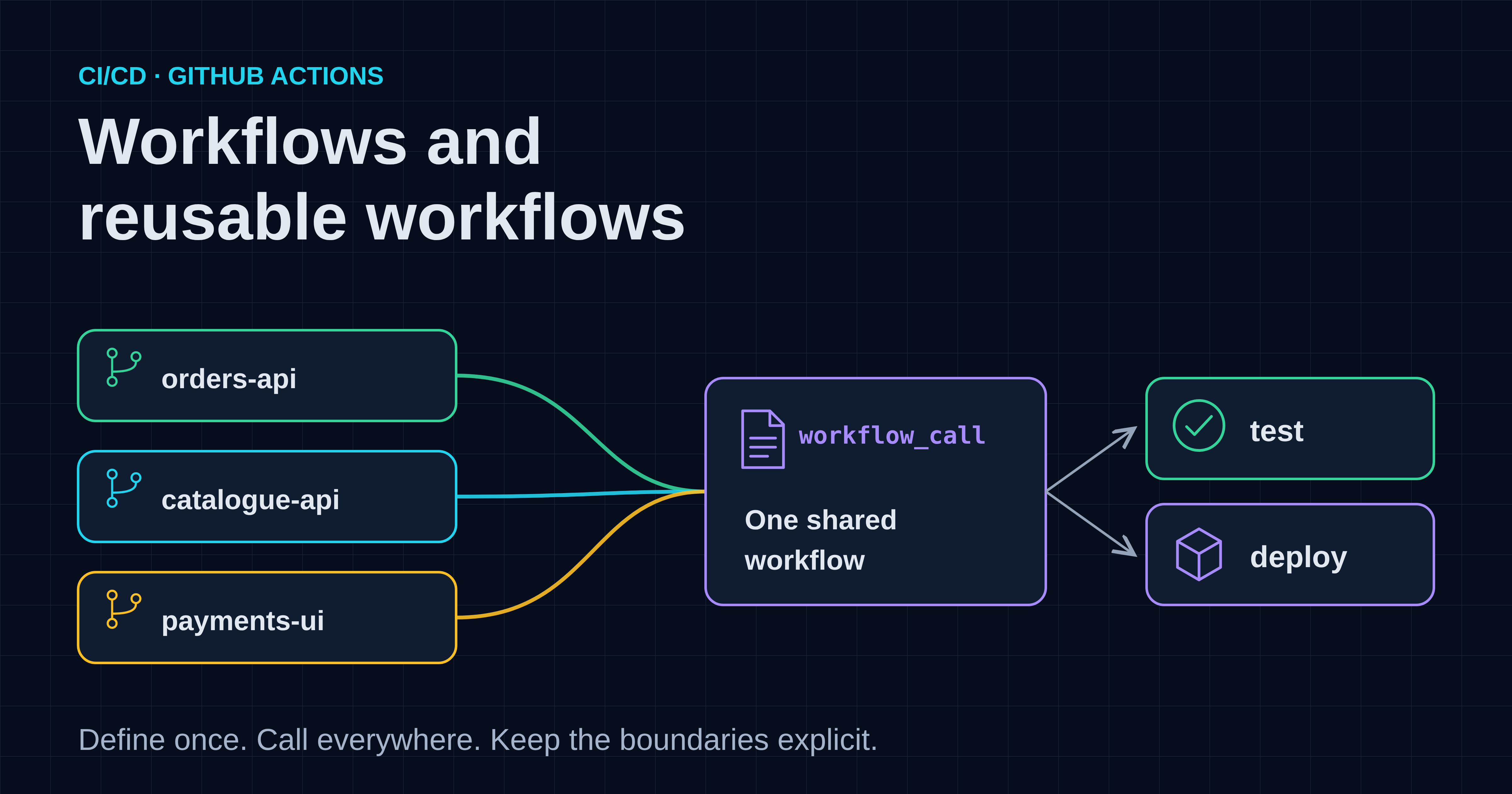
Software teams have not always merged their work continuously. In the 1990s, integrating everyone's changes shortly before a release was still the norm. That late integration was hard to estimate and hard to predict: Martin Fowler describes projects stuck in "integration hell", where every time they fixed an integration bug, two more popped up.[1]
Continuous integration (CI) changed that habit. Kent Beck developed it as a practice within Extreme Programming in the 1990s. Teams integrate their changes into the shared main branch (the mainline) at least daily, and a CI service verifies every commit to it with a full build in an integration environment. Fowler describes CruiseControl as the first CI service; Jenkins and GitHub Actions are among the services teams use today.[1]
GitHub introduced Actions in 2018. In August 2019, it announced built-in CI/CD in beta, with support for Linux, macOS and Windows, and planned general availability for 13 November that year.[2] Because the automation lives in the repository, teams can describe their build, test and deployment steps next to the code.
That convenience creates a new problem as an organisation grows. Imagine that the first service gets a carefully written workflow and the next ten copy it. Over time, each copy can drift: different action versions, different permissions, slightly different secret handling. Fixing one security issue then means editing every repository. GitHub's answer is to reuse workflows rather than copy and paste them.[6]
This article explains the core concepts of GitHub Actions, writes one CI workflow for a small service, and then turns it into a reusable workflow that many repositories can call. It then adds a reusable deployment workflow and covers the security boundaries that matter when you share automation.
What is GitHub Actions?
GitHub Actions is a CI/CD platform built into GitHub. It runs workflows, defined as YAML files in a repository, when events such as a push or pull request occur, so you can build, test and deploy code automatically.[3]
Six terms cover most of what you need:[3]
- An event is something that happens, such as a pull request being opened or a commit being pushed. Workflows can also run on a schedule or be started manually.
- A workflow is an automated process defined in a YAML file in the repository's
.github/workflowsdirectory. A repository can have several. - A job is a set of steps that run on the same runner. By default, jobs run in parallel; a job can wait for another job by declaring a dependency.
- A step either runs a shell command or uses an action. Steps in the same job run in order and can share files.
- An action is a reusable extension, such as one that checks out your repository or installs a language toolchain.
- A runner is the machine that executes a job. GitHub provides hosted Linux, Windows and macOS runners, and you can also host your own.
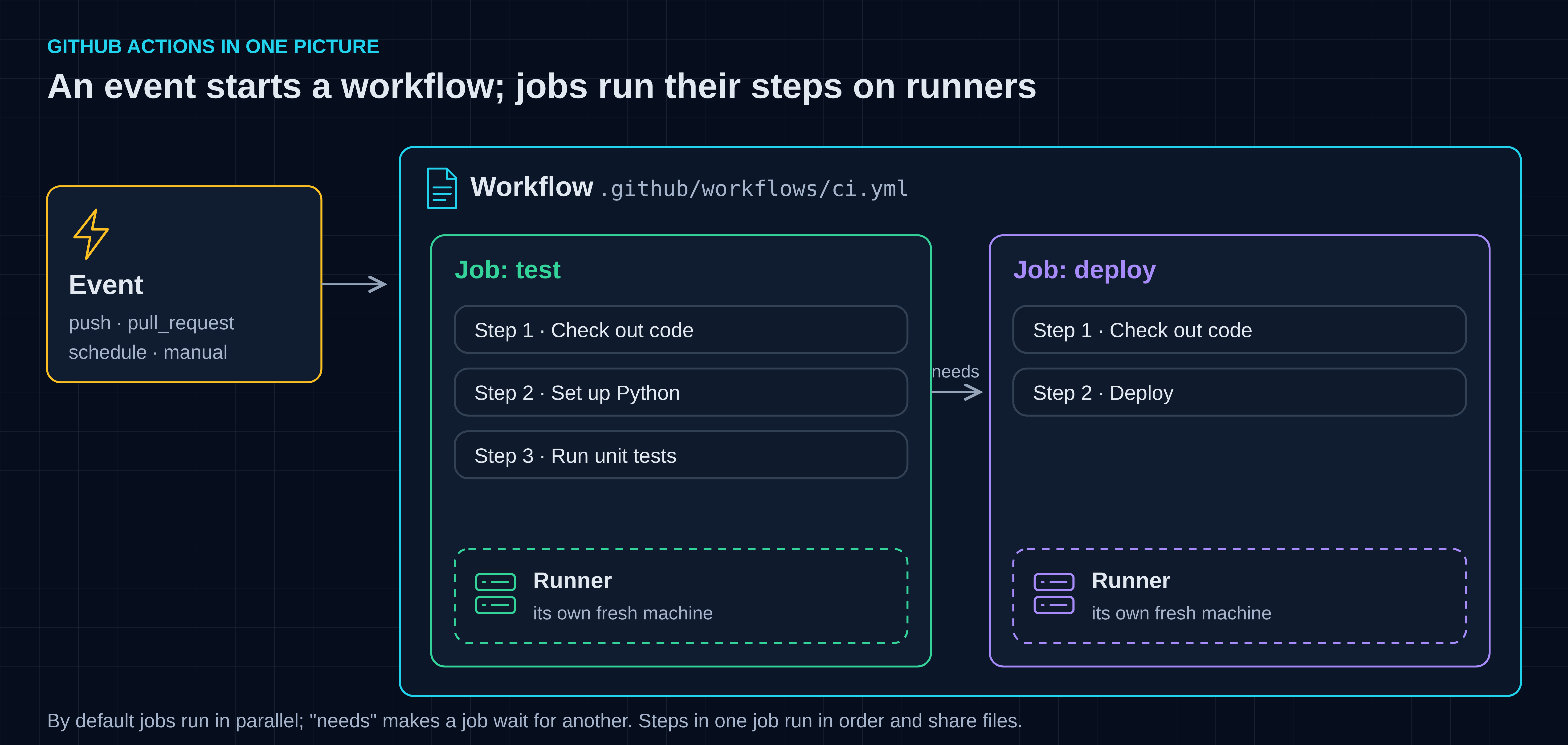
Figure 1 — Conceptual view: an event starts a workflow. Each job runs on its own runner, and its steps run in order on that runner.
What will we build?
We will build CI for a small fictional service, first as one workflow inside the service repository and then as a shared reusable workflow in a central repository. A final step adds a reusable deployment workflow.
The example is the orders API of a fictional online store. A customer submits an order through the website; the orders API calculates the total and records the order. To keep the focus on the workflow, the service is two short Python files: orders.py and its unit tests in test_orders.py. The tests use only Python's standard library:
"""Order arithmetic for the fictional online store."""


def order_total(lines):
    """Return the order total in cents for (quantity, unit_price_cents) pairs."""
    total = 0
    for quantity, unit_price_cents in lines:
        if quantity <= 0:
            raise ValueError("quantity must be positive")
        if unit_price_cents < 0:
            raise ValueError("unit price cannot be negative")
        total += quantity * unit_price_cents
    return total
import unittest

from orders import order_total


class OrderTotalTest(unittest.TestCase):
    def test_adds_line_totals(self):
        self.assertEqual(order_total([(2, 1250), (1, 499)]), 2999)

    def test_rejects_zero_quantity(self):
        with self.assertRaises(ValueError):
            order_total([(0, 1250)])


if __name__ == "__main__":
    unittest.main()
The repository layout is:
orders-api/
├── orders.py
├── test_orders.py
└── .github/
    └── workflows/
        └── ci.yml
Prerequisites: basic Git and YAML familiarity and permission to add files under .github/workflows. The first stage needs one GitHub repository; the shared stages need a second repository in the same organisation for the reusable workflows, and admin access to the service repository to configure its deployment environment. No cloud account is needed for the CI part.
How the examples were checked: we validated every workflow file statically with actionlint and ran the unit tests locally, but did not run the workflows on GitHub. The action versions were pinned on 24 October 2026 and will age; check for newer releases before you copy them, and verify that a SHA comes from the action's own repository rather than a fork.[10] The details are in the section on checking workflows.
How do you write a first CI workflow?
Create a YAML file under .github/workflows, choose the events that trigger it, and define a job with steps that check out the code, install the toolchain and run the tests.[4]
Here is the complete workflow for the orders API, saved as .github/workflows/ci.yml:
name: CI

on:
  pull_request:
  push:
    branches: [main]

permissions:
  contents: read

jobs:
  test:
    runs-on: ubuntu-latest
    timeout-minutes: 10
    steps:
      - name: Check out the repository
        uses: actions/checkout@3d3c42e5aac5ba805825da76410c181273ba90b1 # v7.0.1
        with:
          persist-credentials: false

      - name: Set up Python
        uses: actions/setup-python@6d4fd22b20465ccc0f7354476588e8df7c9ca0e0 # v7.1.0
        with:
          python-version: "3.13"

      - name: Run unit tests
        run: python -m unittest discover --verbose
Most lines are deliberate choices rather than boilerplate:
onruns the workflow for every pull request and for every push tomain. Pull requests get feedback before merging; the push run checks what actually landed.permissions: contents: readlimits the automatically createdGITHUB_TOKEN. GitHub creates this token for each job, and its permissions are limited to the repository.[9] Once you specify any permission, every permission you do not list is set tonone.[5] GitHub recommends read-only access to repository contents as the default, increased only for jobs that need more.[10]timeout-minutes: 10stops a stuck job early. Without it, the default is 360 minutes.[5]- The actions are pinned to full commit SHAs, with the release tag as a comment. A tag can be moved or deleted if an attacker gains access to the action's repository. To replace the code behind a full-length commit SHA, an attacker would need a SHA-1 collision.[10] GitHub also offers workflow dependency lockfiles, currently in public preview, as an alternative to pinning in each file.[14]
persist-credentials: falsestopsactions/checkoutfrom leaving credentials configured for subsequent Git commands.[18][22] This job never pushes, so it does not need the token afterwards."3.13"is quoted. In YAML, an unquoted3.10is the number 3.1, not the version string3.10. Quoting version numbers avoids that surprise.
This single workflow is a good starting point. The trouble starts when the second, third and twentieth service copy it.
What is a reusable workflow?
A reusable workflow is a workflow that other workflows can call, as if it were part of them. You define it once, give it explicit inputs, secrets and outputs, and callers reference that one centrally maintained file by version instead of copying it.[6][7]
GitHub calls the workflow that uses another workflow the caller, and the reused workflow the called workflow. One line in the caller can run an entire called workflow, including all of its jobs.[6] Reusable workflows became generally available in November 2021, with support for outputs and environment secrets.[17]
A workflow becomes reusable when its on section includes workflow_call. Like any workflow, it lives in a repository's .github/workflows directory; subdirectories are not supported.[7]
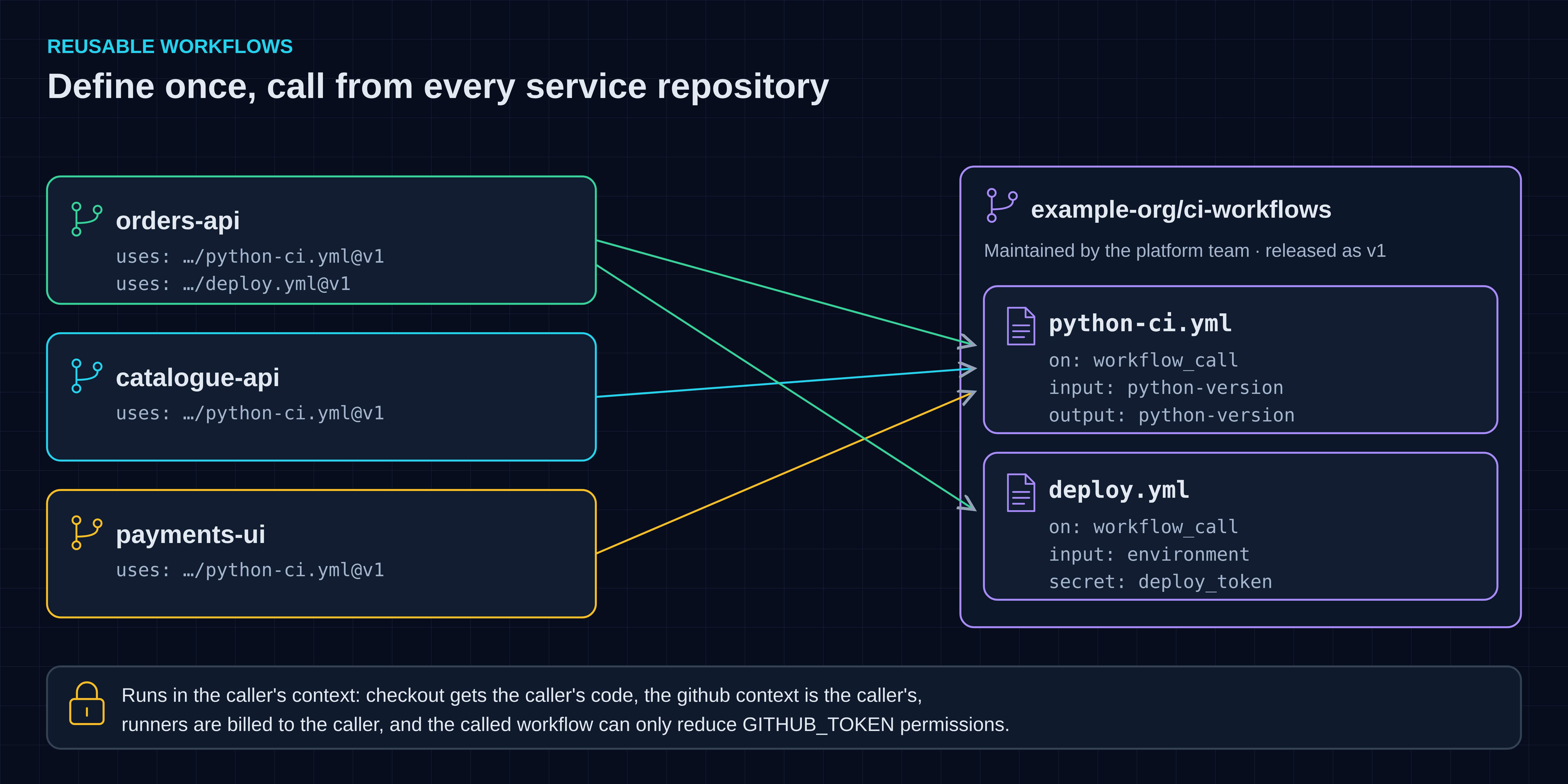
Figure 2 — Several service repositories call shared reusable workflows maintained in a central repository.
How do you turn the CI workflow into a reusable workflow?
Move the job into a central repository, add on: workflow_call with typed inputs and outputs, and replace each service's job with a short job that calls it by path and version.[7]
In this example, the platform or developer-experience team keeps shared workflows in a repository called example-org/ci-workflows:
ci-workflows/
└── .github/
    └── workflows/
        ├── python-ci.yml
        └── deploy.yml
The reusable version of the test job is python-ci.yml:
name: Python CI

on:
  workflow_call:
    inputs:
      python-version:
        description: Python version to install
        required: false
        type: string
        default: "3.13"
    outputs:
      python-version:
        description: The Python version that was installed
        value: ${{ jobs.test.outputs.python-version }}

permissions:
  contents: read

jobs:
  test:
    runs-on: ubuntu-latest
    timeout-minutes: 10
    outputs:
      python-version: ${{ steps.setup-python.outputs.python-version }}
    steps:
      - name: Check out the calling repository
        uses: actions/checkout@3d3c42e5aac5ba805825da76410c181273ba90b1 # v7.0.1
        with:
          persist-credentials: false

      - name: Set up Python
        id: setup-python
        uses: actions/setup-python@6d4fd22b20465ccc0f7354476588e8df7c9ca0e0 # v7.1.0
        with:
          python-version: ${{ inputs.python-version }}

      - name: Run unit tests
        run: python -m unittest discover --verbose
Three parts form the workflow's interface:
- Inputs must declare a
type:boolean,numberorstring.[5] The caller's value must match that type.[7] Here the Python version is optional, with a default. Changing that default later changes what every caller that relies on it gets, so it is not a free change. - Outputs pass data back. A step output must first be mapped to a job output, and the job output to a workflow output.[7] This example returns the version that
actions/setup-pythonreports as installed.[19] - Secrets are also declared under
workflow_call. The deployment example later in this article uses one.
The checkout step deserves attention. In a called workflow from another repository, actions run as if they were part of the caller. actions/checkout therefore checks out the calling repository, orders-api, not ci-workflows.[6] That is exactly what a shared test workflow needs.
In the orders API's own ci.yml, the test job shrinks to six lines:
name: CI

on:
  pull_request:
  push:
    branches: [main]

permissions:
  contents: read

jobs:
  test:
    permissions:
      contents: read
    uses: example-org/ci-workflows/.github/workflows/python-ci.yml@v1
    with:
      python-version: "3.13"

  summary:
    needs: test
    runs-on: ubuntu-latest
    steps:
      - name: Report the tested Python version
        env:
          PYTHON_VERSION: ${{ needs.test.outputs.python-version }}
        run: echo "Tests passed on Python $PYTHON_VERSION"
The test job no longer has runs-on or steps. A reusable workflow is called directly at job level, not from a step.[7] A calling job can use only a small set of keywords, including uses, with, secrets, needs, if, strategy, concurrency and permissions.[8] The summary job shows how a later job reads the reusable workflow's output through needs. The orders API also passes "3.13" explicitly, even though it equals the default, so a future change to the default does not silently change its build.
Before this works, the central team must create and push the v1 tag in ci-workflows. The service repository's Actions settings must allow actions and reusable workflows, and if ci-workflows is private, its own Actions settings must allow access from the service repositories.[8]
A shared workflow also encodes conventions. This one assumes that tests run with python -m unittest discover and need no extra dependencies. Every caller must follow that convention, or it must become an input.
How should callers reference a reusable workflow?
Use {owner}/{repo}/.github/workflows/{file}@{ref}, where the ref is a commit SHA, release tag or branch. GitHub calls the commit SHA the safest option for stability and security.[7] For a repository you control and trust, a release tag is easier to maintain.
The example uses @v1, a release tag in the organisation's own ci-workflows repository. That is a common internal trade-off: the central team can ship compatible fixes behind v1, and every caller picks them up. The cost is that a moved tag changes what runs. For third-party workflows, apply the same caution as for third-party actions.[10]
Two details are useful when you choose:
- Re-runs behave differently. If the reference is not a SHA, re-running all jobs uses whatever the reference points to now. Re-running failed jobs, or one specific job, uses the same commit as the first attempt.[8]
- Access depends on visibility. A caller can use a reusable workflow in the same repository, in a public repository if the organisation allows it, or in a private repository whose settings explicitly allow access.[8]
Treat a shared workflow like a small internal product with a versioned interface. Adding an optional input with a default is compatible. Renaming or removing an input, secret or output, adding a required input or secret, or changing an input's type breaks callers, so release that as v2 and keep v1 working until callers have moved.
What crosses the boundary between caller and called workflow?
Workflow-level env variables do not cross in either direction, and secrets other than GITHUB_TOKEN reach the called workflow only when the caller passes them. The github context, GitHub-hosted runners and billing stay with the caller, and the called workflow can reduce but never increase the caller's GITHUB_TOKEN permissions.[8][7]
These boundaries surprise people the first time:
- Environment variables:
envset at workflow level in the caller is not available in the called workflow, and the reverse is also true. Use inputs and outputs, or organisation, repository or environment variables through thevarscontext.[8] - Secrets: the called workflow receives
GITHUB_TOKENautomatically.[8] Other secrets are passed only to a directly called workflow, by name or withsecrets: inherit.[7] - Permissions: if the calling job does not set
permissions, it inherits the caller’s workflow-level permissions, or the enterprise, organisation or repository defaults if no workflow-level permissions are set. The called workflow can only downgrade what it is given.[8][5] Settingpermissionson the calling job makes the token scope explicit at the call site and keeps it there if the workflow-level block is later changed. - Context: the
githubcontext in a called workflow always belongs to the caller, so values such as the triggering event and ref come from the service repository.[8] - Runners and billing: GitHub-hosted runners are assigned and billed in the caller's context.[8]
- Nesting limits: you can chain up to ten levels of workflows and call at most 50 unique reusable workflows from one workflow file.[8]
How do you add a reusable deployment workflow?
Create a second reusable workflow that takes the target environment as an input and requires a deployment secret. Put the environment on the job inside the reusable workflow, and let the caller decide when to call it.[7]
Deployment is a strong candidate for sharing, because every deployment should go through a protected environment, receive only the secrets it names and never overlap with another deployment of the same service. This is .github/workflows/deploy.yml in ci-workflows:
name: Deploy

on:
  workflow_call:
    inputs:
      environment:
        description: Target deployment environment
        required: true
        type: string
    secrets:
      deploy_token:
        required: true

permissions:
  contents: read

jobs:
  deploy:
    runs-on: ubuntu-latest
    timeout-minutes: 15
    environment: ${{ inputs.environment }}
    concurrency:
      group: deploy-${{ inputs.environment }}
    steps:
      - name: Check out the calling repository
        uses: actions/checkout@3d3c42e5aac5ba805825da76410c181273ba90b1 # v7.0.1
        with:
          persist-credentials: false

      - name: Deploy
        env:
          DEPLOY_TOKEN: ${{ secrets.deploy_token }}
          TARGET_ENVIRONMENT: ${{ inputs.environment }}
        run: ./scripts/deploy.sh "$TARGET_ENVIRONMENT"
The scripts/deploy.sh script and the PRODUCTION_DEPLOY_TOKEN secret are placeholders for whatever your service uses to deploy; the workflow structure is the lesson here. The script must be executable in the calling repository. In the orders API's ci.yml, a deploy job now replaces the summary job:
name: CI

on:
  pull_request:
  push:
    branches: [main]

permissions:
  contents: read

jobs:
  test:
    permissions:
      contents: read
    uses: example-org/ci-workflows/.github/workflows/python-ci.yml@v1
    with:
      python-version: "3.13"

  deploy:
    needs: test
    if: github.event_name == 'push' && github.ref == 'refs/heads/main'
    permissions:
      contents: read
    uses: example-org/ci-workflows/.github/workflows/deploy.yml@v1
    with:
      environment: production
    secrets:
      deploy_token: ${{ secrets.PRODUCTION_DEPLOY_TOKEN }}
Each part has a specific purpose:
- The reusable workflow references the environment; it does not configure it. To use environment secrets, the job in the reusable workflow sets
environment; the calling job cannot use that keyword.[7] An environment can require approval and limit access to secrets. Its protection rules must pass before the job is sent to a runner, and only then can the job read the environment's secrets.[12] - The caller passes the secret explicitly. Even for an environment secret, the caller must pass it, either by name or with
secrets: inherit. It can pass a secret by name even if the secret exists only in the environment.[7]inheritpasses all the secrets the caller can access.[5] Naming the one secret a workflow needs applies the same least-privilege idea that GitHub recommends for credentials.[10] required: trueturns a silent mistake into a failure. If the caller does not pass an environment secret, it resolves to an empty string without an error.required: truemakes the run fail instead, although it does not check that the secret has a value.[7] A deployment script should therefore fail fast when its token is empty.- The
ifcondition limits deployment to pushes onmain. Pull requests still run the tests but never reach the deploy job. This is workflow logic, not access control: someone with write access can change it, and anyone with write access to a repository can read all its repository secrets.[10] concurrencyprevents overlapping deployments of this service. Within the orders API repository, at most one job in the groupdeploy-productionruns at a time. By default, a newer pending deploy job cancels and replaces an older pending one, so queued intermediate deployments are dropped rather than kept.[13] The group applies within the repository, so other services that calldeploy.ymlare not blocked by it. Do not reuse the same group name in caller and called workflow withcancel-in-progress: true, or one can cancel the other.[8]- Inputs reach the shell through
env, not by expanding${{ }}inside the script. Passing values through an intermediate environment variable is GitHub's recommended defence against script injection in inline scripts.[10]
The real protection for production is the environment. Store PRODUCTION_DEPLOY_TOKEN as a secret of the production environment rather than as a repository secret, and configure the environment's protection rules, such as required reviewers and the branches allowed to deploy. Environment secrets are available only to jobs that use the environment, and only after its rules pass.[20] Create the environment before the first deployment: a workflow that references an environment that does not exist creates it without any protection rules, and only repository admins can configure it.[20] Because the reusable workflow runs as part of the caller, the environment and its secret belong to each calling repository, here orders-api, not to ci-workflows; a caller's secrets include its own environment secrets.[5][6] So deploy.yml cannot impose approvals centrally: every service repository that calls it must create and protect its own production environment and store its token there. A rule that allows deployments only from main is only as strong as the protection on that branch; required reviewers are the stronger control. We did not verify these settings on GitHub.
A long-lived deployment token is the simplest example, not the strongest design. If you deploy to a cloud provider that supports OpenID Connect, a workflow can request short-lived credentials directly from the provider instead of storing cloud credentials as GitHub secrets.[15] That set-up deserves its own article.
Which security risks matter most in shared workflows?
A shared workflow spreads both good and bad practice to every caller. Keep token permissions minimal, pin actions, never expand untrusted input inside scripts, and be careful with workflows that run with privileges on pull request content.[10]
- Pull requests from forks: with the exception of
GITHUB_TOKEN, secrets are not passed to workflows triggered from a forked repository, and the token is read-only there.[11] That limits what fork code can reach by default. pull_request_targetandworkflow_run: these triggers run in a privileged context. GitHub warns against using them to check out untrusted pull request code.[10] Avoid them unless a workflow genuinely needs that context.- Untrusted text in scripts: a pull request title written directly into a
runscript with${{ }}can inject shell commands. Pass such values throughenvinstead.[10] - Third-party code: a compromised action could access the repository's secrets and may be able to write to the repository with the
GITHUB_TOKEN. Review what you depend on and pin it. Pinning fixes the action's own code, not the actions it uses in turn; lockfiles also cover those transitive dependencies.[14][10]
Because many repositories call it, the ci-workflows repository becomes part of your delivery supply chain. Protect its main branch, require reviews for changes, and restrict who can create, move or delete release tags such as v1.
When should you use a composite action instead?
Use a composite action to share a few steps inside a job, such as installing tools. Use a reusable workflow to share whole jobs, including their runner choice, environments and secrets.[6][7]
GitHub's documentation summarises the main differences:[6]
| Reusable workflow | Composite action | |
|---|---|---|
| Contains | One or more jobs | Steps only |
| Called from | A job | A step |
| Runner | Chosen by its jobs | The caller's job |
| Logs | Every job and step | One step |
| Secrets | Can use them | Must receive them explicitly as inputs |
| Marketplace | Cannot be published | Can be published |
Composite actions cannot access the secrets context directly. The calling workflow can pass a secret explicitly as an input.[21]
The two work well together. A reusable deployment workflow might call a composite action that installs a deployment tool, so the tool set-up is shared too.
How can you check workflows before pushing them?
Run a workflow linter such as actionlint locally or in CI. It checks syntax, expressions, reusable workflow inputs, outputs and secrets, and common script-injection risks before GitHub ever runs the file.[16]
actionlint is a static checker for workflow files, distributed under the MIT licence. It can also run ShellCheck on run scripts.[16] We ran actionlint 1.7.12 with ShellCheck 0.11.0 on every workflow in this article; it reported no errors. To check the caller–called contract offline, we used modified copies: the caller and the reusable workflows in one local repository, with the example-org/...@v1 references rewritten to local ./.github/workflows/... paths. Again, no errors.
We then introduced deliberate mistakes, and actionlint reported each one:
- a misspelt input name;
- a reference to an output that the reusable workflow does not define;
- a missing or misspelt required secret;
stepsorenvironmenton a job that calls a reusable workflow;- a pull request title expanded directly inside a
runscript.
A linter does not replace a real run. We did not run these workflows on GitHub: runner behaviour, repository access settings, environment protection rules and the token's effective permissions can only be confirmed there. The application's unit tests did run locally on Python 3.11 and 3.13.
Frequently asked questions
Can a reusable workflow live in the same repository as its caller?
Yes. Reference it as ./.github/workflows/{file}; the called workflow then comes from the same commit as the caller.[7] This is a good way to remove duplication inside one repository before you share a workflow across many.
Can I add steps before or after a reusable workflow in the same job?
No. A reusable workflow replaces the whole job, so you cannot add steps to that job.[6] Put extra work in a separate job that uses needs, and pass data through the reusable workflow's outputs, as the summary job in this article does.
Should I use secrets: inherit?
It is convenient within one organisation or enterprise, but it passes every secret the caller can access.[5] For shared deployment workflows, declare the secrets you need and pass them by name. The workflow's interface then documents exactly what it uses.
Sources
[1] https://martinfowler.com/articles/continuousIntegration.html — Martin Fowler: Continuous Integration
[2] https://github.blog/news-insights/product-news/github-actions-now-supports-ci-cd/ — GitHub Actions now supports CI/CD, free for public repositories
[3] https://docs.github.com/en/actions/get-started/understand-github-actions — Understanding GitHub Actions
[4] https://docs.github.com/en/actions/concepts/workflows-and-actions/workflows — Workflows
[5] https://docs.github.com/en/actions/reference/workflows-and-actions/workflow-syntax — Workflow syntax for GitHub Actions
[6] https://docs.github.com/en/actions/concepts/workflows-and-actions/reusing-workflow-configurations — Reusing workflow configurations
[7] https://docs.github.com/en/actions/how-tos/reuse-automations/reuse-workflows — Reuse workflows
[8] https://docs.github.com/en/actions/reference/workflows-and-actions/reusing-workflow-configurations — Reusing workflow configurations reference
[9] https://docs.github.com/en/actions/concepts/security/github_token — GITHUB_TOKEN
[10] https://docs.github.com/en/actions/reference/security/secure-use — Secure use reference
[11] https://docs.github.com/en/actions/reference/workflows-and-actions/events-that-trigger-workflows — Events that trigger workflows
[12] https://docs.github.com/en/actions/concepts/workflows-and-actions/deployment-environments — Deployment environments
[13] https://docs.github.com/en/actions/how-tos/write-workflows/choose-when-workflows-run/control-workflow-concurrency — Control the concurrency of workflows and jobs
[14] https://docs.github.com/en/actions/concepts/security/workflow-dependency-lockfiles — Workflow dependency lockfiles
[15] https://docs.github.com/en/actions/concepts/security/openid-connect — OpenID Connect
[16] https://github.com/rhysd/actionlint — actionlint
[17] https://github.blog/news-insights/product-news/github-actions-reusable-workflows-is-generally-available/ — GitHub Actions: reusable workflows is generally available
[18] https://github.com/actions/checkout/blob/3d3c42e5aac5ba805825da76410c181273ba90b1/action.yml — actions/checkout v7.0.1 action.yml
[19] https://github.com/actions/setup-python/blob/6d4fd22b20465ccc0f7354476588e8df7c9ca0e0/action.yml — actions/setup-python v7.1.0 action.yml
[20] https://docs.github.com/en/actions/how-tos/deploy/configure-and-manage-deployments/manage-environments — Managing environments for deployment
[21] https://docs.github.com/en/actions/reference/workflows-and-actions/contexts — GitHub Actions contexts
[22] https://github.com/actions/checkout/blob/3d3c42e5aac5ba805825da76410c181273ba90b1/README.md — actions/checkout v7.0.1 README
Frequently asked questions
What is GitHub Actions?
GitHub Actions is a CI/CD platform integrated into GitHub. It automates build, test, and deployment processes using workflows defined in YAML files, triggered by events like pushes or pull requests.
How do you create a CI workflow in GitHub Actions?
Create a YAML file in .github/workflows, specify trigger events, and define a job with steps to checkout code, set up the environment, and run tests. This automates the CI process.
What is a reusable workflow in GitHub Actions?
A reusable workflow is a centrally defined workflow that other workflows can call. It allows for shared automation without duplicating code across repositories, improving maintainability.
How do you reference a reusable workflow?
Use {owner}/{repo}/.github/workflows/{file}@{ref}. The ref can be a commit SHA, release tag, or branch. A commit SHA is safest for stability and security.
What security risks are important in shared workflows?
Shared workflows can propagate both good and bad practices. Ensure minimal token permissions, pin actions, avoid expanding untrusted input in scripts, and be cautious with workflows on pull request content.
When should you use a composite action instead of a reusable workflow?
Use a composite action to share steps within a job. Use a reusable workflow to share entire jobs, including runner choice, environments, and secrets. Composite actions are called from steps; reusable workflows from jobs.
About the author
- I’m a hands-on technology architect, engineer and founder of Turing Technology Services, with nearly two decades of experience in software engineering, platform engineering, site reliability engineering and cloud infrastructure. My work combines architecture and implementation with technical leadership, coaching and helping organisations adopt new engineering practices. I’ve worked with organisations including Shell, ING, ABN AMRO, Rabobank, Schiphol Group and Ahold Delhaize, across complex and regulated enterprise environments. On this blog, I share practical guides and perspectives on software architecture, cloud platforms, reliability and AI, explaining the reasoning behind technical choices as well as how to implement them.
CI/CD
Building reliable delivery pipelines for applications and infrastructure. Practical guides to continuous integration, automated testing, reusable workflows, release controls and deployment strategies.