
Deploying Terraform to AWS with GitHub Actions and OIDC
With Terraform and GitHub Actions, you can automate infrastructure deployments to AWS while keeping control over what gets deployed. This guide shows how to build that pipeline and use OpenID Connect to give it temporary AWS access without storing long-lived access keys.
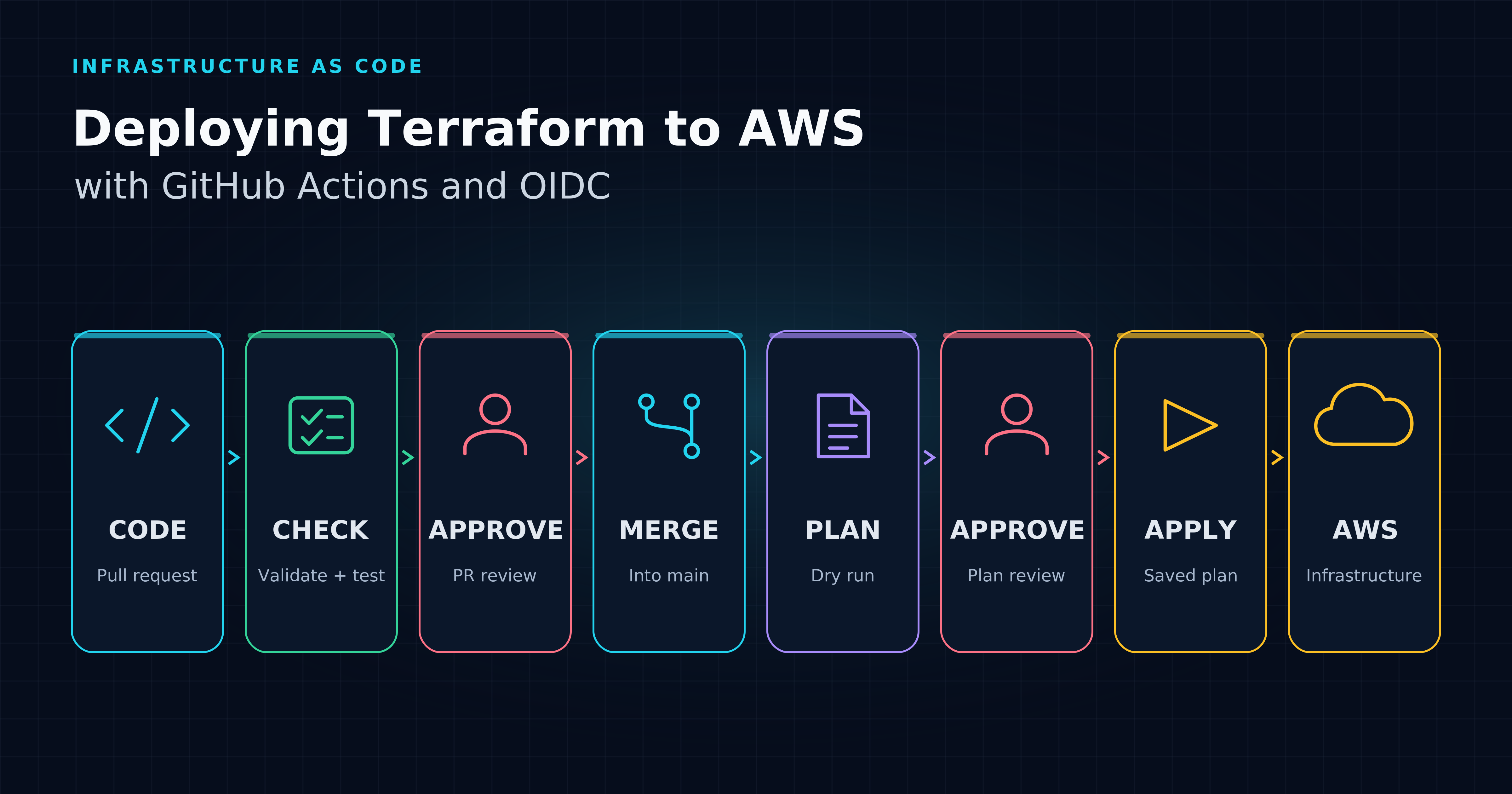
As applications grow, teams need to create and change infrastructure more often. Repeating those changes by hand takes time and makes it easy to miss a setting or configure environments differently. The goal is to make infrastructure delivery repeatable and faster, while keeping control over what changes and who can deploy it.
With Infrastructure as Code, you define and manage infrastructure through code. Terraform lets you describe the intended infrastructure in configuration files that you keep under version control. A deployment pipeline adds a shared process around those files, so each change follows the same checks, review and approval steps. The team can see what was proposed, who approved it and what was executed.
That automation also needs access to AWS. Rather than storing a long-lived access key in GitHub, OpenID Connect lets authorised jobs obtain temporary credentials for a specific IAM role. Together, Terraform, GitHub Actions and OIDC provide a way to automate infrastructure changes with less manual work and more controlled cloud access.
To see how these pieces work together, we'll build a deployment pipeline for an online store that uses an Amazon SQS queue for order events. We'll manage the queue with Terraform and use GitHub Actions to check proposed changes against Dev before they're reviewed, merged and deployed there automatically. The same code then moves through Stage and Production, with separate approvals for planning and applying the changes.
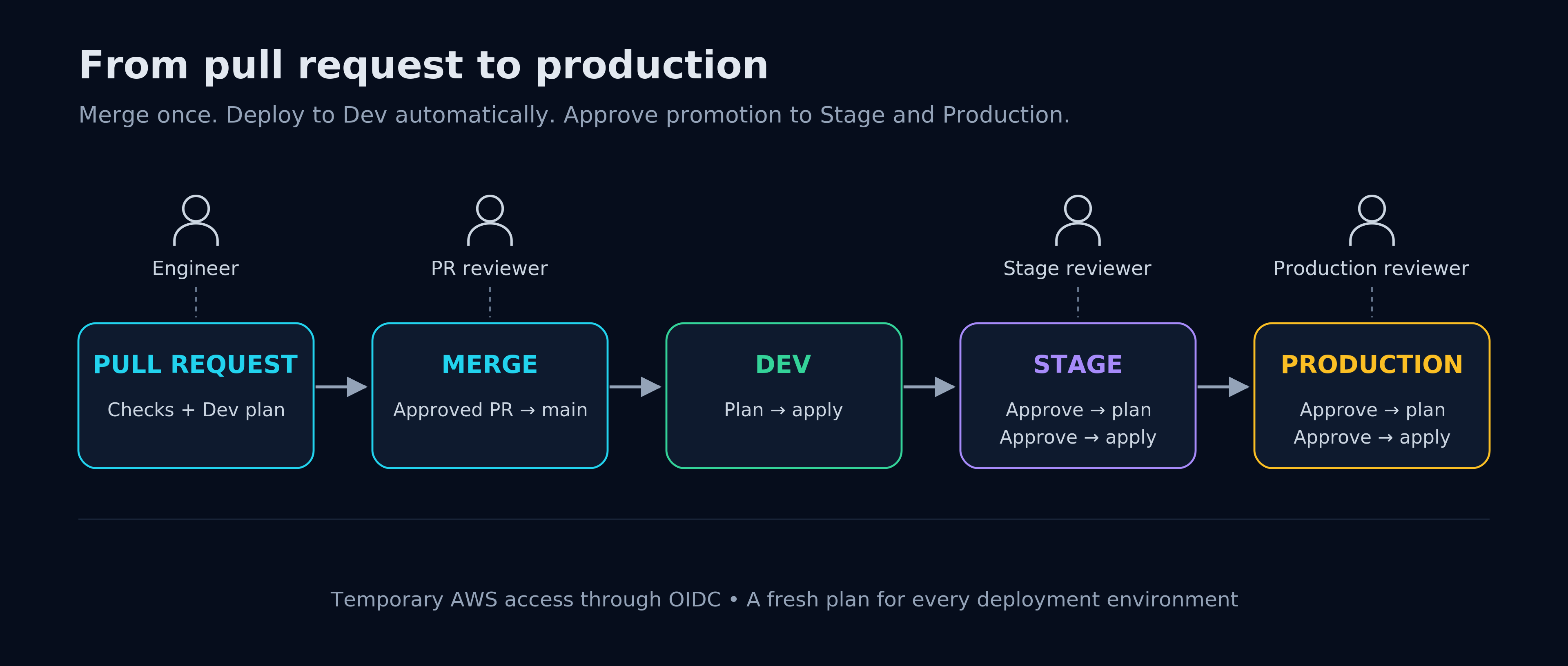
After PR approval and merge, Dev deploys automatically. Stage and Production each require approval to plan, followed by a second approval to apply that saved plan.
What are we setting up?
We are building a Terraform delivery pipeline for an Amazon SQS queue across isolated Dev, Stage and Production AWS accounts. GitHub Actions checks proposed changes, deploys Dev after merge, and requires approvals for Stage and Production. OIDC provides temporary AWS access.
The setup has three parts:
- Terraform: the queue configuration and a separate S3 state bucket in each AWS account.
- AWS access: one IAM role per environment’s AWS account, shared by plan and apply and trusted through GitHub OIDC.
- GitHub Actions: trusted pull requests plan against Dev; merging into
mainautomatically deploys Dev, followed by gated Stage and Production deployments.
The queue keeps the example focused on infrastructure delivery. Application code, queue consumers and their permissions are outside the scope. For an introduction to jobs and runners, see GitHub Actions: An Introduction to Workflows and Reusable Workflows.
You need basic Terraform/YAML knowledge, GitHub repository administration and an approved AWS administrator login for each of the three accounts for initial setup. This guide assumes a private repository with trusted contributors and a GitHub plan that supports required environment reviewers for private repositories. GitHub Free, Pro and Team provide that protection only for public repositories; do not publish sensitive plans to obtain it. [1]
1. Define the infrastructure
Dev, Stage and Production each run in a separate AWS account. Each account contains its own SQS queue, S3 state bucket, GitHub OIDC provider and IAM role for plan and apply; no AWS resources are shared between environments. Keep each account's one-time foundation separate from the infrastructure it supports. That prevents the queue's deployment role from managing its own access controls.
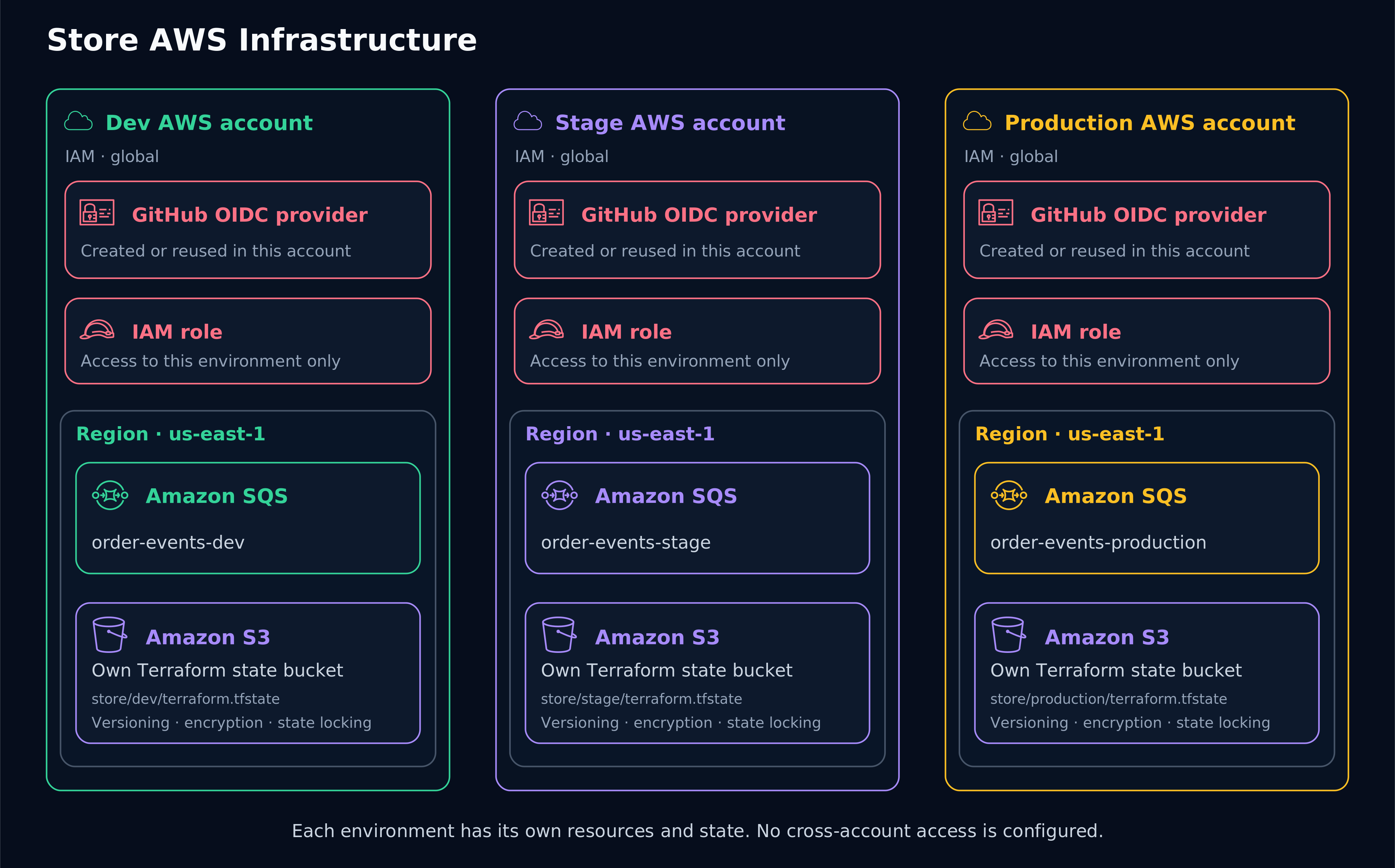
Each environment has its own AWS account, queue, state bucket and OIDC-based IAM access. Bootstrap manages each account’s foundation separately; the deployment pipeline manages its queue. This is the intended architecture, not a live deployment.
Keep this code in a dedicated store-infra GitHub repository, separate from the application code. .github/workflows/ holds the checks and deployment jobs. bootstrap/ creates each account’s foundation locally once; terraform/ defines the queue, with separate input and backend files for Dev, Stage and Production.
store-infra/
├── .github/workflows/
│   ├── pr.yml
│   ├── deploy.yml
│   └── environment.yml
├── bootstrap/
│   ├── versions.tf
│   ├── state.tf
│   ├── identity.tf
│   ├── .terraform.lock.hcl
│   └── tests/identity.tftest.hcl
└── terraform/
    ├── versions.tf
    ├── variables.tf
    ├── main.tf
    ├── vars/
    │   ├── dev.tfvars
    │   ├── dev.backend.hcl
    │   ├── stage.tfvars
    │   ├── stage.backend.hcl
    │   ├── production.tfvars
    │   └── production.backend.hcl
    ├── .terraform.lock.hcl
    └── tests/queue.tftest.hcl
In terraform/versions.tf, pin the toolchain and declare the S3 backend:
terraform {
  required_version = "= 1.17.1"
  required_providers {
    aws = {
      source  = "hashicorp/aws"
      version = "= 6.71.0"
    }
  }
  backend "s3" {}
}
provider "aws" {
  region = "us-east-1"
}
Use one shared queue definition. terraform/variables.tf selects the environment:
variable "environment" {
  type = string
  validation {
    condition     = contains(["dev", "stage", "production"], var.environment)
    error_message = "Choose dev, stage or production."
  }
}
In terraform/main.tf, use it for the queue name and tag:
resource "aws_sqs_queue" "store" {
  name                       = "order-events-${var.environment}"
  message_retention_seconds  = 345600
  visibility_timeout_seconds = 60
  sqs_managed_sse_enabled    = true
  tags = {
    Service     = "store"
    Environment = var.environment
    ManagedBy   = "Terraform"
  }
}
output "queue_url" {
  value = aws_sqs_queue.store.url
}
The example uses encryption, four-day retention and a 60-second visibility timeout. These are teaching choices, not production sizing advice. A real queue also needs suitable retry/dead-letter handling and separate application permissions. [2]
Each environment gets its own account, resource inputs and state bucket. Create these files in terraform/vars/ and replace each bucket placeholder with the bucket created locally by bootstrap in that environment’s account.
dev.tfvars:
environment = "dev"
stage.tfvars:
environment = "stage"
production.tfvars:
environment = "production"
dev.backend.hcl:
bucket       = "REPLACE-WITH-YOUR-DEV-STATE-BUCKET"
key          = "store/dev/terraform.tfstate"
region       = "us-east-1"
encrypt      = true
use_lockfile = true
stage.backend.hcl:
bucket       = "REPLACE-WITH-YOUR-STAGE-STATE-BUCKET"
key          = "store/stage/terraform.tfstate"
region       = "us-east-1"
encrypt      = true
use_lockfile = true
production.backend.hcl:
bucket       = "REPLACE-WITH-YOUR-PRODUCTION-STATE-BUCKET"
key          = "store/production/terraform.tfstate"
region       = "us-east-1"
encrypt      = true
use_lockfile = true
The .tfvars file supplies resource settings to plan; the .backend.hcl file selects the state bucket and key during init. AWS credentials determine the account. Separate accounts and account-local IAM permissions provide the isolation; different variable files alone do not isolate state.
State records which AWS resources Terraform manages. Each account’s S3 bucket gives the team a shared location for that environment only; use_lockfile enables native S3 locking to prevent overlapping Terraform writes. DynamoDB locking is deprecated for this backend. The bucket name is not a secret, but state and saved plan files can contain sensitive values and must stay out of Git. [3][4]
Create the foundation first
Create the foundation locally, once per AWS account, using a pre-existing short-lived administrator login. The pipeline cannot create the bucket and OIDC roles it needs to start. Use the complete bootstrap/ configuration shown below, but keep a clean working directory and separate state for each account.
Once you have created all configuration files shown in this guide, prepare both provider locks from the repository before the copy and -lockfile=readonly commands below:
terraform -chdir=bootstrap providers lock -platform=linux_amd64 -platform=darwin_arm64
terraform -chdir=terraform providers lock -platform=linux_amd64 -platform=darwin_arm64
linux_amd64 covers the ubuntu-24.04 runners; darwin_arm64 is an Apple Silicon workstation example. Replace it with your workstation’s platform, or add further -platform=OS_ARCH flags for other workstations. Review and commit both .terraform.lock.hcl files; subsequent init runs keep them unchanged with -lockfile=readonly. [5][6]
Bootstrap has no explicit backend block, so terraform init uses Terraform’s default local backend. It does not need the S3 bucket it is about to create. For Dev, replace the profile, globally unique bucket name and immutable repository identity before running:
Run these three groups separately in the same Bash shell; do not paste them together as one script. The fail-fast setting stops on errors and may close an interactive shell. First, check the account:
# From the store-infra repository, after a short-lived Dev administrator login:
set -euo pipefail
export AWS_PROFILE=store-dev-admin
aws sts get-caller-identity # Confirm this is the intended Dev account before proceeding.
Confirm that the returned Account is the intended Dev account before continuing. Only then initialize and plan:
umask 077
mkdir "$HOME/store-foundation-dev"
cp bootstrap/*.tf bootstrap/.terraform.lock.hcl "$HOME/store-foundation-dev/"
terraform -chdir="$HOME/store-foundation-dev" init -lockfile=readonly
terraform -chdir="$HOME/store-foundation-dev" plan -out=foundation.tfplan \
  -var='environment=dev' \
  -var='state_bucket_name=REPLACE-WITH-YOUR-DEV-STATE-BUCKET' \
  -var='github_repository_subject=example-org@123/store-infra@456'
terraform -chdir="$HOME/store-foundation-dev" show foundation.tfplan
Review the saved plan’s proposed resources and access policy. Only after accepting it, run the apply group below; applying a saved plan does not ask for confirmation again:
terraform -chdir="$HOME/store-foundation-dev" apply foundation.tfplan
If an operation fails after creating the foundation directory, retain that account’s directory and state. Reopen Bash if needed, repeat the account check, and rerun init and plan in that directory before reviewing again; do not repeat the initial mkdir/copy steps or delete the existing state.
Repeat from the repository for Stage and Production with their own administrator profiles, environment values, bucket names and new directories (store-foundation-stage and store-foundation-production). Keep the repository identity the same. Never switch accounts in a directory containing another account’s state. If GitHub’s OIDC provider already exists in an account, pass its ARN as github_oidc_provider_arn when planning.
Secure and back up each local foundation state and saved plan; never commit them or give the pipeline roles access. Later migration to separate administrator-controlled remote state is optional. [7]
After bootstrap, put each bucket name in its environment’s backend file. The pipeline authenticates through the existing OIDC role, then initializes terraform/ with -backend-config=vars/dev.backend.hcl (or the matching Stage/Production file). That initializes the workload’s S3 backend, not the foundation’s local state.
This example uses three isolated AWS accounts, the standard aws partition and us-east-1. GitHub assumes roles directly in the target account; no cross-account trust or resource access is configured. Customer-managed KMS keys need additional configuration.
2. Connect GitHub to AWS with OIDC
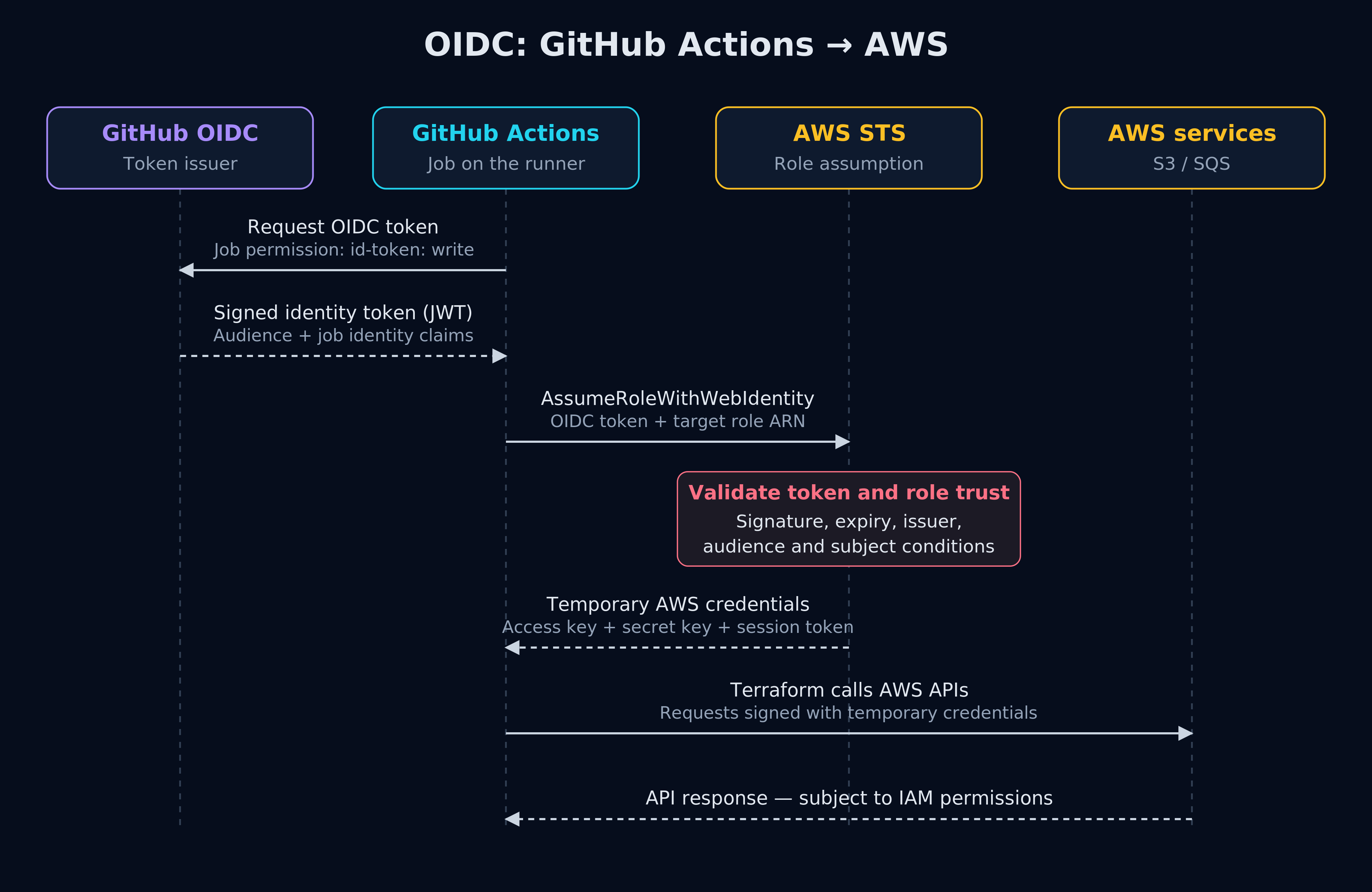
GitHub supplies the job identity; AWS validates it and issues temporary credentials for the requested role.
Why use OIDC instead of stored access keys?
OIDC lets GitHub Actions obtain temporary AWS credentials without storing long-lived access keys. AWS verifies the job’s identity against an IAM role’s trust policy before granting access. This avoids managing reusable keys in GitHub and limits how long issued credentials remain usable.
A traditional setup gives the workflow an IAM user's access key ID and secret access key, stored as GitHub secrets. GitHub protects the stored values, but a job that receives them can use or leak them. Those long-lived keys do not automatically expire: a stolen copy can remain usable until the keys are deactivated or deleted. Rotation means replacing them in both AWS and the systems that use them. [8][9]
OIDC replaces that stored credential with a trust relationship. AWS does not simply accept whoever possesses a reusable key; it checks a short-lived, signed identity token issued by GitHub for the job. The exchange works like this:
- GitHub identifies the job: it issues an OIDC token containing claims such as the repository and deployment environment.
- AWS checks the trust policy: the token must come from the expected issuer and match the configured audience and subject, such as this repository's
productionenvironment. - AWS STS issues temporary credentials: the job assumes an IAM role and uses its permissions to run Terraform. Those credentials expire automatically at the end of their configured lifetime, not necessarily when the job finishes.
For example, we can trust only jobs using the production environment in one repository. GitHub's environment rules then restrict that environment to main and require approval before the apply job starts. A different repository cannot assume the role merely by copying the workflow YAML. [10]
The security advantages are concrete:
- No long-lived AWS key to store or rotate in GitHub. Each authorised job obtains fresh, temporary access.
- A shorter exposure window. Stolen session credentials expire, although they can still be abused while valid.
- Access tied to workload identity. The trust policy checks the repository and environment rather than relying only on possession of a static secret.
OIDC does not automatically reduce permissions: a static key can also be tightly scoped, and an overly powerful OIDC role is still dangerous. Its strength is combining short-lived credentials with specific identity checks and least-privilege roles. A compromised authorised workflow can still misuse its access. Protect workflow changes, runners and environment approvals. [11]
The trust policy decides who may assume the role; the permissions policy decides what that role may do. id-token: write only permits requesting GitHub's token—it does not grant AWS permissions.
Use one IAM role in each environment’s AWS account for both plan and apply. It can manage that environment’s queue, state and lock file. PR planning uses Dev’s deployment-capable role too: running terraform plan does not reduce its IAM permissions. Trusted same-repository workflow authors are inside the Dev access boundary.
This example assumes immutable OIDC subject claims. Set github_repository_subject to your repository identity, such as example-org@123/store-infra@456, using your own names and numeric IDs. The subject suffix follows the GitHub environment used by the job:
| GitHub environment | Subject suffix for plan and apply |
|---|---|
dev (including trusted PR planning) |
:environment:dev |
stage |
:environment:stage |
production |
:environment:production |
An environment replaces the branch or PR context in the subject; it is not appended to it. [12]
In bootstrap/identity.tf, aws_caller_identity supplies the account ID for IAM resource ARNs. It identifies the current caller; it does not independently verify that you selected the intended account:
data "aws_caller_identity" "current" {}

locals {
  oidc_arn = var.github_oidc_provider_arn != null ? var.github_oidc_provider_arn : aws_iam_openid_connect_provider.github[0].arn
}
resource "aws_iam_openid_connect_provider" "github" {
  count          = var.github_oidc_provider_arn == null ? 1 : 0
  url            = "https://token.actions.githubusercontent.com"
  client_id_list = ["sts.amazonaws.com"]
}
resource "aws_iam_role" "terraform" {
  name = "store-terraform-${var.environment}"
  assume_role_policy = jsonencode({
    Version = "2012-10-17"
    Statement = [{
      Effect    = "Allow"
      Principal = { Federated = local.oidc_arn }
      Action    = "sts:AssumeRoleWithWebIdentity"
      Condition = { StringEquals = {
        "token.actions.githubusercontent.com:aud" = "sts.amazonaws.com"
        "token.actions.githubusercontent.com:sub" = "repo:${var.github_repository_subject}:environment:${var.environment}"
      } }
    }]
  })
}
resource "aws_iam_role_policy" "terraform" {
  role = aws_iam_role.terraform.id
  name = "store-state-and-queue"
  policy = jsonencode({
    Version = "2012-10-17"
    Statement = [
      {
        Effect   = "Allow"
        Action   = ["s3:ListBucket"]
        Resource = "arn:aws:s3:::${var.state_bucket_name}"
      },
      {
        Effect   = "Allow"
        Action   = ["s3:GetObject", "s3:PutObject"]
        Resource = "arn:aws:s3:::${var.state_bucket_name}/store/${var.environment}/terraform.tfstate"
      },
      {
        Effect   = "Allow"
        Action   = ["s3:GetObject", "s3:PutObject", "s3:DeleteObject"]
        Resource = "arn:aws:s3:::${var.state_bucket_name}/store/${var.environment}/terraform.tfstate.tflock"
      },
      {
        Effect   = "Allow"
        Action   = ["sqs:GetQueueAttributes", "sqs:GetQueueUrl", "sqs:ListQueueTags", "sqs:CreateQueue", "sqs:SetQueueAttributes", "sqs:TagQueue", "sqs:UntagQueue", "sqs:DeleteQueue"]
        Resource = "arn:aws:sqs:us-east-1:${data.aws_caller_identity.current.account_id}:order-events-${var.environment}"
      }
    ]
  })
}
output "role_arn" {
  value = aws_iam_role.terraform.arn
}
The trust policy checks the exact audience and repository context. Avoid wildcard repository trust. Each bootstrap run creates only its account’s single role. State-object access, bucket listing and queue permissions stay within that account and environment. Each environment’s role can delete its named queue, so review those changes carefully. [13][14]
Configure the GitHub environments
Create dev, stage and production before running the workflow. Map each GitHub environment to its separate AWS account:
- Dev: no required reviewers. In selected deployment branch rules, allow
mainandrefs/pull/*/mergeso trusted PRs can plan against Dev and merged changes can deploy automatically. - Stage and Production: allow only
mainand enable required reviewers. Each environment is approved twice: first to start its plan job, then to apply the reviewed plan. Disable self-review and administrator bypass where supported. - Protect
main: require PR approval and passing checks, prevent direct pushes, and require review of workflow and Terraform changes. - Keep fork workflows credential-free: do not enable Send write tokens or Send secrets to fork pull requests. Do not use
pull_request_targetto execute proposed code.
The PR plan job references dev. Both deployment jobs reference their target environment, making its variables available through vars. GitHub checks protection rules before each job starts. In Stage and Production, approve planning first; once the plan job finishes, review its output in GitHub Actions and approve the dependent apply job. Configure these rules in GitHub before running the workflow. [15]
Set AWS_REGION to us-east-1 as a GitHub repository variable, since all three environments use that region. In each GitHub environment, set AWS_ROLE_ARN from its own account’s bootstrap role_arn output:
| Location | Variable | Value |
|---|---|---|
| Repository | AWS_REGION |
us-east-1 |
| Each GitHub environment | AWS_ROLE_ARN |
That account’s store-terraform-<environment> role ARN, shared by plan and apply |
The role ARN identifies the target AWS account, so no separate account-ID variable is needed. The workflows read the region through vars.AWS_REGION; the Terraform provider and S3 backend files also use us-east-1. Neither variable is an access key; keep actual credentials, state and plans out of the repository.
3. Check pull requests and plan against Dev
The PR workflow has one plan job for trusted same-repository pull requests. It checks formatting, authenticates through the dev GitHub environment, initializes Dev’s S3 backend, validates and tests the code, and creates a plan using Dev’s .tfvars. Foundation creation and checks stay local.
Planning is privileged: it reads Dev state and executes Terraform configuration and provider code. This path assumes all contributors who can push same-repository branches are trusted with that access. The guard below excludes forks, public repositories and untrusted author associations; it is not a sandbox for hostile contributors. Fork PRs and other excluded contexts are skipped by this workflow. [16]
Use .github/workflows/pr.yml:
name: Terraform PR checks
on:
  pull_request:
    branches: [main]
permissions:
  contents: read
env:
  TF_IN_AUTOMATION: 'true'
  TF_INPUT: 'false'
jobs:
  plan:
    if: >-
      github.event.repository.private == true &&
      github.event.pull_request.head.repo.id == github.event.repository.id &&
      contains(fromJSON('["OWNER","MEMBER","COLLABORATOR"]'), github.event.pull_request.author_association) &&
      github.actor != 'dependabot[bot]'
    runs-on: ubuntu-24.04
    timeout-minutes: 15
    environment: dev
    permissions:
      contents: read
      id-token: write
    concurrency:
      group: terraform-store-dev
      cancel-in-progress: false
    steps:
      - uses: actions/checkout@3d3c42e5aac5ba805825da76410c181273ba90b1 # v7.0.1
        with:
          ref: ${{ github.sha }}
          persist-credentials: false
      - uses: hashicorp/setup-terraform@dfe3c3f87815947d99a8997f908cb6525fc44e9e # v4.0.1
        with:
          terraform_version: 1.17.1
          terraform_wrapper: false
      - name: Format
        run: terraform -chdir=terraform fmt -check -recursive
      - uses: aws-actions/configure-aws-credentials@e1253824e5c10ff9df46874f81ed3ec929e19cfd # v6.3.0
        with:
          role-to-assume: ${{ vars.AWS_ROLE_ARN }}
          aws-region: ${{ vars.AWS_REGION }}
          role-session-name: tf-pr-${{ github.run_id }}
      - name: Initialize Dev backend
        run: terraform -chdir=terraform init -input=false -lockfile=readonly -backend-config=vars/dev.backend.hcl
      - name: Validate
        run: terraform -chdir=terraform validate
      - name: Mock tests
        run: terraform -chdir=terraform test
      - name: Plan against Dev
        run: terraform -chdir=terraform plan -input=false -no-color -lock-timeout=5m -var-file=vars/dev.tfvars
Authentication assumes the configured role directly in Dev’s account before initializing the existing S3 backend. Format, init, validate, test and plan are separate steps, so a failure is easy to locate. The PR plan uses the proposed merge revision and appears in the restricted run log; it is feedback for review, not a plan that will be applied after merge.
Commit terraform/.terraform.lock.hcl so CI uses the same provider versions without changing the lock file. [5]
terraform/tests/queue.tftest.hcl checks all three queue identities without accessing AWS:
mock_provider "aws" {}
run "queue_dev" {
  command = plan
  variables {
    environment = "dev"
  }
  assert {
    condition     = aws_sqs_queue.store.name == "order-events-dev" && aws_sqs_queue.store.tags.Environment == "dev"
    error_message = "Queue identity must match its environment-scoped IAM resource."
  }
  assert {
    condition     = aws_sqs_queue.store.sqs_managed_sse_enabled && aws_sqs_queue.store.message_retention_seconds == 345600
    error_message = "Retain encryption and four-day retention."
  }
}
run "queue_stage" {
  command = plan
  variables {
    environment = "stage"
  }
  assert {
    condition     = aws_sqs_queue.store.name == "order-events-stage" && aws_sqs_queue.store.tags.Environment == "stage"
    error_message = "Queue identity must match its environment-scoped IAM resource."
  }
  assert {
    condition     = aws_sqs_queue.store.sqs_managed_sse_enabled && aws_sqs_queue.store.message_retention_seconds == 345600
    error_message = "Retain encryption and four-day retention."
  }
}
run "queue_production" {
  command = plan
  variables {
    environment = "production"
  }
  assert {
    condition     = aws_sqs_queue.store.name == "order-events-production" && aws_sqs_queue.store.tags.Environment == "production"
    error_message = "Queue identity must match its environment-scoped IAM resource."
  }
  assert {
    condition     = aws_sqs_queue.store.sqs_managed_sse_enabled && aws_sqs_queue.store.message_retention_seconds == 345600
    error_message = "Retain encryption and four-day retention."
  }
}
Mock tests do not evaluate real IAM permissions or AWS behavior. The examples were checked locally; no AWS resources were deployed and the GitHub Actions workflows were not executed live. [17]
4. Deploy Dev, then promote through Stage and Production
An approved merge triggers a push to main. Dev plans and applies automatically. After Dev succeeds, Stage waits for approval to create its plan, then waits for a second approval before applying that saved plan. Production follows the same two-approval sequence after Stage succeeds. All jobs use the same commit, but each environment gets a fresh plan against its own account, state bucket and inputs.
Use .github/workflows/deploy.yml to define the sequence:
name: Terraform Deploy
on:
  push:
    branches: [main]
  workflow_dispatch:
permissions:
  contents: read
  id-token: write
jobs:
  dev:
    if: github.ref == 'refs/heads/main'
    uses: ./.github/workflows/environment.yml
    with:
      environment: dev
  stage:
    needs: dev
    uses: ./.github/workflows/environment.yml
    with:
      environment: stage
  production:
    needs: stage
    uses: ./.github/workflows/environment.yml
    with:
      environment: production
The local reusable workflow avoids repeating the same plan/apply jobs three times. In .github/workflows/environment.yml, both jobs reference the same target environment. The apply job depends on plan, so its review follows the completed plan job:
name: Terraform Environment
on:
  workflow_call:
    inputs:
      environment:
        required: true
        type: string
permissions:
  contents: read
  id-token: write
env:
  TF_IN_AUTOMATION: 'true'
  TF_INPUT: 'false'
  TARGET_ENV: ${{ inputs.environment }}
jobs:
  plan:
    if: >-
      github.ref == 'refs/heads/main' &&
      contains(fromJSON('["dev","stage","production"]'), inputs.environment)
    runs-on: ubuntu-24.04
    timeout-minutes: 15
    environment: ${{ inputs.environment }}
    concurrency:
      group: terraform-store-${{ inputs.environment }}
      cancel-in-progress: false
    outputs:
      artifact_id: ${{ steps.upload.outputs.artifact-id }}
    steps:
      - uses: actions/checkout@3d3c42e5aac5ba805825da76410c181273ba90b1 # v7.0.1
        with:
          ref: ${{ github.sha }}
          persist-credentials: false
      - uses: hashicorp/setup-terraform@dfe3c3f87815947d99a8997f908cb6525fc44e9e # v4.0.1
        with:
          terraform_version: 1.17.1
          terraform_wrapper: false
      - name: Format
        run: terraform -chdir=terraform fmt -check -recursive
      - uses: aws-actions/configure-aws-credentials@e1253824e5c10ff9df46874f81ed3ec929e19cfd # v6.3.0
        with:
          role-to-assume: ${{ vars.AWS_ROLE_ARN }}
          aws-region: ${{ vars.AWS_REGION }}
          role-session-name: tf-plan-${{ github.run_id }}
      - name: Initialize environment backend
        run: terraform -chdir=terraform init -input=false -lockfile=readonly -backend-config="vars/$TARGET_ENV.backend.hcl"
      - name: Validate
        run: terraform -chdir=terraform validate
      - name: Mock tests
        run: terraform -chdir=terraform test
      - name: Create saved plan
        run: |
          mkdir -p plan
          terraform -chdir=terraform plan -input=false -no-color -lock-timeout=5m -var-file="vars/$TARGET_ENV.tfvars" -out=../plan/tfplan
      - uses: actions/upload-artifact@cf430e030ddbb5b0abf93d22962f4752f3646cd9 # v7.0.2
        id: upload
        with:
          name: tfplan-${{ inputs.environment }}-${{ github.run_id }}-${{ github.run_attempt }}
          path: plan/tfplan
          retention-days: 1
          if-no-files-found: error
          overwrite: false
  apply:
    needs: plan
    if: github.ref == 'refs/heads/main'
    runs-on: ubuntu-24.04
    timeout-minutes: 15
    environment: ${{ inputs.environment }}
    concurrency:
      group: terraform-store-${{ inputs.environment }}
      cancel-in-progress: false
    steps:
      - uses: actions/checkout@3d3c42e5aac5ba805825da76410c181273ba90b1 # v7.0.1
        with:
          ref: ${{ github.sha }}
          persist-credentials: false
      - uses: hashicorp/setup-terraform@dfe3c3f87815947d99a8997f908cb6525fc44e9e # v4.0.1
        with:
          terraform_version: 1.17.1
          terraform_wrapper: false
      - uses: actions/download-artifact@9000827ccba6bdab643e8b6fd33ac0654aef8333 # v8.0.2
        with:
          artifact-ids: ${{ needs.plan.outputs.artifact_id }}
          path: plan/
          merge-multiple: true
          digest-mismatch: error
      - uses: aws-actions/configure-aws-credentials@e1253824e5c10ff9df46874f81ed3ec929e19cfd # v6.3.0
        with:
          role-to-assume: ${{ vars.AWS_ROLE_ARN }}
          aws-region: ${{ vars.AWS_REGION }}
          role-session-name: tf-apply-${{ github.run_id }}
      - name: Initialize matching backend
        run: terraform -chdir=terraform init -input=false -lockfile=readonly -backend-config="vars/$TARGET_ENV.backend.hcl"
      - name: Apply only this environment's saved plan
        run: terraform -chdir=terraform apply -input=false -lock-timeout=5m ../plan/tfplan
Reviewers check the proposed changes directly in the plan job’s output in GitHub Actions before approving apply. The artifact contains only the saved Terraform plan, so the apply job can execute that same plan. Dev uses the same workflow without manual approval.
The apply job checks out the same commit and downloads the artifact by ID from the plan job in this workflow run. It assumes the same environment role used by plan in its own account, initializes the matching backend and applies that saved plan. No separate verification script is needed.
Each environment must apply its own saved plan, not the PR plan or another environment’s plan. To retry Dev, Stage or Production, re-run that environment’s plan job in the existing workflow run. GitHub re-runs the selected job and its dependents without repeating completed upstream jobs. A Dev rerun can continue through Stage and Production; a Stage rerun can continue through Production; a Production rerun stays within Production. Stage and Production retain their approvals before plan and apply, while Dev runs automatically. Review the new plan in the job output before approving apply.
A job re-run keeps the original commit and Git ref. Each new plan artifact includes the run attempt in its name, and apply downloads the artifact ID returned by its plan job. If the plan is missing or stale, or an apply partially changed resources, re-run planning rather than blindly retrying apply with the old plan. Use Run workflow when you want a new run from the currently selected main revision, starting at Dev. [18]
Passing a saved plan to terraform apply counts as Terraform's approval and does not prompt again. Stage and Production each have two environment gates: permission to plan, then approval to apply the saved plan. Dev runs both jobs automatically. [19][20]
Saved plans can contain secrets in cleartext, and job logs can also expose sensitive information. Keep workflow logs and artifacts restricted; this example retains the plan artifact for one day. [21]
5. Handle overlapping changes and failures
Job-level concurrency uses terraform-store-dev, terraform-store-stage and terraform-store-production. The PR plan and both Dev deployment jobs share the same Dev group, preventing their operations from overlapping. Only the actual jobs hold these groups—not the reusable-workflow callers, which would risk nested deadlock. S3 native locking remains the state-level safeguard. Neither stops a person or another system changing AWS directly. cancel-in-progress: false avoids cancelling an active apply, but GitHub's default pending-run behavior is not a queue that guarantees every dispatch will execute. [22]
Concurrency does not reserve state across the approval gap. The plan job releases its group and Terraform lock when it ends; another job can change state while approval waits. Terraform rejects a saved plan if its state is stale. If state or infrastructure changes, regenerate the plan and review again. [23]
For drift detection, a separate trusted scheduled workflow can reference the target GitHub environment and run terraform plan -detailed-exitcode with its environment role and no apply job. The same environment protection rules still apply, including required reviewers: 0 means no changes, 1 an error and 2 proposed changes. Decide whether to update the code or correct the infrastructure rather than automatically reverting every difference. [19]
A failed apply can leave partial changes. Inspect the actual state and resources, fix the cause, then make a fresh plan. Do not blindly replay an old plan or restore old state as though that rolls AWS back. Only force-unlock after confirming that the owning operation is no longer running.
Reference: the bootstrap files
These files complete the locally created, administrator-controlled foundation for one environment in one AWS account. Reuse the configuration—not the state—for the other two accounts. The queue’s deployment workflow never applies these files.
bootstrap/versions.tf:
terraform {
  required_version = "= 1.17.1"
  required_providers {
    aws = {
      source  = "hashicorp/aws"
      version = "= 6.71.0"
    }
  }
}
provider "aws" {
  region = "us-east-1"
}
variable "environment" {
  type = string
  validation {
    condition     = contains(["dev", "stage", "production"], var.environment)
    error_message = "Choose dev, stage or production."
  }
}
variable "state_bucket_name" {
  type = string
}
variable "github_repository_subject" {
  type        = string
  description = "Immutable repository identity, without repo: or :environment:; e.g. acme@123/store@456."
  validation {
    condition     = can(regex("^[A-Za-z0-9_.-]+@[0-9]+/[A-Za-z0-9_.-]+@[0-9]+$", var.github_repository_subject))
    error_message = "Use the owner and repository names with their immutable numeric IDs."
  }
}
variable "github_oidc_provider_arn" {
  type        = string
  default     = null
  description = "This account's existing GitHub OIDC provider ARN, or null to create one."
  validation {
    condition     = var.github_oidc_provider_arn == null ? true : var.github_oidc_provider_arn == "arn:aws:iam::${data.aws_caller_identity.current.account_id}:oidc-provider/token.actions.githubusercontent.com"
    error_message = "Reuse only the GitHub OIDC provider in the current AWS account."
  }
}
bootstrap/state.tf:
resource "aws_s3_bucket" "state" {
  bucket        = var.state_bucket_name
  force_destroy = false
  lifecycle {
    prevent_destroy = true
  }
}
resource "aws_s3_bucket_versioning" "state" {
  bucket = aws_s3_bucket.state.id
  versioning_configuration {
    status = "Enabled"
  }
}
resource "aws_s3_bucket_public_access_block" "state" {
  bucket                  = aws_s3_bucket.state.id
  block_public_acls       = true
  block_public_policy     = true
  ignore_public_acls      = true
  restrict_public_buckets = true
}
resource "aws_s3_bucket_server_side_encryption_configuration" "state" {
  bucket = aws_s3_bucket.state.id
  rule {
    apply_server_side_encryption_by_default {
      sse_algorithm = "AES256"
    }
  }
}
resource "aws_s3_bucket_policy" "tls" {
  bucket = aws_s3_bucket.state.id
  policy = jsonencode({
    Version = "2012-10-17"
    Statement = [{
      Effect    = "Deny"
      Principal = "*"
      Action    = "s3:*"
      Resource  = [aws_s3_bucket.state.arn, "${aws_s3_bucket.state.arn}/*"]
      Condition = { Bool = { "aws:SecureTransport" = "false" } }
    }]
  })
}
The bucket has versioning, encryption, blocked public access and a TLS-only policy. prevent_destroy protects against deletion through this Terraform configuration; it is not an independent AWS deletion control. Keep foundation state and recovery access separate from routine deployments.
Frequently asked questions
Does OIDC mean the workflow has no secrets?
No. It removes the need to store a long-lived AWS access key for this exchange. The job still receives temporary credentials and may read sensitive state. Protect the code, runner, action dependencies and outputs that can access them. [10]
Why not generate another plan after approval?
The first approval authorizes the plan job; the second approves its proposed changes. After that second approval, apply the same saved plan rather than generating a different one. If it is no longer suitable, restart planning and review. [19]
Can one role handle both plan and apply?
Yes. This example uses one role per isolated AWS account, shared by that environment’s plan and apply jobs. Planning has the same IAM permissions as applying; environment approvals and trusted workflow code control how that access is used.
Is the state lock enough to prevent every conflict?
No. It coordinates clients using that backend lock, not every writer to the AWS resource. Use workflow concurrency as well, keep plans short-lived, and replan when the environment changes. [4][22]
Sources
[1] GitHub — Deployments and environments
[2] HashiCorp AWS provider — SQS queue resource (pinned version)
[3] HashiCorp — Terraform state
[5] HashiCorp — Dependency lock file
[6] HashiCorp — terraform providers lock command
[7] HashiCorp — terraform init
[8] AWS — Security credentials and credential lifetimes
[10] GitHub — Configuring OpenID Connect in Amazon Web Services
[11] AWS — OpenID Connect federation
[12] GitHub — OpenID Connect reference
[13] AWS — Create a role for an OpenID Connect identity provider
[14] AWS — Amazon SQS actions, resources and condition keys
[15] GitHub — Managing environments for deployment
[16] GitHub — Secure use reference
[17] HashiCorp — Mock providers
[18] GitHub — Re-running workflows and jobs
[19] HashiCorp — terraform plan
[20] HashiCorp — terraform apply
[21] GitHub — Storing and sharing data from a workflow
[22] GitHub — Control workflow concurrency
[23] HashiCorp — Saved-plan state checks in Terraform 1.17.1
Frequently asked questions
What is the purpose of using Terraform with GitHub Actions and OIDC?
Using Terraform with GitHub Actions and OIDC automates infrastructure changes in AWS, making deployments faster and more controlled. OIDC provides temporary AWS credentials, enhancing security by avoiding long-lived access keys.
How does OIDC improve security in GitHub Actions?
OIDC improves security by allowing GitHub Actions to obtain temporary AWS credentials without storing long-lived access keys. AWS verifies the job's identity before granting access, reducing the risk of key exposure.
Can I use one IAM role for both plan and apply in Terraform?
Yes, you can use one IAM role per AWS account for both plan and apply operations. This role should have permissions to manage the environment's resources, and GitHub environment approvals control its usage.
Why is a saved plan used instead of generating a new one after approval?
A saved plan ensures that the approved changes are applied exactly as reviewed. Regenerating a plan after approval could introduce unreviewed changes. If circumstances change, a new plan should be generated and reviewed again.
Is the state lock sufficient to prevent all conflicts during Terraform operations?
No, the state lock only coordinates clients using the same backend lock. It doesn't prevent all AWS resource changes. Use workflow concurrency and ensure plans are short-lived to minimize conflicts.
What should I do if a Terraform apply fails?
Inspect the actual state and resources, fix any issues, then create a fresh plan. Avoid replaying old plans or restoring old state, as they don't roll AWS back. Confirm the operation is not running before force-unlocking.
About the author
- I’m a hands-on technology architect, engineer and founder of Turing Technology Services, with nearly two decades of experience in software engineering, platform engineering, site reliability engineering and cloud infrastructure. My work combines architecture and implementation with technical leadership, coaching and helping organisations adopt new engineering practices. I’ve worked with organisations including Shell, ING, ABN AMRO, Rabobank, Schiphol Group and Ahold Delhaize, across complex and regulated enterprise environments. On this blog, I share practical guides and perspectives on software architecture, cloud platforms, reliability and AI, explaining the reasoning behind technical choices as well as how to implement them.
Infrastructure as Code
Designing and managing infrastructure through code. Practical guides to Terraform, reusable modules, state management, testing and drift detection, with maintainable patterns for cloud and platform environments.